Eye Pop Effect
Cartoon eyes pop out on springs
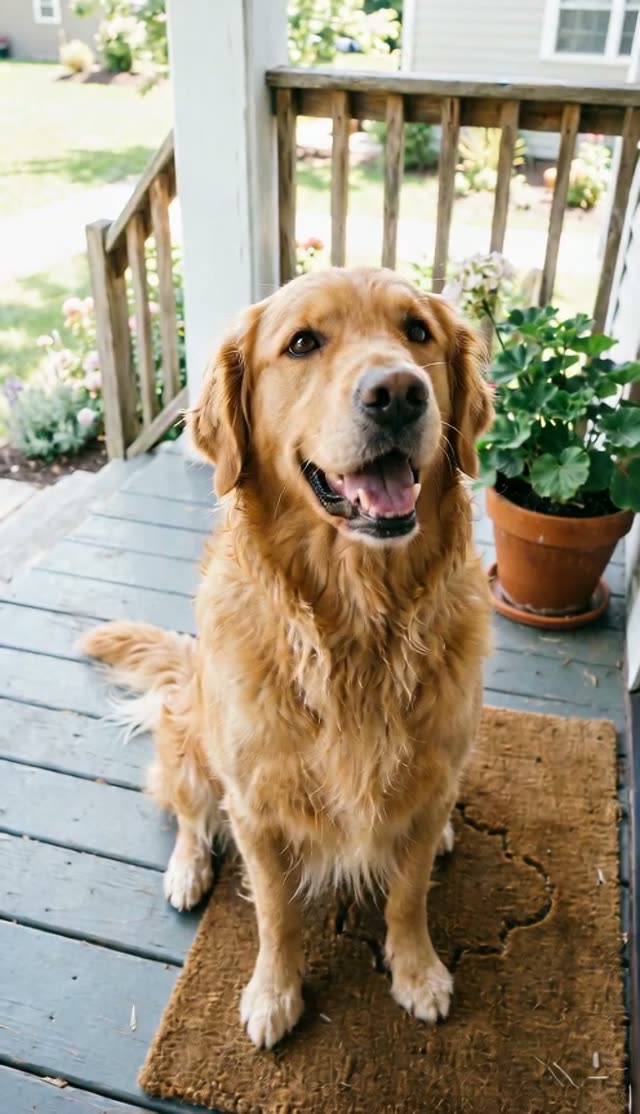
Cartoon Eye Pop
Springy eyes, then snap back
A photo of a pet or toy. A harmless gag.
Full-screen on phones: Instagram Reels, YouTube Shorts, WhatsApp Status.
Advanced options
Motion or style reference. MP4 or MOV, 480p to 720p, up to 15s total.
MP3 or WAV, up to 15 MB and 30s total.
Example
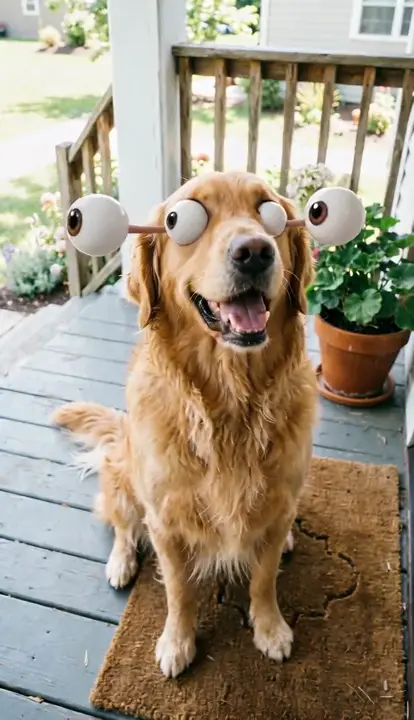
Eye Pop Effect
Springy eyes, then snap back
- Output
- 5s · 480p
AI Eye Pop Effect: Make Cartoon Eyes Pop Out of Any Photo
Updated
Short answer: the AI eye pop effect, also called "eye-pop it", is the cartoon gag where the eyes of the subject in a photo pop out of the head in surprise and snap back. On VdoBloom you upload one photo of a pet or a toy, and the eyes widen, shoot forward on springy stalks, wobble and snap back into place with a boing. The tab opens on Seedance 2 Mini at 5 seconds, 480p and vertical 9:16, which costs 8 credits. New accounts get 10 free credits, so your first eye pop clip is free.
Your photo is the first frame, and the rest of the face and body stay as they are. The camera and the light stay locked, so only the eyes move. It is cute and silly by design: no blood and nothing scary.
This is the cartoon eye pop video, not an eye retouching filter. If you want brighter or bigger eyes in a still photo, that is a photo editor job; if you want the camera to zoom into an eye, use the AI Eye Zoom Effect. Free-tier downloads carry a VdoBloom watermark; any paid plan or credit pack removes it.
Examples
Cartoon Eye Pop
Make thisHow it works
- 1
Upload a photo of a pet or toy
A clear, front-facing photo where both eyes are easy to see. Dogs, cats, plush toys and cartoon figures work well.
- 2
Keep Cartoon Eye Pop or edit the prompt
The template is loaded for you. The prompt is editable: ask for a bigger pop, a slower wobble or a surprised open mouth.
- 3
Check the settings
Seedance 2 Mini, 5 seconds, 480p, 9:16 is the 8-credit default. 720p is 17 credits. Other image-to-video models are in the same picker.
- 4
Generate
The eyes pop, wobble and snap back. The clip lands in My Creations in a few minutes.
- 5
Download and post
Vertical 9:16 is ready for Reels, Shorts and TikTok. Free-tier downloads are watermarked.
Why use this tool
Classic cartoon physics
Eyes on springy stalks, a wobble and a snap-back, the look of old cartoons.
The rest stays still
Only the eyes move. The face, body, camera and background stay as in your photo.
Cute, not creepy
The prompt rules out blood and anything scary, so the clip suits family feeds and pet accounts.
Low cost per try
At 8 credits a clip you can try several photos of your pet and keep the funniest.
Editable gag
Change the size of the pop, the timing or the reaction in plain words.
Model choice
Most image-to-video models are in the picker if you want to compare the gag across models.
Quick facts
The AI eye pop effect on VdoBloom at a glance.
- What it makes: a 5-second clip where the eyes pop out on springs, wobble and snap back.
- Other names: eye-pop it, cartoon eye pop, eyes popping out effect.
- Input: one photo of a pet or a toy with both eyes visible.
- Template: Cartoon Eye Pop (editable prompt).
- Default: Seedance 2 Mini, 5 seconds, 480p, 9:16: 8 credits. 720p: 17 credits.
- Free credits: 10 at signup, plus daily check-in credits.
- Watermark: on free-tier clips; removed with any paid plan or credit pack.
Eye pop, eye zoom or wink?
Three different things share the word "eye". Pick the one you mean:
- Eye pop
- What it does:Cartoon eyes pop out on springs and snap back
- Where on VdoBloom:This page
- Eye zoom
- What it does:The camera pushes into the eye and through the pupil
- Where on VdoBloom:AI Eye Zoom Effect
- Wink
- What it does:One eye closes in a natural wink
- Where on VdoBloom:AI Wink Video Generator
| What you want | What it does | Where on VdoBloom |
|---|---|---|
| Eye pop | Cartoon eyes pop out on springs and snap back | This page |
| Eye zoom | The camera pushes into the eye and through the pupil | AI Eye Zoom Effect |
| Wink | One eye closes in a natural wink | AI Wink Video Generator |
Read more: AI Eye Zoom Effect · AI Wink Video Generator
What an eye pop clip costs
Credits for one 5-second clip. The exact price is on the Create button before you generate.
- Seedance 2 Mini (default)
- 480p:8
- 720p:17
- Seedance 2 Fast
- 480p:24
- 720p:50
- Seedance 2
- 480p:38
- 720p:82
| Model | 480p | 720p |
|---|---|---|
| Seedance 2 Mini (default) | 8 | 17 |
| Seedance 2 Fast | 24 | 50 |
| Seedance 2 | 38 | 82 |
Read more: Seedance 2 Mini
Is the AI eye pop effect free?
Your first clip is. New accounts get 10 free credits and the default clip costs 8. Daily check-in credits add more. Free-tier clips carry a watermark; any paid plan or credit pack removes it. The Lite pack is 300 credits for $19.50 one-time (the credits never expire) or $15 a month, which covers 37 default eye pop clips.
Tips for a funny eye pop
What helps most:
- Both eyes clearly visible and facing the camera. Side angles make the pop look odd.
- Big, round eyes (puppies, kittens, plush toys) give the biggest laugh.
- A plain background keeps the attention on the eyes.
- Pair the clip with a surprise caption: "when the treat bag opens".
- If the eyes change shape before the pop, re-run once or try another model.
Frequently asked questions
What is the AI eye pop effect?
A cartoon video gag where the eyes of the subject in a photo pop out on springy stalks, wobble and snap back. On VdoBloom it is made from one photo of a pet or toy.
Is the AI eye pop effect free?
Your first clip is. New accounts get 10 free credits and the default 5-second clip costs 8. Free-tier clips carry a watermark; any paid plan or credit pack removes it.
How do I make the eye pop effect?
Upload a photo of a pet or toy to the Eye Pop tab, keep the Cartoon Eye Pop template or edit the prompt, and press Create. The clip is ready in My Creations in a few minutes.
Can I use a photo of a person?
The template is written for pets and toys, which give the cleanest cartoon look. If you use a person, use your own photo or one of someone who agreed to it.
Is the eye pop effect scary or gory?
No. The prompt asks for a harmless cartoon gag, cute and playful, with no blood and nothing scary.
What is the difference between eye pop and eye zoom?
Eye pop makes cartoon eyes spring out of the head. Eye zoom moves the camera into the eye and through the pupil. VdoBloom has a separate tab for each.
How long is the clip?
Five seconds by default, enough for the pop, the wobble and the snap-back. Seedance 2 Mini can go from 4 to 15 seconds; longer clips cost more.
Which photos work best?
A sharp, front-facing photo with both eyes visible and even light. Pets and plush toys with big round eyes work best.