Crumble Effect
Crumble anything like a sandcastle
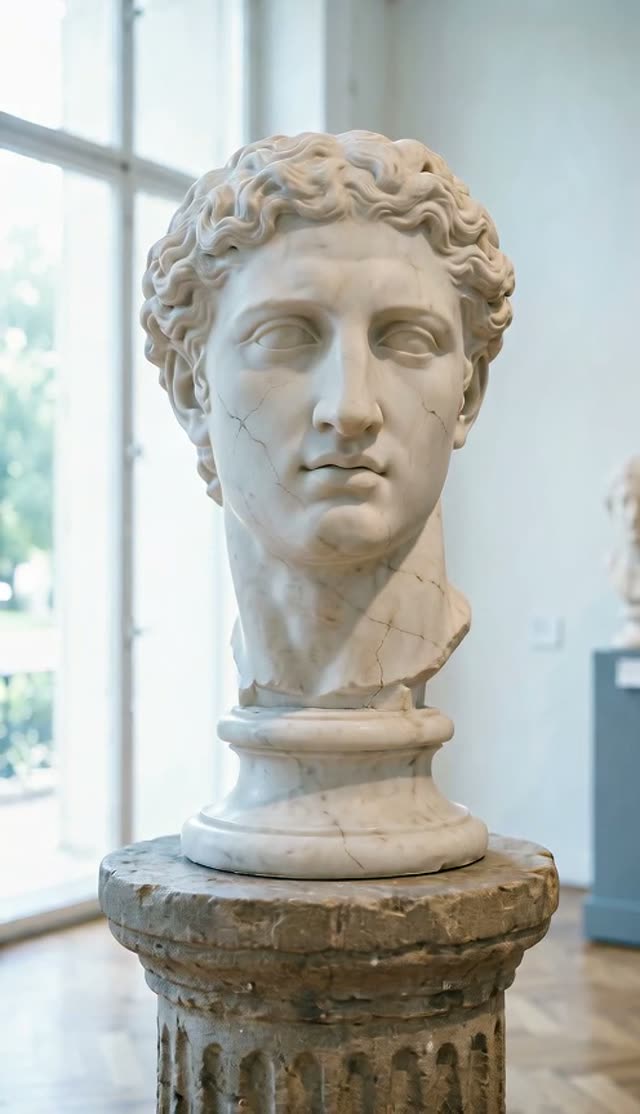
Crumble to Sand
Cracks, then collapses
A photo of an object or statue.
Full-screen on phones: Instagram Reels, YouTube Shorts, WhatsApp Status.
Advanced options
Motion or style reference. MP4 or MOV, 480p to 720p, up to 15s total.
MP3 or WAV, up to 15 MB and 30s total.
Example
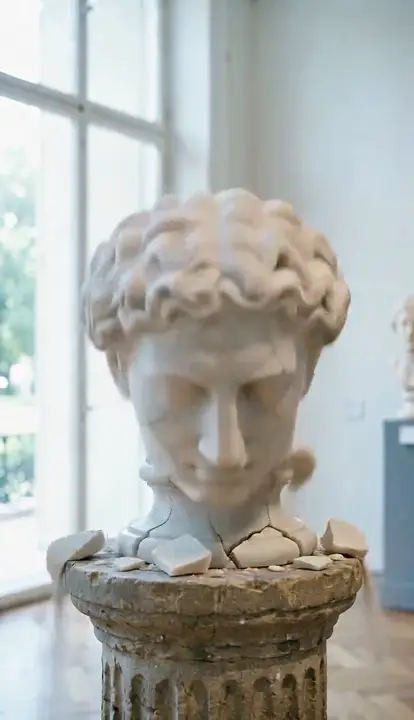
Crumble Effect
Cracks, then collapses
- Output
- 5s · 480p
AI Crumble Effect: Crumble Anything in Your Photo Into Sand
Updated
Short answer: the AI crumble effect, also called "crumble it", is the short clip where an object dries out, cracks and falls apart like a sandcastle. On VdoBloom you upload one photo of the object and pick Crumble to Sand. Fine cracks spread, chunks break off and the object collapses into a heap of sand and dust on its base. The tab opens on Seedance 2 Mini at 5 seconds, 480p and vertical 9:16, which costs 8 credits. New accounts get 10 free credits, so your first crumble clip is free.
Your photo is the first frame, so the object looks exactly as you shot it before it starts to crack. The camera and the light stay locked and nothing else in the scene moves. There is no smoke and no fire: only the crumble.
It works best on statues, sculptures, sandcastles, mugs, toys, cars and products. Free-tier clips carry a VdoBloom watermark; any paid plan or credit pack removes it. A failed render refunds its credits automatically.
Examples
Crumble to Sand
Make thisHow it works
- 1
Upload a photo of one object
A single clear subject on a simple background: a statue, a vase, a toy, a car, a product. Even light helps the cracks read.
- 2
Keep the Crumble to Sand template
It loads an editable prompt: cracks spread, chunks break off, and the object collapses into fine sand and dust on its base.
- 3
Edit the material if you like
Ask for red desert sand, wet beach sand, grey stone dust or chalk. Keep "no smoke, no fire" and the locked camera so only the crumble moves.
- 4
Check the settings
Seedance 2 Mini, 5 seconds, 480p, 9:16 is the 8-credit default. 720p is 17 credits. You can switch to another image-to-video model in the same picker.
- 5
Generate and post
The clip lands in My Creations in a few minutes, ready for Reels, Shorts and TikTok.
Why use this tool
The real object first
The photo is the first frame, so viewers see your exact object before the first crack appears.
A sandcastle collapse
Cracks, falling chunks and a heap of sand on the base: a crumble that ends in a pile, not a cloud.
Locked camera
The prompt keeps the camera, the light and the rest of the scene still. One action only: the crumble.
No smoke, no fire
A clean, brand-safe effect that suits products and family accounts.
Cheap to try many objects
At 8 credits a clip, you can test several photos and keep the best collapse.
Made for short video
Vertical 9:16 by default and five seconds long. Square, 16:9, 3:4, 4:3 and 21:9 are in the same menu.
Quick facts
The AI crumble effect at a glance.
- What it makes: a short clip where the object in your photo cracks and collapses into a heap of sand.
- Other names: crumble it, crumble to sand, sandcastle effect.
- Input: one photo of an object or statue.
- Template: Crumble to Sand (editable prompt).
- Default: Seedance 2 Mini, 5 seconds, 480p, 9:16: 8 credits. 720p: 17 credits.
- Length: 4 to 15 seconds on Seedance 2 Mini.
- Free credits: 10 at signup, plus 2 to 5 a day from the daily check-in.
- Watermark: on free-tier clips; removed with any paid plan or credit pack.
What a crumble clip costs
Credits for one 5-second clip. The exact price is on the Create button before you generate.
- Seedance 2 Mini (default)
- 480p:8
- 720p:17
- Seedance 2 Fast
- 480p:24
- 720p:50
- Seedance 2
- 480p:38
- 720p:82
| Model | 480p | 720p |
|---|---|---|
| Seedance 2 Mini (default) | 8 | 17 |
| Seedance 2 Fast | 24 | 50 |
| Seedance 2 | 38 | 82 |
Read more: Seedance 2 Mini
Crumble, dissolve or disintegrate: which effect do you want?
People use these words for three different looks. VdoBloom has a separate preset for each, so pick the one that matches the ending you want.
- Crumble (this page)
- Best subject:An object or statue
- What happens:Cracks spread, chunks break off, it collapses like a sandcastle
- Ends with:A heap of sand on the base
- Dissolve
- Best subject:An object or statue
- What happens:It breaks down from the top into fine glittering particles in its own colours
- Ends with:Empty space, the particles drift away
- Dust Disintegration
- Best subject:A person (full or half body)
- What happens:Starting at the fingertips, the person turns to dust that blows away on the wind
- Ends with:Only the background
| Effect | Best subject | What happens | Ends with |
|---|---|---|---|
| Crumble (this page) | An object or statue | Cracks spread, chunks break off, it collapses like a sandcastle | A heap of sand on the base |
| Dissolve | An object or statue | It breaks down from the top into fine glittering particles in its own colours | Empty space, the particles drift away |
| Dust Disintegration | A person (full or half body) | Starting at the fingertips, the person turns to dust that blows away on the wind | Only the background |
Read more: AI Dissolve Effect · Dust Disintegration Effect
Is the AI crumble effect free?
Your first clip is. New accounts get 10 free credits and the default clip costs 8. The daily check-in adds 2 to 5 credits a day. Free-tier clips carry a watermark; any paid plan or credit pack removes it. The Lite pack is 300 credits for $19.50 one-time (the credits never expire) or $15 a month, which covers 37 default crumble clips.
Read more: Credit packs and plans
Best things to crumble
Subjects that give the cleanest collapse:
- Statues, busts and sculptures: the classic look.
- Sandcastles and clay pots, which already look like they could fall apart.
- Mugs, vases and toys on a table.
- Cars and bikes, for a dramatic product clip.
- Your own product, for a playful reveal or a "before it is gone" ad.
Tips for a convincing crumble
What helps most:
- One object only, centred, with space around it.
- A plain table or background. Busy scenes confuse which object should crumble, and the background can start to break too.
- Even light without hard shadows across the object.
- Name the sand colour in the prompt if you want it to match the object.
- If the whole scene starts to fall apart, re-run once; the prompt already tells the model that nothing else moves.
Frequently asked questions
What is the AI crumble effect?
A short video effect where an object cracks and falls apart like a sandcastle, ending as a heap of sand and dust. It is also called "crumble it". On VdoBloom it works from one photo.
Is the AI crumble effect free?
Your first clip is. New accounts get 10 free credits and the default 5-second clip costs 8. Free-tier clips carry a watermark; any paid plan or credit pack removes it.
How do I make something crumble in a video?
Upload one photo of the object, keep the Crumble to Sand template, and press Create. The clip is ready in My Creations in a few minutes.
Is this the same as the "Crumble it" effect from Pika?
It is the same idea. "Crumble it" is a popular name for this kind of effect. VdoBloom has its own crumble preset that runs on image-to-video models such as Seedance 2 Mini, starting from your photo as the first frame.
Can I make a person crumble to dust?
This preset is written for objects and statues. For a person, use Dust Disintegration: the person breaks into dust from the fingertips and blows away. It opens on Seedance 2 Fast at 5 seconds and 720p, which costs 50 credits.
What is the difference between crumble and dissolve?
Crumble cracks the object and drops it into a heap of sand on its base. Dissolve breaks it into fine glittering particles that drift away until nothing is left.
How long is the clip?
Five seconds by default, which is enough for the full collapse. Seedance 2 Mini can go from 4 to 15 seconds; longer clips cost more.
Which photos work best?
One clear object with some space around it, shot in even light on a simple background. Statues, sculptures, pots, toys and products all work well.
Can I change what it crumbles into?
Yes. Edit the prompt and describe the material, for example red desert sand, grey stone dust or chalk. Keep the locked camera and "no smoke, no fire" so only the crumble moves.
Can I use the clip in an ad?
Yes, once the watermark is removed with a paid plan or credit pack. Use a photo of your own product so the object in the first frame is real.