Deflate Effect
Let the air out of anything

Deflate
Wrinkles into a flat skin
Upload a photo of a toy or object. It wrinkles and deflates like a balloon.
Full-screen on phones: Instagram Reels, YouTube Shorts, WhatsApp Status.
Advanced options
Motion or style reference. MP4 or MOV, 480p to 720p, up to 15s total.
MP3 or WAV, up to 15 MB and 30s total.
Example
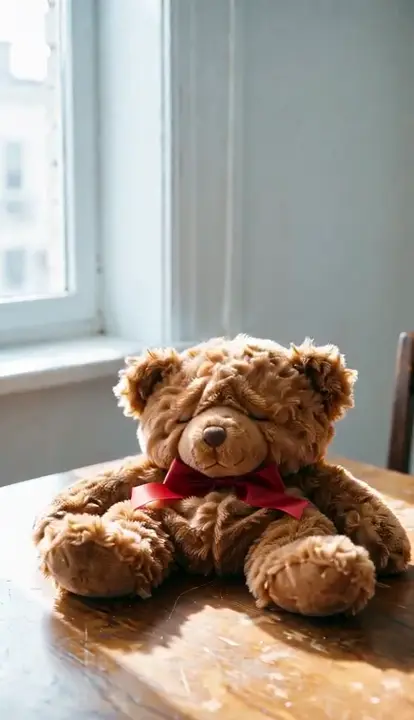
Deflate Effect
Wrinkles into a flat skin
- Output
- 5s · 480p
AI Deflate Effect: Make Anything Deflate Like a Balloon
Updated
Short answer: the AI deflate effect, also called the balloon deflating effect, turns one photo into a short video where the main object loses its air. It wrinkles, sags and collapses into a flat, crumpled skin that keeps its colours and pattern. On VdoBloom you upload a photo and press Create. The tab opens on Seedance 2 Mini at 5 seconds, 480p and vertical 9:16, which costs 8 credits. New accounts get 10 free credits, so your first deflate clip is free.
Your photo is the first frame. The camera and the light stay locked and nothing else in the scene moves, so all you see change is the object going flat. A clip is usually ready in a few minutes and lands in My Creations.
It works best on things that could hold air: plush toys, inflatables, pool floats, balls, sneakers, cushions, cars and products. Free-tier clips carry a VdoBloom watermark; any paid plan or credit pack removes it. If a render fails, the credits go back to your balance automatically.
Examples
Deflate
Make thisHow it works
- 1
Upload a photo of one object
One clear subject on a simple background: a plush toy, a ball, a sneaker, a cushion, a car or a product. Even light helps.
- 2
Keep the Deflate template
It is loaded for you. The prompt describes the object wrinkling, sagging and collapsing into a flat skin with a soft hiss of escaping air.
- 3
Edit the prompt if you like
Ask for a slower leak, a sudden pop then a sag, or a half-deflated object that stops part way. Change one thing at a time.
- 4
Check model, length and size
Seedance 2 Mini, 5 seconds, 480p, 9:16 is the 8-credit default. 720p is 17 credits. The image-to-video models are in the same picker if you want to compare.
- 5
Generate and post
The clip renders on the server, so you can close the tab. It is sized for Reels, Shorts and TikTok.
Why use this tool
The real object first
Your photo is frame one, so viewers see the exact object, colours and print before the air goes out.
Colours and pattern kept
The prompt tells the model the flat skin keeps the object's colours and pattern, so a deflated toy still looks like that toy.
Locked camera and light
Only the object moves. The background, light and framing stay as shot, which is what makes the collapse read as physics.
Cheap to test
At 8 credits a clip you can try several objects and keep the funniest one.
Compare models in one place
The image-to-video models work on this tab with one credit balance, so you can run the same photo on Seedance 2 Fast or another model for a final take.
Vertical by default
9:16 and five seconds out of the box, the size and length the trend uses on short-video apps.
Quick facts
The AI deflate effect at a glance.
- What it makes: a short clip where the object in your photo wrinkles, sags and deflates like a balloon.
- Other names: AI balloon deflating effect, deflate it, let the air out.
- Input: one photo. The photo is the first frame.
- Template: Deflate. The prompt is editable.
- Default: Seedance 2 Mini, 5 seconds, 480p, 9:16: 8 credits. 720p: 17 credits.
- Lengths: 4 to 15 seconds on Seedance 2 Mini; the price rises with length.
- Free credits: 10 at signup, plus 2 to 5 a day from the daily check-in.
- Watermark: on free-tier clips; removed with any paid plan or credit pack.
What a deflate clip costs
Credits for one clip on the Seedance 2 models. The exact price is on the Create button before you generate.
- Seedance 2 Mini (default)
- Length:5 s
- 480p:8
- 720p:17
- Seedance 2 Mini
- Length:8 s
- 480p:13
- 720p:27
- Seedance 2 Fast
- Length:5 s
- 480p:24
- 720p:50
- Seedance 2
- Length:5 s
- 480p:38
- 720p:82
| Model | Length | 480p | 720p |
|---|---|---|---|
| Seedance 2 Mini (default) | 5 s | 8 | 17 |
| Seedance 2 Mini | 8 s | 13 | 27 |
| Seedance 2 Fast | 5 s | 24 | 50 |
| Seedance 2 | 5 s | 38 | 82 |
Read more: Seedance 2 Mini model page · Plans and credit packs
Is the AI deflate effect free?
Your first clip is. New accounts get 10 free credits, and the default clip costs 8. The daily check-in adds 2 to 5 credits a day. Free-tier clips carry a watermark; any paid plan or credit pack removes it. The Lite pack is 300 credits for $19.50 one-time (the credits never expire) or $15 a month, which covers 37 default deflate clips.
Ways to make a deflate effect
There are three common routes. Pick by how much setup you want.
- Ready-made effect page (our pick: VdoBloom)
- Examples:VdoBloom Deflate Effect, Pika Pikaffects Deflate, FlexClip AI Deflate Effect
- What you do:Upload a photo, press Create. On VdoBloom the prompt stays editable and you can switch models.
- General image-to-video model with your own prompt
- Examples:Seedance 2, Kling, Runway
- What you do:Write the deflate prompt yourself and keep the camera locked.
- Open-source LoRA
- Examples:Wan 2.1 Deflate LoRA on Hugging Face or Civitai
- What you do:Run it in ComfyUI or Diffusers on your own GPU with the trigger phrase.
| Route | Examples | What you do |
|---|---|---|
| Ready-made effect page (our pick: VdoBloom) | VdoBloom Deflate Effect, Pika Pikaffects Deflate, FlexClip AI Deflate Effect | Upload a photo, press Create. On VdoBloom the prompt stays editable and you can switch models. |
| General image-to-video model with your own prompt | Seedance 2, Kling, Runway | Write the deflate prompt yourself and keep the camera locked. |
| Open-source LoRA | Wan 2.1 Deflate LoRA on Hugging Face or Civitai | Run it in ComfyUI or Diffusers on your own GPU with the trigger phrase. |
Best things to deflate
Objects that give the funniest collapse:
- Plush toys and teddy bears: they sag into a flat fabric skin.
- Inflatables, pool floats and beach balls: the classic balloon look.
- Sneakers, handbags and cushions.
- Cars and toy cars: a car that goes flat like a bouncy castle.
- Your own product, for a playful ad or a before-and-after joke.
Tips for a clean deflate
What helps most:
- One object only, centred, with space around it.
- A plain table, floor or wall behind it. Busy scenes confuse which object should deflate.
- Even light without hard shadows across the object.
- Say how it goes flat: a slow leak, a pop then a sag, or a wobble before it collapses.
- If the background moves or a second object deflates, re-run once or try Seedance 2 Fast.
Frequently asked questions
What is the AI deflate effect?
A short video effect where the subject of a photo loses its air like a balloon: it wrinkles, sags and collapses into a flat skin. It is also called the AI balloon deflating effect. On VdoBloom it works from one photo.
Is the AI deflate effect free?
Your first clip is. New accounts get 10 free credits and the default 5-second clip costs 8. Free-tier clips carry a watermark; any paid plan or credit pack removes it.
How do I make a deflate video from a photo?
Upload one photo of an object, keep the Deflate template, and press Create. The clip is ready in My Creations in a few minutes.
What photos work best?
One clear object with some space around it, shot in even light on a simple background. Plush toys, inflatables, balls, shoes, cushions, cars and products work well.
Can I deflate a person or a pet?
The template is written for objects and toys. With a photo of a person the main subject is what deflates, so use only photos of yourself or of adults who agreed, and keep it playful.
How long is a deflate clip?
Five seconds by default, enough for the full collapse. Seedance 2 Mini can go from 4 to 15 seconds; an 8-second clip is 13 credits at 480p.
Is there an inflate effect too?
Yes. The AI Inflate Effect does the opposite: the object swells up round and glossy and floats away. The Squish, Melt and Crush effects work the same way, from one photo.
Can I add sound or captions?
Yes. Download the clip and add a hiss, music or a caption in your editor, or use the VdoBloom AI Caption Generator and Sound Effect Generator.
Can I use the clip in an ad?
Yes, once the watermark is removed with a paid plan or credit pack. Use a photo of your own product, and you keep the content you generate under VdoBloom's terms.