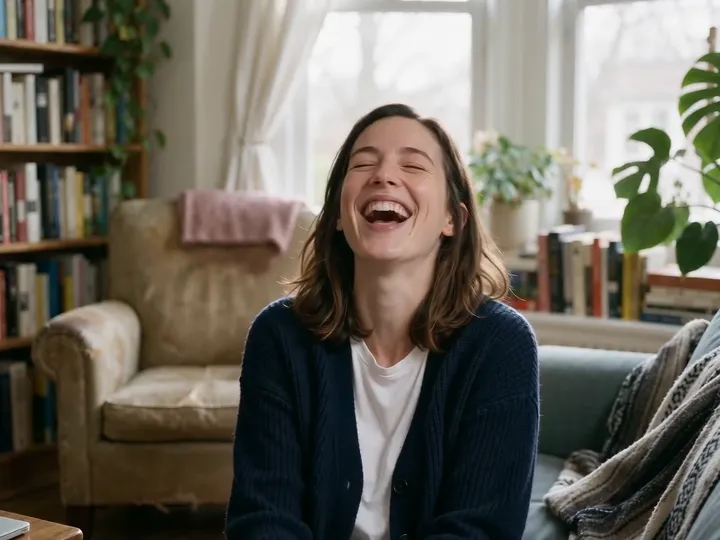
Laughing Video

Turn a photo into a laughing clip

Template
Your photo
Upload a photo or drop it hereJPG, PNG, WebP or HEIC · 10 MB

A clear, front-facing face works best.

Example

Laughing Video

A still portrait breaks into a natural, joyful laugh

Output
5s · 480p

AI Laughing Video Generator: Make Any Photo Laugh

Updated

Short answer: upload one clear front-facing photo, pick Joyful, Hilarious, Gentle or Hearty, and VdoBloom returns a 5-second laughing clip of that person. The default model, Seedance 2 Mini, costs 8 credits at 480p, which the 10 free signup credits cover. Pick 9:16, 1:1 or 16:9 before you render. It takes one photo, not two.

The VdoBloom AI Laughing Video Generator turns one still photo into a short clip of that person laughing: the eyes crease, the cheeks lift, the shoulders move and the head tips the way a real laugh moves a face. Upload a portrait, pick one of four laugh styles (Joyful, Hilarious, Gentle or Hearty) and the video arrives in a few minutes. No filming, no actor, no video reference.

Is it free? New accounts get 10 free credits, and the tab opens on Seedance 2 Mini, which costs 8 credits for a 5-second 480p clip, so your first laughing video is covered. Free-tier results carry a VdoBloom watermark; any purchase removes it. After that, clips cost 8 to 48 credits at 5 seconds depending on the model, and the Lite pack is 300 credits for $19.50 one-time (credits never expire) or $15 a month.

It is built for reaction cutaways, meme punchlines, group-chat replies and warming up old family portraits. The laughing tab runs on a keyframe pipeline: a WAN 2.7 step first composes a laughing frame from your photo, then the video model you pick animates it. That extra step is included in the price shown, and every model in the image-to-video picker can animate it.

Examples

Watch the tutorial

How to Make an AI Laughing Video from 1 Photo (Step by Step) | VdoBloom Tutorial

Turn one photo into an AI laughing video with VdoBloom. Pick a laugh style (Joyful, Hilarious, Gentle or Hearty), confirm the person is an adult and you have their consent, upload one photo, and create. In this video we…

All VdoBloom tutorials

How it works

  1. 1

    Upload one clear portrait

    A sharp, front-facing photo with the whole face visible and reasonably large in frame. Include the shoulders if you can: a real laugh moves the upper body, and the model needs something to move.

  2. 2

    Pick a laugh style

    Joyful (bright smile, natural light), Hilarious (big contagious laugh, warm light), Gentle (soft chuckle, soft light) or Hearty (full belly laugh, natural light). Each loads its own prompt.

  3. 3

    Edit the prompt if you want more

    The prompt box stays editable. Add what the person is laughing at, the room, or a direction such as "laughing while glancing off-camera".

  4. 4

    Choose a model, length and aspect ratio

    Seedance 2 Mini is the default at 8 credits for 480p and 5 seconds. Pick 9:16 for TikTok and Reels, 1:1 for feeds or 16:9 for edits. The exact credit cost shows before you generate.

  5. 5

    Generate and download

    The clip renders in the background and lands in My Creations. Free-tier downloads are watermarked; after any purchase the clean MP4 downloads at the resolution you chose.

Why use this tool

  • Four laugh performances

    Joyful, Hilarious, Gentle and Hearty differ in expression and intensity, and Hilarious and Gentle also change the lighting. Running one photo through two styles is the quickest way to find the laugh that suits that face.

  • The laugh belongs to your subject

    The model animates the face you uploaded rather than a stock face, so the clip still reads as that person. For a reaction clip or a family video, that is the whole point.

  • Keyframe pipeline included in the price

    A WAN 2.7 keyframe step builds the laughing frame before the video model runs. You pay only the video model price shown in the picker; the keyframe step is not billed separately.

  • Every video model

    Runway, Kling, PixVerse and Vidu plus Seedance, Veo, WAN and the rest of the image-to-video picker all animate the laughing keyframe.

  • Sized for the feed before you render

    Set 9:16, 1:1 or 16:9 at generation time so the clip arrives framed for TikTok, Instagram or YouTube without a later crop.

  • Failed jobs refund automatically

    If a generation fails, the credits return to your balance without a support ticket.

Quick facts

The short version, before you upload:

  • Input: one clear front-facing photo.
  • Styles: Joyful, Hilarious, Gentle, Hearty.
  • Default: Seedance 2 Mini, 5 s, 480p, 8 credits. Every model in the picker is still selectable.
  • Length: 5 seconds by default; 10 seconds on Runway Gen-3 is 20 credits, and Seedance 2 Mini runs up to 15 seconds.
  • Free: 10 credits on signup plus a daily check-in of 2–5 credits (25 over a 7-day streak).
  • Watermark: free-tier clips are watermarked; any paid plan or credit pack gives the clean MP4.
  • Paying: one-time packs start at 200 credits for $10.39 and never expire; no subscription needed.

Quick facts: the AI laughing video generator

The numbers that matter before you spend credits.

Input
One photo; the face should be clear and reasonably large
Output
MP4 clip of that person laughing, 5 seconds by default
Laugh styles
Joyful, Hilarious, Gentle, Hearty
Default model and price
Seedance 2 Mini, 8 credits for 5 s at 480p
Other models
Full image-to-video picker, from 10 to 48 credits at 5 s / 720p
Aspect ratios
9:16, 1:1 or 16:9, set before rendering
Free credits
10 on signup, enough for one Runway Gen-3 clip (watermarked)
Sound
Silent on Runway Gen-3; add a laugh track in your editor

How to make someone in a photo laugh with AI

Three steps, about a minute of your time plus a few minutes of rendering.

  • 1. Upload a sharp, front-facing photo with a neutral or lightly smiling face and the shoulders in frame. Closed-mouth photos give the model the most room to build a laugh.
  • 2. Pick a laugh style: Gentle for a soft chuckle, Joyful for a bright smile-laugh, Hilarious or Hearty for a big reaction.
  • 3. Keep Seedance 2 Mini (8 credits) or pick another model, choose the aspect ratio, and generate. The clip lands in My Creations.

Can I use AI laughing videos for funny memes?

Yes, that is one of the main uses. Render in 9:16 for TikTok, Reels and Shorts, or 1:1 for group chats and feeds. Use Hilarious or Hearty for a punchline reaction and Gentle for a smug, knowing chuckle.

The download is an MP4, which X, Instagram, TikTok, WhatsApp and Telegram all accept. If you need a GIF file, convert the MP4 in your editor or a converter app. Add text and a laugh sound in the editor, if the clip is silent.

Only use photos of yourself or of adults who are happy to be in the joke, and label AI video where a platform asks you to.

Which model should I use for a laughing video?

All prices are for a 5-second clip at 720p unless noted, taken from the same credit table the picker uses. Start cheap, step up only if the motion looks stiff.

Seedance 2 Mini (default)
Credits:17 (8 at 480p)
When to pick it:The model the tab opens on; 4 to 15 seconds
Runway Gen-3
Credits:10 (1080p: 20, 10 s: 20)
When to pick it:First try and everyday reaction clips; covered by the free credits
Vidu 2.0
Credits:15 (4 s)
When to pick it:A shorter, tighter laugh beat
PixVerse v3.5
Credits:18
When to pick it:Faster, punchier laughter
Vidu Q3 Turbo
Credits:20
When to pick it:Smoother motion when Gen-3 looks stiff
Runway Gen-4 Turbo
Credits:20
When to pick it:Quick Runway step-up
PixVerse v4.5
Credits:22
When to pick it:More natural face and shoulder movement
Kling V2.5 Turbo
Credits:40
When to pick it:Hero shot in a longer edit
PixVerse v6
Credits:45
When to pick it:Newest PixVerse, cinematic look
Runway Gen-4.5
Credits:48
When to pick it:Top of the Runway range

Read more: Runway Gen-3 model page · PixVerse v4.5 model page · Vidu Q3 Turbo model page

The four laugh styles

Each style is a separate prompt, not one animation at four volumes. The prompt stays editable under all four.

Joyful
What you get:Bright, open smile and happy laughter, natural lighting
Best for:Warm family clips, birthday posts
Hilarious
What you get:Big, contagious laugh, warm lighting
Best for:Reaction cutaways, meme punchlines
Gentle
What you get:Quiet chuckle and soft smile, soft lighting
Best for:Subtle amusement, old portraits
Hearty
What you get:Full, genuine belly laugh, natural lighting
Best for:Big comedic moments

What does a laughing video cost?

Credits are deducted only when the job is accepted, and a failed render is refunded.

  • One-time pack credits never expire; subscription credits reset each billing cycle.
  • Free-tier downloads are watermarked. Any purchase, a one-time pack or a subscription, unlocks clean downloads.
1 clip, Runway Gen-3, 720p, 5 s
Credits:10
Notes:Covered by the 10 free signup credits
All 4 styles on Runway Gen-3
Credits:40
Notes:Compare every laugh on one photo
1 clip, Runway Gen-3, 1080p, 5 s
Credits:20
Notes:Sharper for big screens
1 clip, PixVerse v4.5, 720p, 5 s
Credits:22
Notes:Step-up model
Lite pack, 300 credits
Credits:$19.50 one-time
Notes:30 Runway Gen-3 laughing clips; or $15 a month

What people make with AI laughing videos

A laugh is one of the most reusable short clips you can have, because it works as a reaction to almost anything.

  • Reaction cutaways: drop a 5-second laugh after a joke or a fail in a commentary or podcast edit.
  • Meme punchlines and group-chat replies: a friend (with their agreement) laughing at your message lands better than an emoji.
  • Old family photos: a Gentle or Joyful laugh brings a grandparent's portrait to life for a birthday or memorial video.
  • Character and mascot art: illustrated faces can laugh too, as long as the face is clear and front-facing.
  • Brand and creator content: a laughing host makes a warmer channel intro or end card than a static photo.

Tips for a laugh that looks real

Most bad results trace back to the photo, not the model.

  • Use a sharp, evenly lit, front-facing portrait. Sunglasses, a hand over the mouth or deep shadow on one side all cost realism.
  • Keep the face large in frame. A face that is a few dozen pixels wide in a group shot gives the model little to animate.
  • Show the shoulders. A laugh is a whole-upper-body movement.
  • A neutral or lightly smiling start photo works better than one already mid-laugh, because the model has room to build the expression.
  • Two people in one photo? Say "both people laughing together" in the prompt, or the model may animate only the more prominent face.
  • Change one thing per retry: the style, the crop or one sentence of prompt. Repeating identical inputs rarely fixes a result.

What the laughing generator cannot do

Knowing the limits saves credits.

  • Runway Gen-3 returns a silent clip. Plan to add a laugh track or music in your editor if the clip needs sound.
  • It takes one photo. It cannot composite two separate photos into one laughing scene.
  • Seedance, Veo, WAN and the other image-to-video models are in the picker too; the keyframe is built the same way whichever you choose.
  • It cannot recover detail that is not in the photo; a blurry source gives a soft result on every model.

Read more: How to make an AI laughing video (guide) · Image to Video AI

Frequently asked questions

How do I get free credits for more laughing videos?

New accounts get 10 credits, and the daily check-in adds 2 to 5 credits a day (25 over a 7-day streak). Free-tier clips are watermarked; any credit pack removes it.

What does the laughing tab cost if I already have credits?

The tab starts on Seedance 2 Mini at 480p, 8 credits for 5 seconds; Runway Gen-3 at 720p is 10. You can pick any model in the picker.

What is the best AI laughing video effect?

Pick the effect by the reaction you want: Gentle for a soft chuckle, Joyful for a bright laugh, Hilarious or Hearty for a big belly laugh. For the model, start with Runway Gen-3 at 10 credits; for a hero shot, Kling V2.5 Turbo (40) or Runway Gen-4.5 (48) give fuller motion.

Is there an AI laughing video generator for funny memes?

Yes. Upload the photo, pick Hilarious or Hearty, set 9:16 or 1:1 and generate. You get an MP4 you can post on TikTok, Reels, X or WhatsApp. Add captions and a laugh sound in your editor, if the clip has no audio.

How do I make someone in a photo laugh with AI?

Upload a clear front-facing photo of them to the laughing tab, choose a laugh style, keep the default Seedance 2 Mini model (8 credits for 5 seconds at 480p) and click generate. The clip arrives in My Creations in a few minutes.

Is the AI laughing video generator free?

Your first clip is. New accounts get 10 free credits and the default model, Seedance 2 Mini, costs 8 credits for a 5-second 480p laughing video. Free-tier results carry a VdoBloom watermark. There is no unlimited free plan; more clips need credits, starting with the Lite pack at 300 credits for $19.50 one-time.

How do I make a photo laugh with AI?

Upload a clear portrait to the laughing tab, choose Joyful, Hilarious, Gentle or Hearty, keep Seedance 2 Mini or pick another model, set the aspect ratio and click generate. The clip appears in My Creations a few minutes later.

How much does each laughing video cost?

At 5 seconds and 720p: Runway Gen-3 10 credits, PixVerse v3.5 18, Vidu Q3 Turbo 20, Runway Gen-4 Turbo 20, PixVerse v4.5 22, Kling V2.5 Turbo 40, PixVerse v6 45 and Runway Gen-4.5 48. Vidu 2.0 renders 4 seconds for 15. The keyframe step is included.

Will the video have a watermark?

On the free tier, yes. You can still download the watermarked copy. Any purchase, a one-time credit pack or a subscription, removes the watermark and unlocks the clean MP4.

Which model gives the most natural laugh?

Start with Runway Gen-3 at 10 credits; it holds facial detail well for reaction clips. If the motion looks stiff, try Vidu Q3 Turbo (20) or PixVerse v4.5 (22). Kling V2.5 Turbo (40) and Runway Gen-4.5 (48) are the top options for a hero shot.

Can I pick Seedance or Veo on this tab?

Yes. The laughing effect composes a keyframe with WAN 2.7 first, then whichever model you pick, Seedance and Veo included, animates it.

Can two people laugh in the same video?

Yes, if both are in the one photo you upload. Add "both people laughing together" to the prompt, and use a photo where both faces are a similar size and equally sharp.

Does the laughing video have sound?

Do not count on it. The laughing presets ask for a visual performance, so plan to add a laugh track or music in your editor if the clip needs audio.

How long does it take?

Usually a few minutes. Five-second 720p clips are fastest; 1080p, 10-second clips and the heavier models take longer. The job runs in the background, so you can leave the page.

Whose photos can I animate?

Your own, or photos of adults who have agreed to be animated. Do not upload photos of children. Generations are moderated and requests can be rejected. Most social platforms ask you to label AI-generated video when you post it.