On Fire Effect
Stylized flames rise around you, calm and unharmed
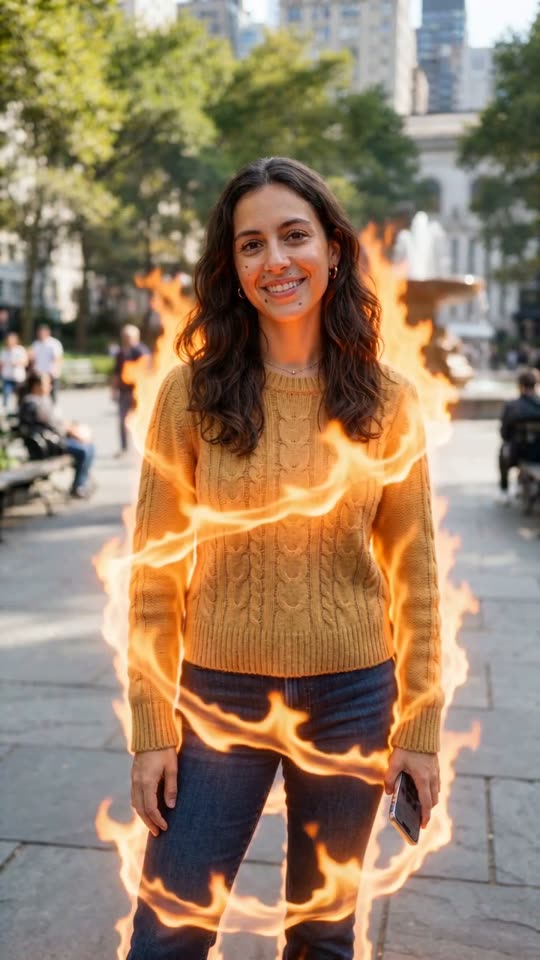
Flame Aura
Fire aura, totally calm
A full or half-body photo. The fire aura never burns.
Full-screen on phones: Instagram Reels, YouTube Shorts, WhatsApp Status.
Advanced options
Motion or style reference. MP4 or MOV, 480p to 720p, up to 15s total.
MP3 or WAV, up to 15 MB and 30s total.
Example
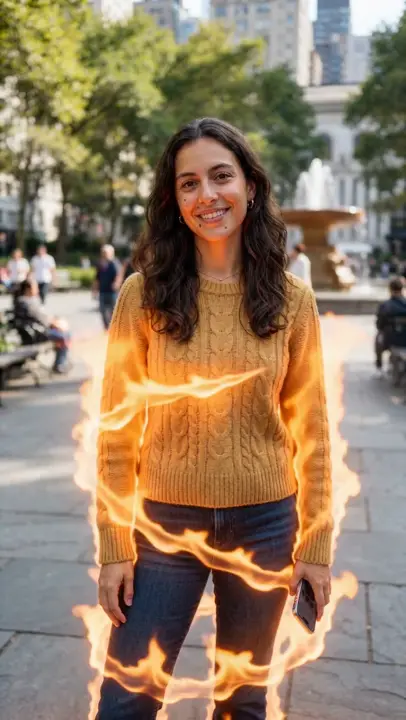
On Fire Effect
Fire aura, totally calm
- Output
- 5s · 720p
AI On Fire Effect: Turn a Photo Into a Video With Flames Around You
Updated
Short answer: the VdoBloom AI on fire effect turns one photo into a 5-second video where bright orange flames rise from the ground and curl around your arms and shoulders like a glowing aura, while you stand calm, breathe slowly and look at the camera. The fire never touches your skin, hair or clothes, and warm firelight falls on your face. The camera stays locked, so the flames carry the shot.
Cost: the tab opens on Seedance 2 Fast at 720p and vertical 9:16, which costs 50 credits. Switch to Seedance 2 Mini at 480p and the same clip costs 8 credits, which the 10 free signup credits cover (17 credits at 720p). The clip is ready in a few minutes. Free-tier downloads carry a VdoBloom watermark; any paid plan or credit pack removes it.
Your photo is the first frame, so the video starts on your real face and the flame effect grows from there. No green screen, masking or editing software is needed. The prompt is editable, so you can ask for blue flames, embers drifting in the air or fire around the hands only.
Examples
Flame Aura
Make thisHow it works
- 1
Upload one photo
A clear full-body or half-body photo with your face sharp and some space around you for the flames.
- 2
Keep Flame Aura or edit the prompt
Flame Aura is loaded for you. Change the flame colour or where the fire sits, and keep the line that the person stays calm and unharmed.
- 3
Pick a model
Seedance 2 Fast at 720p (50 credits) is the default. Seedance 2 Mini at 480p (8 credits) is the low-cost option; Seedance 2 and Seedance 2.5 are in the same picker.
- 4
Generate
The flames rise around you in one locked shot. The clip lands in My Creations in a few minutes.
- 5
Download and post
Vertical 9:16 is ready for Reels, Shorts and TikTok. Free-tier downloads are watermarked.
Why use this tool
Flame aura, not burning
The flames surround you like a power aura and never burn skin, hair or clothes, so the clip reads as a superpower, not an accident.
Your face stays yours
The photo is the first frame and the prompt keeps the face, hair and outfit from it.
Locked camera
Only the fire moves, which is what makes the effect look real.
From 8 credits
Seedance 2 Mini at 480p costs 8 credits for 5 seconds, inside the 10 free signup credits.
Editable flames
Ask for blue fire, embers in the air, a stronger blaze or flames only in your hands.
One photo, no VFX skills
No masking, compositing or keyframes: upload, generate, download.
Quick facts
The AI on fire effect at a glance.
- What it makes: a 5-second clip of flames rising around you like an aura while you stay calm.
- Other names: AI fire effect, AI flame effect, flame aura, flame on, covered in flames.
- Input: one full-body or half-body photo.
- Template: Flame Aura (editable prompt).
- Default: Seedance 2 Fast, 5 seconds, 720p, 9:16: 50 credits.
- Low-cost option: Seedance 2 Mini, 5 seconds, 480p: 8 credits (720p: 17).
- Free: 10 credits at signup, plus 2 to 5 daily check-in credits.
- Watermark: on free-tier clips; removed with any paid plan or credit pack.
What an on fire clip costs
Credits for one 5-second clip. The exact price is on the Create button before you generate. The Lite pack is 300 credits for $19.50 one-time (the credits never expire) or $15 a month.
- Seedance 2 Mini
- 480p:8
- 720p:17
- Seedance 2 Fast (default at 720p)
- 480p:24
- 720p:50
- Seedance 2
- 480p:38
- 720p:82
| Model | 480p | 720p |
|---|---|---|
| Seedance 2 Mini | 8 | 17 |
| Seedance 2 Fast (default at 720p) | 24 | 50 |
| Seedance 2 | 38 | 82 |
Read more: Seedance 2 Mini · Seedance 2 Fast · Seedance 2
Fire effect ideas to try in the prompt
Flame Aura is the default. Change the fire part of the prompt for a different look:
- Blue or purple flames for a fantasy or gaming look.
- Fire only in the open palms, like a fire power.
- Embers and sparks drifting up around you.
- A slow build: a small flame at the feet that grows into a full aura.
- Golden fire with a soft glow for a calm, heroic intro.
Tips for a clean fire effect
- Use a full or half-body photo with space around you, so the flames have room.
- A darker or plain background makes the fire stand out.
- Keep the face sharp and front-facing so it stays recognisable.
- Draft on Seedance 2 Mini at 480p (8 credits), then make the final at 720p.
- Keep the "calm and unharmed" line in the prompt. Generations are moderated and may be refused.
Frequently asked questions
What is the AI on fire effect?
A short video made from one photo where flames rise around the person like a glowing aura. On VdoBloom the person stays calm and unharmed and the fire never touches skin, hair or clothes.
Is the AI on fire effect free?
You can make one free. New accounts get 10 free credits, and a 5-second clip on Seedance 2 Mini at 480p costs 8. The default Seedance 2 Fast at 720p costs 50. Free-tier clips carry a watermark.
How do I put fire around myself in a video?
Upload a clear photo to the On Fire Effect tab, keep the Flame Aura template, pick a model and press Create. The flames are added in one locked shot, with no editing software.
Can I change the colour of the flames?
Yes. Edit the prompt, for example "bright blue flames", and keep the rest of it so you stay calm and unharmed.
Does it work on a video I already filmed?
No. This tab starts from one photo and makes a new 5-second clip. Your photo is the first frame.
Can I add fire to an object or a logo instead of a person?
The template is written for a person. You can rewrite the prompt for an object, but results vary. For a logo, try the AI Logo Animation tool.
Which photo works best?
A sharp, well-lit full-body or half-body photo, face to the camera, with some space around you. A plain or darker background helps the fire stand out.
How long is the clip?
Five seconds by default, in vertical 9:16. Longer clips cost more credits.
Can I use someone else’s photo?
Only your own photo or one of someone who agreed to it. Generations are moderated and may be refused.