Paper Tear Effect
Rip your photo open like paper
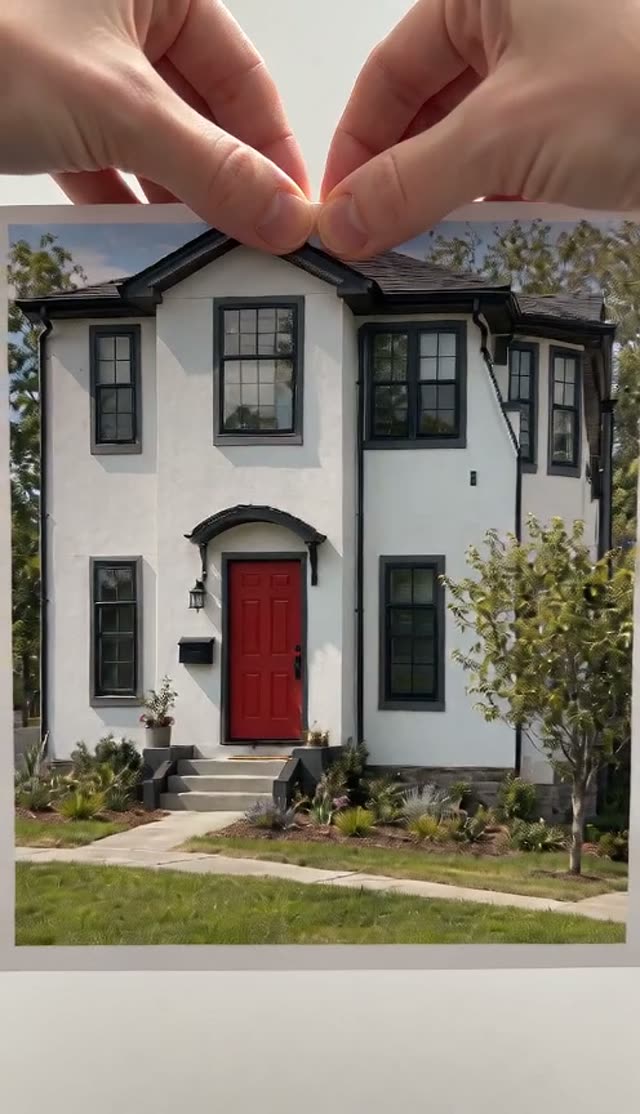
Rip the Photo
Torn open to a bright sky
Any photo works.
Full-screen on phones: Instagram Reels, YouTube Shorts, WhatsApp Status.
Advanced options
Motion or style reference. MP4 or MOV, 480p to 720p, up to 15s total.
MP3 or WAV, up to 15 MB and 30s total.
Example
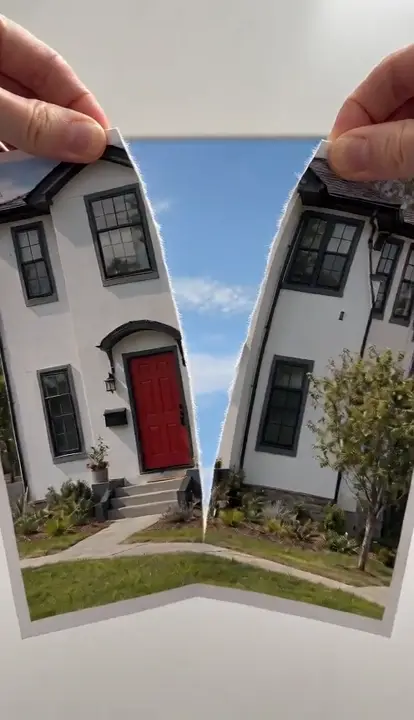
Paper Tear Effect
Torn open to a bright sky
- Output
- 5s · 480p
AI Paper Tear Effect: Rip Your Photo Open Like Paper
Updated
Short answer: upload any photo and VdoBloom turns it into a short video where your picture becomes a printed sheet of paper. Two hands grip the top edge and tear it down the middle, the torn halves curl apart with paper fibres along the rip, and a bright blue sky with white clouds shows through behind it. The tab opens on Seedance 2 Mini at 5 seconds, 480p and vertical 9:16, which costs 8 credits. New accounts get 10 free credits, so your first paper tear clip is free.
A "ripped paper effect" is often a still image with torn edges. This one makes a moving clip: the tear happens on camera, with a locked camera, so it works as a reveal or an intro for Reels, Shorts and TikTok. Your photo is the first frame, so the clip starts on exactly the picture you uploaded.
Clips usually finish in a few minutes and land in My Creations. Free-tier downloads carry a VdoBloom watermark; any paid plan or credit pack removes it. If a render fails, its credits go back to your balance.
Examples
Rip the Photo
Make thisHow it works
- 1
Upload a photo
Any photo works: a portrait, a product, a pet, a poster or a landscape. It becomes the first frame of the video, before the tear starts.
- 2
Keep the Rip the Photo template
The tear is already written for you: two hands rip the photo straight down the middle and the halves curl apart to show a blue sky.
- 3
Pick a model, length and size
Seedance 2 Mini at 5 seconds and 480p is 8 credits. Choose 720p for a sharper clip (17 credits), up to 15 seconds, and 9:16, 1:1, 16:9, 3:4, 4:3 or 21:9.
- 4
Generate and download
The cost shows on the button before you start. Download the MP4 or cut it into your edit as a reveal.
Why use this tool
A real tear, on video
The paper rips on camera with curling halves and visible fibres along the edge, not a static torn-edge frame.
Starts on your photo
The upload is frame one, so viewers see your picture first and then watch it tear.
Locked camera
The template asks for a locked camera and one action only, the tear, which keeps short clips clean and easy to cut.
Low price per clip
8 credits for a 5-second 480p clip on Seedance 2 Mini, with the exact cost shown before you generate.
Any image-to-video model
Keep Seedance 2 Mini for cost, or switch to Seedance 2 Fast or Seedance 2. Seedance 2 also offers 1080p and 4K.
Every common size
Vertical 9:16 for Reels and Shorts, 1:1 for feeds, 16:9 for YouTube, plus 3:4, 4:3 and 21:9.
Quick facts
The paper tear tool at a glance.
- What it makes: a video where your photo is torn in half by two hands, revealing a blue sky with clouds.
- Input: one photo. Any subject works.
- Template: Rip the Photo (one template).
- Default: Seedance 2 Mini, 5 seconds, 480p, 9:16: 8 credits.
- Length: 4 to 15 seconds on Seedance 2 Mini.
- Free to try: 10 credits at signup cover one default clip.
- Watermark: on free-tier downloads; removed with any paid plan or credit pack.
Paper tear image or paper tear video?
People mean three different things by "paper tear effect". Pick the tool that matches the result you want.
- Your photo ripping open on camera (our pick)
- What to use:VdoBloom Paper Tear Effect
- What you get:A 4 to 15 second video, from 8 credits
- A still image with torn paper edges or a torn-paper collage
- What to use:An AI photo editor with a torn-paper prompt
- What you get:One edited image
- A tear between two of your own clips
- What to use:A paper-rip transition template in a video editor
- What you get:A transition layered over your footage
| What you want | What to use | What you get |
|---|---|---|
| Your photo ripping open on camera (our pick) | VdoBloom Paper Tear Effect | A 4 to 15 second video, from 8 credits |
| A still image with torn paper edges or a torn-paper collage | An AI photo editor with a torn-paper prompt | One edited image |
| A tear between two of your own clips | A paper-rip transition template in a video editor | A transition layered over your footage |
Read more: AI Photo Editor · How to make an AI transition video
How much does the paper tear effect cost?
You pay per clip, by model, length and resolution. The price for your exact settings is on the button before you generate. These are the Seedance models most people use on this tab.
- Seedance 2 Mini (default)
- 5 s, 480p:8
- 5 s, 720p:17
- 10 s, 480p:16
- 10 s, 720p:33
- Seedance 2 Fast
- 5 s, 480p:24
- 5 s, 720p:50
- 10 s, 480p:48
- 10 s, 720p:100
- Seedance 2
- 5 s, 480p:38
- 5 s, 720p:82
- 10 s, 480p:76
- 10 s, 720p:163
| Model | 5 s, 480p | 5 s, 720p | 10 s, 480p | 10 s, 720p |
|---|---|---|---|---|
| Seedance 2 Mini (default) | 8 | 17 | 16 | 33 |
| Seedance 2 Fast | 24 | 50 | 48 | 100 |
| Seedance 2 | 38 | 82 | 76 | 163 |
Read more: Plans and credit packs · Seedance 2 Mini · Seedance 2
Using the paper tear as a reveal or transition
The clip ends on open blue sky, which makes a clean cut point. Put the tear at the start of a video and cut to your next shot once the sky fills the frame, or put it at the end as an outro.
- Use a photo that sets up the reveal: a "before" picture, a teaser poster or a closed product box.
- Keep it short: 5 seconds is enough for the full tear. Longer clips hold on the sky.
- Match the size to the platform before you generate: 9:16 for Reels, Shorts and TikTok, 16:9 for YouTube.
- Need it sharper for a big screen? Run the finished clip through the AI Video Upscaler.
Read more: AI Video Upscaler
Which photos tear best?
The whole photo becomes the paper, so almost anything works. A few things help the tear look real.
- Bright, clear photos read best as a printed sheet. Very dark photos hide the paper fibres.
- Keep the main subject a little off the centre line if you want it to stay whole on one half.
- Fine text in the photo can blur or bend as the paper curls, so avoid relying on small writing.
- Only use photos you have the right to use. Before each run you tick a box confirming that, and that anyone shown is an adult (18+).
Limits to know
There is one template, so the tear always runs top to bottom down the middle with two hands, and the reveal behind it is always a blue sky with clouds. You cannot type your own prompt on this tab. Seedance 2 Mini renders up to 720p; Seedance 2 goes up to 1080p and 4K. Prompts and photos are checked before a job runs, so some uploads are refused.
Frequently asked questions
Is there a free AI paper tear effect?
Yes, to start. New VdoBloom accounts get 10 free credits, and one default paper tear clip (Seedance 2 Mini, 5 seconds, 480p) costs 8. Free-tier downloads carry a VdoBloom watermark; any paid plan or credit pack removes it.
How do I make a paper tear effect video from a photo?
Open the Paper Tear Effect tab, upload your photo, keep the Rip the Photo template, pick a length and size, and press Generate. Your photo is the first frame, then two hands tear it down the middle to reveal a blue sky.
How much does the paper tear effect cost?
8 credits for 5 seconds at 480p on Seedance 2 Mini, or 17 at 720p. A 10-second clip is 16 credits at 480p. Seedance 2 Fast and Seedance 2 cost more. The Lite plan is 300 credits for $15 a month or $19.50 one-time.
Can I choose what shows behind the tear?
Not on this tab. The template always reveals a bright blue sky with white clouds. Many people use that sky as the cut point to their next clip.
Can I use it as a paper rip transition?
Yes, as a reveal. Put the clip before your next shot and cut when the sky fills the frame. For a tear laid over two clips you already filmed, use a transition template in a video editor.
Can I make a torn paper image instead of a video?
This tab makes video. For a still torn-paper picture, use the AI Photo Editor and describe the torn edges you want.
What sizes and lengths can I make?
Seedance 2 Mini runs 4 to 15 seconds at 480p or 720p, in 9:16, 1:1, 16:9, 3:4, 4:3 or 21:9. The tab opens at 5 seconds, 480p, 9:16.
How long does it take?
Most clips finish in a few minutes. You can leave the page and find the video in My Creations. A failed render refunds its credits.