Animate a Drawing
Bring a child’s drawing or doodle to life: it waves, jumps or dances
A flat, well-lit photo of a drawing on paper.
Full-screen on phones: Instagram Reels, YouTube Shorts, WhatsApp Status.
Advanced options
Motion or style reference. MP4 or MOV, 480p to 720p, up to 15s total.
MP3 or WAV, up to 15 MB and 30s total.
Example
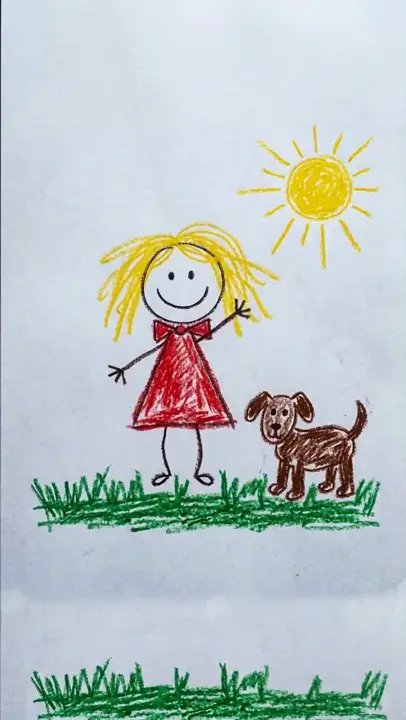
Animate a Drawing
Turns and waves at you
- Output
- 5s · 720p
Animate a Drawing: Bring Your Kid’s Drawing to Life With AI
Updated
Animate a Drawing turns a photo of a drawing into a short video where the drawn character moves. Photograph a crayon, marker or pencil drawing, pick one of six moves (Wave Hello, Jump for Joy, Dance, Walk Across the Page, Fly or Swim, or Come Alive) and the AI animates it while keeping the same lines, colors and paper.
Is it free? The tool opens on Seedance 2 Fast at 720p, where a 5-second vertical clip costs 50 credits. Switch the model to Seedance 2 Mini at 480p and the same clip costs 8 credits, which the 10 free credits for new accounts cover. Free-tier downloads carry a VdoBloom watermark; any paid credit pack or plan removes it.
It does not redraw or "improve" the art. Every move tells the model to keep the picture flat and hand-drawn on paper, with a still camera and no new characters or text, so the result looks like a simple flip-book cartoon of your child’s own picture. It is not frame-by-frame animation software: it brings a finished drawing to life in one step.
How it works
- 1
Photograph the drawing
Lay it flat in good light and shoot straight down so the whole page is in frame, with no glare, shadows or fingers.
- 2
Pick a move
Wave Hello, Jump for Joy, Dance, Walk Across the Page, Fly or Swim, or Come Alive. The prompt is shown and you can edit it.
- 3
Choose the model and length
Seedance 2 Fast at 720p is selected first. Seedance 2 Mini at 480p is the lowest price. Clips run 4 to 15 seconds (up to 30 on Seedance 2.5) and start in 9:16 for phones.
- 4
Generate and share
The clip lands in My Creations, ready to send to family or post to Reels, TikTok or a class group.
Why use this tool
Still your drawing
Same lines, crayon or marker texture, colors and paper. Nothing is redrawn, smoothed, shaded or made 3D.
Any doodle
People, pets, monsters, cars and rockets. The Fly or Swim move is written for birds, fish, planes and cars.
Six ready-made moves
Each move is a full prompt with the drawing rules built in, so you only upload and press generate.
Still camera
No zoom and no camera moves. Only the drawn figures move, so the paper stays put like a real flip-book.
A keepsake to share
A few seconds of your child’s art moving is the kind of clip grandparents watch on repeat.
Works on a phone
It runs in the browser: take the photo and animate it on the same phone.
The six moves
Pick the move that suits what is in the drawing.
- Wave Hello
- What happens:The main character lifts an arm and waves two or three times with a small bounce
- Works best for:People, animals and monsters with arms
- Jump for Joy
- What happens:A small crouch, a jump with arms up, a squash-and-stretch landing and a smile
- Works best for:Single characters
- Dance
- What happens:The drawn characters sway, swing their arms and tap their feet, then finish with a pose
- Works best for:Drawings with one or more figures
- Walk Across the Page
- What happens:The character walks with bouncy steps from one side of the paper toward the other
- Works best for:Characters with legs and space to walk
- Fly or Swim
- What happens:A bird flaps and flies a loop, a fish wiggles, a plane or car glides with drawn motion lines
- Works best for:Birds, fish, planes, cars and rockets
- Come Alive
- What happens:Soft breathing, blinking, a wider smile and a head tilt
- Works best for:Portraits and busy drawings
| Move | What happens | Works best for |
|---|---|---|
| Wave Hello | The main character lifts an arm and waves two or three times with a small bounce | People, animals and monsters with arms |
| Jump for Joy | A small crouch, a jump with arms up, a squash-and-stretch landing and a smile | Single characters |
| Dance | The drawn characters sway, swing their arms and tap their feet, then finish with a pose | Drawings with one or more figures |
| Walk Across the Page | The character walks with bouncy steps from one side of the paper toward the other | Characters with legs and space to walk |
| Fly or Swim | A bird flaps and flies a loop, a fish wiggles, a plane or car glides with drawn motion lines | Birds, fish, planes, cars and rockets |
| Come Alive | Soft breathing, blinking, a wider smile and a head tilt | Portraits and busy drawings |
What it costs to animate a drawing
You pay per clip, by model and resolution. The price is shown on the Create button before you generate.
- New accounts get 10 free credits: one 5-second Seedance 2 Mini clip at 480p.
- A 10-second Seedance 2 Mini clip at 480p is 16 credits.
- The Lite pack is 300 credits for $19.50 one-time (never expires) or $15 a month: 37 Mini clips at 480p, or 6 Fast clips at 720p.
- Seedance 2 Mini
- 5 s at 480p:8 credits
- 5 s at 720p:17 credits
- Seedance 2 Fast (selected first, at 720p)
- 5 s at 480p:24 credits
- 5 s at 720p:50 credits
- Seedance 2
- 5 s at 480p:38 credits
- 5 s at 720p:82 credits
- Seedance 2.5
- 5 s at 480p:56 credits
- 5 s at 720p:126 credits
| Model | 5 s at 480p | 5 s at 720p |
|---|---|---|
| Seedance 2 Mini | 8 credits | 17 credits |
| Seedance 2 Fast (selected first, at 720p) | 24 credits | 50 credits |
| Seedance 2 | 38 credits | 82 credits |
| Seedance 2.5 | 56 credits | 126 credits |
Read more: See all plans and credit packs
How to photograph a drawing so it animates well
The photo decides most of the result.
- Shoot from directly above with the drawing filling most of the frame.
- Use daylight or even room light; avoid flash glare on crayon and marker.
- Thick, clear outlines animate better than faint pencil. Trace over faint lines with a marker first if the drawing is yours to change.
- Keep one main character for Wave Hello, Jump for Joy and Walk Across the Page.
- Leave some empty paper around the figure so a walk or a jump has room.
AI drawing animation or animation software?
Two different things are called "animate a drawing". Pick by how much drawing you want to do.
- Our pick for a finished drawing: VdoBloom Animate a Drawing. One photo, one move, one short video, and the drawing keeps its own lines.
- To draw every frame yourself: frame-by-frame apps such as Krita, FlipaClip or Procreate Dreams. More control, but you draw each frame.
- To rig a stick figure with joints: Meta’s Animated Drawings demo, which works on humanoid figures where you place the joints.
Read more: How to animate your kid’s drawing with AI · Best AI animation generators
Ideas for animated drawings
A moving drawing makes a small, personal video.
- A birthday or holiday message to grandparents.
- A school art show or end-of-year class video.
- A story-time clip where the drawn hero waves goodbye.
- Pet portraits and family drawings saved as moving keepsakes.
- A doodle mascot for a channel intro or a small business post.
Limits worth knowing
Each clip animates one photo. Faint, very busy or tilted photos can drift or move the wrong figure; re-run or try another move. The drawing stays 2D, so it will not turn into a 3D or realistic character. Photograph only the drawing, not the child.
Frequently asked questions
Can I animate a drawing for free?
Yes, for one clip. New accounts get 10 free credits, and a 5-second Seedance 2 Mini clip at 480p costs 8. The tool opens on Seedance 2 Fast at 720p (50 credits), so switch the model first. Free-tier downloads carry a watermark.
How do I bring my child’s drawing to life?
Take a flat, well-lit photo of the drawing from above, upload it to Animate a Drawing, pick a move such as Wave Hello or Dance, and press generate. The clip appears in My Creations with the drawing moving in its own lines and colors.
Does it change my child’s drawing?
No. Every move tells the model to keep the exact drawing, texture, colors and paper and to move only the drawn figures. If something drifts, re-run it or try another move.
What kind of photo works best?
A flat, evenly lit photo taken from directly above, with the drawing filling most of the frame. Thick, clear lines animate better than faint pencil.
Can it animate animals, cars or monsters?
Yes. The Fly or Swim move is written for birds, fish, planes and cars, and Wave Hello, Jump for Joy and Dance work on monsters and animals with arms and legs.
How long is the video?
Clips start at 5 seconds and can be set from 4 to 15 seconds, or up to 30 seconds on Seedance 2.5. Longer clips cost more; a 10-second Seedance 2 Mini clip at 480p is 16 credits.
Is this animation software like Krita or FlipaClip?
No. Those apps let you draw every frame by hand. Animate a Drawing takes one finished drawing and animates it for you in one step, which suits kids’ art and quick keepsakes.
How much does it cost to animate a drawing?
For a 5-second clip: Seedance 2 Mini 8 credits at 480p or 17 at 720p, Seedance 2 Fast 24 or 50, Seedance 2 38 or 82, and Seedance 2.5 56 or 126. The exact price shows before you generate.
Can I animate a drawing on my phone?
Yes. It runs in the phone browser, so you can photograph the drawing and animate it on the same device. Clips start in 9:16, the vertical shape phones and Reels use.
Is the drawing private?
Uploads and finished clips stay in your account. VdoBloom does not publish them to a public gallery, so sharing is your choice.