Clone Yourself
Copies of you step out until four stand in a row
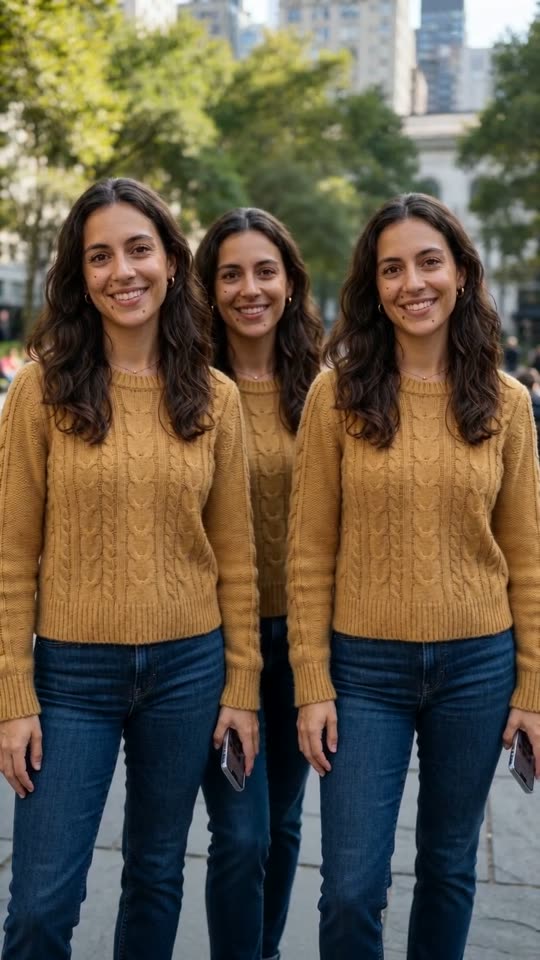
Four of Me
Four identical copies
A half or full-body photo with space on both sides works best.
Full-screen on phones: Instagram Reels, YouTube Shorts, WhatsApp Status.
Advanced options
Motion or style reference. MP4 or MOV, 480p to 720p, up to 15s total.
MP3 or WAV, up to 15 MB and 30s total.
Example
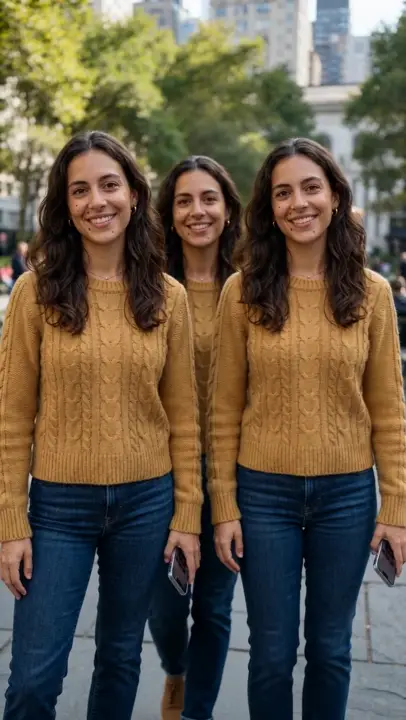
Clone Yourself
Four identical copies
- Output
- 5s · 720p
Clone Yourself in a Video: Four of You From One Photo, No Editing
Updated
Short answer: VdoBloom’s Clone Yourself effect turns one photo into a short video where identical copies of you step out from behind you, one by one, until four of you stand side by side and smile at the camera. The camera stays locked, so it looks like a real trick shot. You need no tripod, no second take and no masking. The tab opens on Seedance 2 Fast (5 seconds, 720p, 50 credits); switch to Seedance 2 Mini at 480p and a clip costs 8 credits, which the 10 free signup credits cover.
"Clone yourself video" can mean two things. This page is the visual clone effect: several copies of you in one shot, the multiplicity trick that editors usually build by filming each position and masking the takes together. If you want a talking AI twin of yourself that reads any script in your face and voice, that is a different tool: use AI Presenter, Talking Avatar and Voice Clone instead (links below).
It is made for Reels, Shorts and TikTok trend clips, channel intros and "me, myself and I" jokes, from a single photo of yourself.
Examples
Four of Me
Make thisHow it works
- 1
Upload one photo of yourself
A half-body or full-body photo with your face sharp and some empty space on both sides of you. The copies need room to step into.
- 2
Keep the Four of Me template or edit it
The prompt is already written: locked camera, copies step out one by one, four in a row, same face, hair and outfit. You can change the action or the number of copies in the prompt; results vary more as you add people.
- 3
Pick model and quality
Seedance 2 Fast at 720p for 5 seconds is the default at 50 credits. Seedance 2 Mini at 480p is 8 credits for a first try. The price shows before you generate.
- 4
Generate and share
The vertical 9:16 clip renders in a few minutes and lands in My Creations, ready for Reels, Shorts and TikTok.
Why use this tool
One photo, no editing
The old way is a tripod, the same light for every take and a mask for each copy. Here the photo is the first frame and the model adds the copies.
Same face on every copy
The prompt tells the model to keep your face, hair and outfit on all four people, and the camera never moves, so nothing drifts away from the photo.
Same background and light
The scene from your photo stays as it is, so the copies sit in the same room and the same light, the detail that gives away a bad clone edit.
Four Seedance 2 models
Seedance 2 Mini, Seedance 2 Fast, Seedance 2 and Seedance 2.5 are all in the picker, each priced before you generate.
Refunded on failure
If a render fails, its credits are returned to your balance automatically.
Private by default
Clips stay in your own library. Nothing is posted anywhere for you.
Quick facts
The effect at a glance.
- What it does: identical copies of the person in your photo step out one by one until four stand in a row, with a locked camera.
- Input: one photo of yourself, half or full body, with space on both sides.
- Template: Four of Me. The prompt is editable.
- Default: Seedance 2 Fast, 720p, 5 seconds, 9:16 vertical, 50 credits.
- Lowest-cost option on the tab: Seedance 2 Mini, 480p, 5 seconds, 8 credits.
- Free start: 10 credits at signup plus a daily check-in. Free-tier downloads carry a watermark; any paid plan or credit pack removes it.
- Failed renders refund their credits automatically.
Clone effect or AI twin: which one do you need?
Most guides mix these up. Pick by what the video has to do.
- Several copies of you in one shot
- What it is:Visual clone effect (multiplicity)
- VdoBloom tool:Clone Yourself (this page)
- You reading a typed script
- What it is:Photo + script, AI voice-over, waist-up presenter
- VdoBloom tool:AI Presenter
- Your photo lip-synced to your own audio
- What it is:Talking photo from a portrait and an audio clip
- VdoBloom tool:Talking Avatar
- New lines spoken in your own voice
- What it is:Voice clone audio (use it as the audio clip in Talking Avatar)
- VdoBloom tool:Voice Clone
| You want | What it is | VdoBloom tool |
|---|---|---|
| Several copies of you in one shot | Visual clone effect (multiplicity) | Clone Yourself (this page) |
| You reading a typed script | Photo + script, AI voice-over, waist-up presenter | AI Presenter |
| Your photo lip-synced to your own audio | Talking photo from a portrait and an audio clip | Talking Avatar |
| New lines spoken in your own voice | Voice clone audio (use it as the audio clip in Talking Avatar) | Voice Clone |
Read more: Talking Avatar · Voice Clone · AI Presenter Video · AI digital twin avatars explained
How much does a clone yourself video cost?
You pay per clip in credits, by model and quality. No subscription is needed: the Lite pack is 300 credits for $19.50 one-time (the credits never expire) or $15 a month. Prices below are for one 5-second clip.
- Seedance 2 Mini
- 480p:8
- 720p:17
- Good for:First try on free credits
- Seedance 2 Fast (default)
- 480p:24
- 720p:50
- Good for:The tab default; steady faces
- Seedance 2
- 480p:38
- 720p:82
- Good for:More detail
- Seedance 2.5
- 480p:56
- 720p:126
- Good for:Final version
| Model | 480p | 720p | Good for |
|---|---|---|---|
| Seedance 2 Mini | 8 | 17 | First try on free credits |
| Seedance 2 Fast (default) | 24 | 50 | The tab default; steady faces |
| Seedance 2 | 38 | 82 | More detail |
| Seedance 2.5 | 56 | 126 | Final version |
Read more: Seedance 2 Fast model page · Seedance 2 Mini model page · Plans and credit packs
How to clone yourself in a video without editing
The classic method films you in several spots with the camera on a tripod, then masks the takes together in an editor. It needs the same light in every take and careful masks. With this effect you skip all of that: one photo goes in, and the copies are generated in one locked shot.
- Stand in the middle of the photo with clear floor or wall on both sides.
- Use even light. Hard side light makes the copies look pasted in.
- Half-body or full-body photos work best; tight face close-ups leave no room for copies.
- Plain or simple backgrounds give the cleanest result.
- If a copy’s face drifts, run it again or move up from Seedance 2 Mini to Seedance 2 Fast.
Limits
The effect starts from one photo of one person and makes one short clip. The copies do not talk or act out different roles on their own; for a talking clone use AI Presenter or Talking Avatar. More than four copies, or copies doing different things, can break the likeness on some takes. If you want a music track, add one when you edit.
Only upload photos of yourself or of people who agreed to it. Every request is checked against VdoBloom’s content policy.
Frequently asked questions
How do I clone myself in a video?
Upload one half-body or full-body photo of yourself to the Clone Yourself tab and generate. Copies of you step out one by one until four of you stand in a row, with the camera locked. There is no tripod, masking or second take. A first try on Seedance 2 Mini at 480p costs 8 credits.
Is there a free clone yourself video maker?
You can try this one free. New VdoBloom accounts get 10 credits, and a 5-second clip on Seedance 2 Mini at 480p costs 8. The tab default, Seedance 2 Fast at 720p, costs 50. Free-tier downloads carry a watermark; any paid plan or credit pack removes it.
Can I make an AI clone of myself that talks?
Not with this effect: the copies here smile at the camera but do not speak. For a talking version of you, use AI Presenter with your photo and a typed script, or Talking Avatar with your photo and an audio clip. Voice Clone can make that audio clip in your own voice.
How many clones can I make?
The Four of Me template makes four of you. You can edit the prompt to ask for two or three, or a different action. Asking for many more copies makes the faces harder for the model to keep the same.
Do I need a green screen or a tripod?
No. Those are for the classic edit, where you film each copy and mask the takes together. Here one photo is the first frame and the copies are generated in the same shot, background and light.
Will all the clones look like me?
The prompt keeps the same face, hair and outfit on every copy. A sharp, front-facing photo with even light gives the best match. Very small or side-on faces drift more; re-run once if a copy looks off.
What photo works best?
One person, half or full body, face sharp and not covered, standing in the middle of the frame with empty space on both sides. A simple background helps the copies blend in.
How long is the clip and how long does it take?
The tab opens at 5 seconds in 9:16 vertical. Seedance 2 Fast and Seedance 2 Mini make clips from 4 to 15 seconds. A 5-second clip is usually ready in a few minutes and lands in My Creations.