Falling Through the Feed
You fall backward out of a phone screen through photo posts
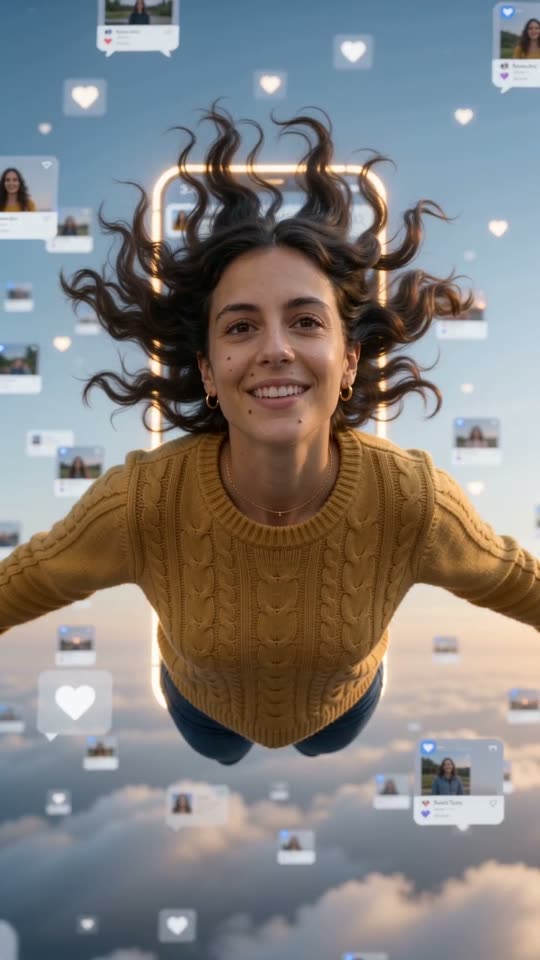
Fall Back
Out of the screen
A clear photo of yourself works best.
Full-screen on phones: Instagram Reels, YouTube Shorts, WhatsApp Status.
Advanced options
Motion or style reference. MP4 or MOV, 480p to 720p, up to 15s total.
MP3 or WAV, up to 15 MB and 30s total.
Example
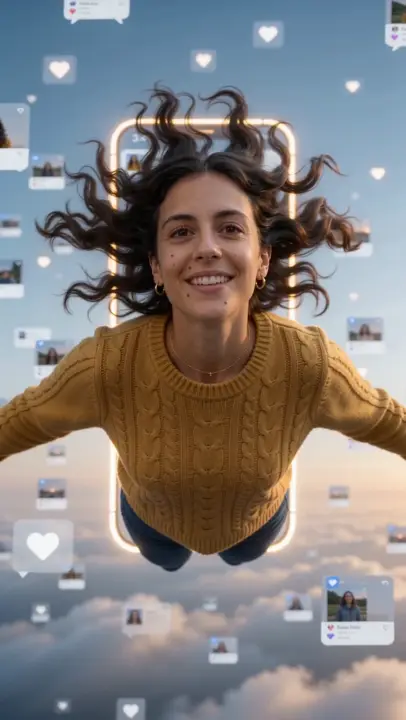
Falling Through the Feed
Out of the screen
- Output
- 5s · 720p
Falling Through the Feed: The Phone-Screen Fall Trend From One Photo
Updated
Short answer: VdoBloom’s Falling Through the Feed effect turns one photo of you into a short vertical video where you tip backward out of a giant glowing phone screen and fall slowly through floating photo posts and heart icons, with the camera locked on your face. You do not film a fall or edit anything. The tab opens on Seedance 2 Fast (5 seconds, 720p, 9:16, 50 credits). Switch to Seedance 2 Mini at 480p and a clip costs 8 credits, which the 10 free signup credits cover. Most clips are ready in a few minutes.
The trend is also called the "falling through Instagram" trend: a creator seems to drop out of their phone and keep falling through a feed of posts. The usual way to make it is to film yourself falling, generate styled versions of the clip with an AI video model, and build the scrolling feed in an editor with green-screen post frames and keyframes. This effect does the fall in one step from a single photo. No app names, logos or readable text appear, so the clip fits any platform.
Examples
Fall Back
Make thisHow it works
- 1
Upload one clear photo of yourself
Half-body or full-body, face sharp and well lit, nothing covering it. The photo is the first frame, so the face, hair and outfit carry into the fall.
- 2
Keep the Fall Back template or edit it
The prompt is already written: phone screen in the sky, a backward fall through the glass, posts and hearts drifting past, camera locked on your face. You can change the style or what floats past.
- 3
Pick model and quality
Seedance 2 Fast at 720p is the default (50 credits for 5 seconds). Seedance 2 Mini at 480p is 8 credits for a first try. The price shows before you generate.
- 4
Generate and post
The 9:16 clip lands in your Creations library, ready for Reels, Shorts and TikTok. Add a sound or a whoosh when you post.
Why use this tool
One photo, no filming
You skip the fall on the grass, the reference clip on a table and the green-screen edit. The photo goes in and the fall comes out.
Your face stays centered
The prompt keeps the camera falling with you, so your face stays the same size in the frame with no zoom out. That is what keeps it looking like you.
No logos or readable text
Posts and hearts are generic shapes, so nothing ties the clip to one app and it is safe to post anywhere.
Four Seedance 2 models
Seedance 2 Mini, Seedance 2 Fast, Seedance 2 and Seedance 2.5 are all in the picker, each priced before you generate.
Refund on failure
Credits are taken when the model accepts the job and come back automatically if the render fails.
Private by default
Clips stay in your own library. Nothing is posted for you.
Quick facts
The effect at a glance.
- What it does: you tip backward out of a giant phone screen and fall through floating posts and hearts, camera locked on your face.
- Input: one photo of yourself. Template: Fall Back (editable prompt).
- Default: Seedance 2 Fast, 720p, 5 seconds, 9:16 vertical, 50 credits.
- Lowest cost on the tab: Seedance 2 Mini, 480p, 5 seconds, 8 credits.
- Length: 4 to 15 seconds on Seedance 2 Mini and Seedance 2 Fast.
- Free start: 10 credits at signup plus a daily check-in. Free-tier downloads carry a watermark; any paid plan or credit pack removes it.
- No app names, logos or readable text in the clip.
One-photo effect or the film-and-edit method?
Both make the same trend. Pick by how much time you have and how many styles you want.
- What you need
- This effect:One photo
- Film-and-edit method:Two phone clips of you (a fall and a lying-down shot), an AI video tool and an editor
- Steps
- This effect:Upload, generate
- Film-and-edit method:Film, generate each styled fall, build post frames, chroma key, keyframe the scroll
- Result
- This effect:One continuous fall out of a phone screen
- Film-and-edit method:Several falls, one per post, often each in a different art style
- Time
- This effect:A few minutes
- Film-and-edit method:An evening of editing
- Cost here
- This effect:From 8 credits
- Film-and-edit method:One generation per post, plus your editor
| This effect | Film-and-edit method | |
|---|---|---|
| What you need | One photo | Two phone clips of you (a fall and a lying-down shot), an AI video tool and an editor |
| Steps | Upload, generate | Film, generate each styled fall, build post frames, chroma key, keyframe the scroll |
| Result | One continuous fall out of a phone screen | Several falls, one per post, often each in a different art style |
| Time | A few minutes | An evening of editing |
| Cost here | From 8 credits | One generation per post, plus your editor |
How to make the multi-post version
In the longer version of the trend you fall through several posts, and each one shows the fall in a new style, such as anime, a pencil sketch or pixel art. You can build that from this tab: run the same photo several times, and each time change the style words at the end of the prompt (for example, replace "Photoreal" with "anime style" or "pencil sketch on paper"). Keep the rest of the prompt as it is so the framing matches from clip to clip, then put the clips one after another in your video editor.
- Use the same photo, model, length and 9:16 frame for every clip so the cuts line up.
- Change only the style words. The framing lines are what keep your face centered.
- Draft every style on Seedance 2 Mini at 480p (8 credits), then re-run the keepers at 720p.
- A sound effect on each cut (a whoosh or a swipe) hides the joins.
What a falling through the feed video costs
You pay per clip in credits, set by model and quality. No subscription is needed: the Lite pack is 300 credits for $19.50 one-time (the credits never expire) or $15 a month. Prices below are for one 5-second clip.
- Seedance 2 Mini
- 480p:8
- 720p:17
- Good for:First try on free credits, style drafts
- Seedance 2 Fast (default)
- 480p:24
- 720p:50
- Good for:The tab default at 720p
- Seedance 2
- 480p:38
- 720p:82
- Good for:More detail
| Model | 480p | 720p | Good for |
|---|---|---|---|
| Seedance 2 Mini | 8 | 17 | First try on free credits, style drafts |
| Seedance 2 Fast (default) | 24 | 50 | The tab default at 720p |
| Seedance 2 | 38 | 82 | More detail |
Read more: Seedance 2 Fast model page · Seedance 2 Mini model page · Plans and credit packs
Tips for a clean fall
- A front-facing photo with even light keeps your face steady while you fall.
- Half-body photos work well: the face is big enough to stay sharp, and there is room for hair to float up.
- Avoid sunglasses, hands over the face and heavy filters.
- If you spin or tumble instead of falling straight back, run it again; the camera lines in the prompt are what keep the fall straight.
- Keep the default 9:16 frame for Reels, Shorts and TikTok.
Limits
The effect makes one continuous fall from one photo of one person. It does not build the scrolling feed or the post frames for you; for the multi-post version, join several clips in an editor. Floating posts show shapes and pictures, not real posts, and there is no readable text. Only upload photos of yourself or of people who agreed to it. Every request is checked against VdoBloom’s content policy.
Frequently asked questions
What is the falling through the feed trend?
A short video trend where a person seems to drop out of their phone and keep falling through a feed of posts. It is also called the falling through Instagram trend. Some versions show one long fall; others cut between several posts, each in a different art style.
How do I do the falling through Instagram trend with AI?
The quick way is one photo: upload it to the Falling Through the Feed tab and generate. You tip backward out of a phone screen and fall past posts and hearts, camera locked on your face. The longer way is to film yourself falling, make styled AI versions of the clip, and build the scrolling feed in an editor.
Is the falling through the feed effect free?
You can try it free. New accounts get 10 credits, and a 5-second clip on Seedance 2 Mini at 480p costs 8. The tab default, Seedance 2 Fast at 720p, costs 50. Free-tier downloads carry a watermark; any paid plan or credit pack removes it.
Do I need to film myself falling?
No. One photo is the first frame and the model makes the fall. Filming is only needed for the film-and-edit method.
Can I fall through several posts in different styles?
Yes, with a few clips. Run the same photo several times and change only the style words in the prompt (anime, pencil sketch, pixel art), then join the clips in your editor. Use the same model, length and frame for each one so the cuts line up.
Will an app logo or my username show up?
No. The prompt asks for no logos, brand names or readable text, so the screen and posts are generic. That keeps the clip safe to post on any platform.
Which AI model works best for this trend?
The tab opens on Seedance 2 Fast at 720p. Seedance 2 Mini is the low-cost option for drafts, and Seedance 2 and Seedance 2.5 add detail at a higher price. All four are in the picker and priced before you generate.
How long is the clip and how long does it take?
It opens at 5 seconds in 9:16 vertical. Seedance 2 Mini and Seedance 2 Fast make clips from 4 to 15 seconds. A 5-second clip is usually ready in a few minutes and lands in your Creations library.
What photo works best?
One person, half or full body, face sharp, front-facing and evenly lit, with nothing covering it. A simple background helps, because the photo turns into the phone screen you fall out of.