Vertical Phone Vlog
Arm’s-length selfie vlog, filters off
A chest-up photo with your face clear and sharp.
Full-screen on phones: Instagram Reels, YouTube Shorts, WhatsApp Status.
Advanced options
Motion or style reference. MP4 or MOV, 480p to 720p, up to 15s total.
MP3 or WAV, up to 15 MB and 30s total.
Example
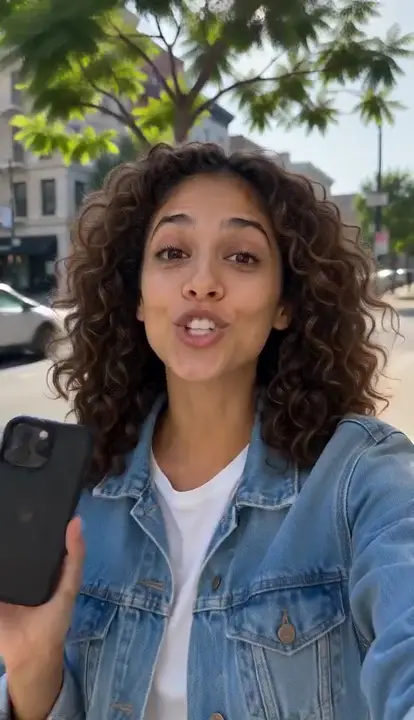
Vertical Phone Vlog
Sunny street, excited story time
- Output
- 5s · 480p
Phone Vlog Video Generator: An AI Selfie Vlog From One Photo, No Filming
Updated
Short answer: the VdoBloom phone vlog video generator turns one chest-up photo into a 5-second vertical selfie vlog. You hold the phone at arm's length, walk and talk, and say the line you typed, with the voice and lip sync made in the same clip. It opens on Seedance 2 Mini at 480p in 9:16, which costs 8 credits.
Is it free to try? Yes. New accounts get 10 free credits, which covers the first clip, and the daily check-in adds 2 to 5 more. Free-tier clips can be downloaded with a VdoBloom watermark; any paid plan or credit pack gives the clean file. A clip is usually ready in a few minutes.
This is an AI vlog maker for when you have not filmed anything: a talking selfie clip for a hook, a story opener, a reaction or a joke. If you already have phone footage and want it cut, captioned or turned into shorts, use the AI Clip Maker or the AI Caption Generator instead. Both are linked below.
How it works
- 1
Upload one chest-up photo
A sharp photo with your face large and well lit. Your face, hair and outfit carry over into the vlog scene.
- 2
Pick a template
Walk-and-Talk is a sunny street with an excited "Okay, you are not going to believe this." Morning Routine is a small kitchen, coffee and a sleepy "Good morning, day three of trying."
- 3
Write your own line in quotes
Replace the quoted words with yours. Under about ten words fits a 5-second clip; raise the length for more.
- 4
Choose length, quality and model
Seedance 2 Mini runs 4 to 15 seconds at 480p or 720p. Seedance 2 Fast, Seedance 2 and Seedance 2.5 are in the same picker. The price shows before you generate.
- 5
Generate and post
The 9:16 clip lands in My Creations, ready for TikTok, Reels and Shorts.
Why use this tool
A vlog without a camera
One photo is enough. The street or kitchen, the walk and the handheld phone are made by the AI.
Voice and lip sync in one step
The quoted line is spoken and lip-synced in the clip by the Seedance model, with street or kitchen sound behind it.
The real front-camera look
Slightly wide lens, chest-up framing, handheld bounce with each step, exposure shifting from shade to sun and mild sensor noise. Beauty filter and stabilisation are off on purpose.
Your face kept
The photo is used as a reference, so the scene is new while your face, hair and outfit stay the same.
Vertical by default
The tab opens on 9:16, the shape vlogs are watched in. Other ratios are in the settings.
Refund on failure
If a render fails, the credits go back to your balance automatically.
Quick facts
The tool at a glance.
- What it makes: a vertical selfie vlog clip of you walking and talking to your phone.
- Input: one chest-up photo. No video and no microphone needed.
- Templates: Walk-and-Talk and Morning Routine. The prompt and the line are editable.
- Audio: your quoted line is spoken and lip-synced, with background sound.
- Default: Seedance 2 Mini, 5 seconds, 480p, 9:16, 8 credits.
- Length: 4 to 15 seconds on Seedance 2 Mini.
- Free credits: 10 at signup plus 2 to 5 a day from the daily check-in.
- Watermark: on free-tier clips; removed with any paid plan or credit pack.
Make a vlog, or edit the vlog you filmed?
People who search for a phone vlog video generator want one of two things. Pick the tool that matches what you have:
- One photo, no footage (our pick for this search)
- What you want:A short talking selfie vlog made by AI
- Where on VdoBloom:This page
- A long vlog or talking video you filmed
- What you want:Short 9:16 clips of the best moments, with captions
- Where on VdoBloom:AI Clip Maker (2 credits a minute of video)
- A short clip you filmed
- What you want:Word-timed captions burned in
- Where on VdoBloom:AI Caption Generator
- A script you want read on camera
- What you want:A longer talking-head video
- Where on VdoBloom:AI Talking Avatar
| You have | What you want | Where on VdoBloom |
|---|---|---|
| One photo, no footage (our pick for this search) | A short talking selfie vlog made by AI | This page |
| A long vlog or talking video you filmed | Short 9:16 clips of the best moments, with captions | AI Clip Maker (2 credits a minute of video) |
| A short clip you filmed | Word-timed captions burned in | AI Caption Generator |
| A script you want read on camera | A longer talking-head video | AI Talking Avatar |
Read more: AI Clip Maker · AI Caption Generator · AI Talking Avatar
What a phone vlog clip costs
Credits for one 5-second clip. All four models read your photo as a reference and make the voice in the same clip.
- Seedance 2 Mini (default)
- 480p:8
- 720p:17
- Good for:Drafts and everyday posts
- Seedance 2 Fast
- 480p:24
- 720p:50
- Good for:Sharper faces, still quick
- Seedance 2
- 480p:38
- 720p:82
- Good for:Hero clips and ads
- Seedance 2.5
- 480p:56
- 720p:126
- Good for:The newest Seedance model
| Model | 480p | 720p | Good for |
|---|---|---|---|
| Seedance 2 Mini (default) | 8 | 17 | Drafts and everyday posts |
| Seedance 2 Fast | 24 | 50 | Sharper faces, still quick |
| Seedance 2 | 38 | 82 | Hero clips and ads |
| Seedance 2.5 | 56 | 126 | The newest Seedance model |
Read more: Seedance 2 Mini model page · Seedance 2 model page · See credit packs
How long can the vlog be?
Seedance 2 Mini makes 4 to 15 seconds in one clip. Longer clips cost more and give room for a longer line:
- 5 s (default)
- 480p:8
- 720p:17
- Fits a line of about:10 words
- 10 s
- 480p:16
- 720p:33
- Fits a line of about:20 words
- 15 s
- 480p:24
- 720p:50
- Fits a line of about:30 words
| Length on Seedance 2 Mini | 480p | 720p | Fits a line of about |
|---|---|---|---|
| 5 s (default) | 8 | 17 | 10 words |
| 10 s | 16 | 33 | 20 words |
| 15 s | 24 | 50 | 30 words |
Lines that work in a phone vlog
Short, spoken, one idea. Put the words in double quotes:
- "Okay, you are not going to believe this." (the built-in Walk-and-Talk line)
- "Good morning, day three of trying." (the built-in Morning Routine line)
- "I finally found the best coffee in town."
- "Quick update: the move is done."
- "Do not judge me, but I tried it."
Tips for a believable selfie vlog
What helps most:
- Use a chest-up photo with your face large and evenly lit. Skip sunglasses and heavy filters.
- Say how you speak: excited, sleepy, whispering, laughing.
- Name the place in the prompt (a beach path, a train platform, a market) to change the scene.
- Keep the handheld camera as it is; the bounce is what makes it look filmed on a phone.
- Regenerate once before changing model; results vary between runs.
Limits and content rules
Each clip is one short scene with one line, not a full day-in-the-life vlog. For several scenes, make a few clips and join them in any editor. The street, the kitchen and any people in the background are made up by the AI.
Use your own photo or a photo of an adult who agreed to it. Do not present a clip as real footage of a real person. Prompts are screened before a job runs and generations follow VdoBloom's content policies.
Frequently asked questions
What is a phone vlog video generator?
It is a tool that makes a vlog-style video for you. Some apps edit the clips you filmed; this one makes the clip itself from one photo: a vertical selfie vlog of you walking and talking to your phone, with your line spoken and lip-synced.
Can AI make a vlog without filming?
Yes, for short clips. Upload one chest-up photo, type your line in quotes and VdoBloom makes a 5-second 9:16 vlog clip of you saying it. For a longer vlog, make several clips and join them.
Is the phone vlog video generator free?
You can try it free. New accounts get 10 credits and the default clip (Seedance 2 Mini, 5 s, 480p) costs 8. The daily check-in adds 2 to 5 credits a day. Free-tier clips carry a watermark; any paid plan or credit pack removes it.
Does it make the voice too?
Yes. The quoted line is spoken and lip-synced in the same clip by the Seedance model, with street or kitchen sound. There is no separate voice-over step.
How long can my line be?
About ten words for a 5-second clip. Raise the length to 10 or 15 seconds on Seedance 2 Mini for a longer line; longer lines in a short clip get rushed or cut.
I already filmed a vlog on my phone. Can VdoBloom edit it?
Use the AI Clip Maker to turn a long video of 1 to 90 minutes into short 9:16 clips with captions, at 2 credits a minute of video, or the AI Caption Generator to add captions to a short clip. This page makes new clips from a photo.
Can I change where the vlog is filmed?
Yes. The prompt is editable. Replace the sunny street or the kitchen with your own place, such as a beach path, a train platform or a bookshop, and keep the phone-camera details in the prompt.
Which aspect ratio should I use?
9:16 is the default and fills the screen on TikTok, Reels and Shorts. 1:1, 3:4, 4:3, 16:9 and 21:9 are also in the settings on the Seedance models.
Can I use someone else's photo?
Only of an adult who agreed to it. Do not use a clip to put words in a real person's mouth or to pass it off as their real footage.