Podcast Clip Video
Two-person podcast moment, studio mics
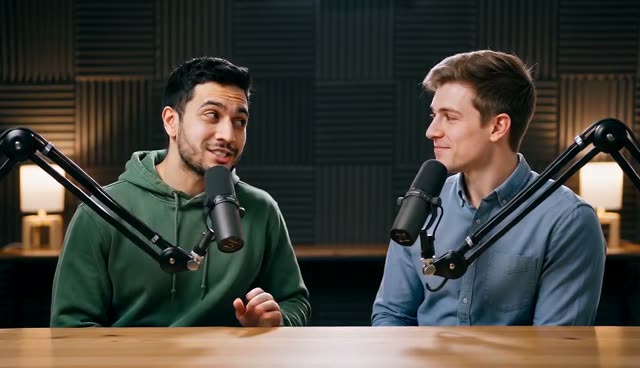
Studio Moment
Boom mics, cosy studio, big laugh
One photo adds an AI co-host. Lines are lip-synced.
Wide screen: YouTube videos, TVs, laptops and website headers.
Advanced options
Motion or style reference. MP4 or MOV, 480p to 720p, up to 15s total.
MP3 or WAV, up to 15 MB and 30s total.
Example
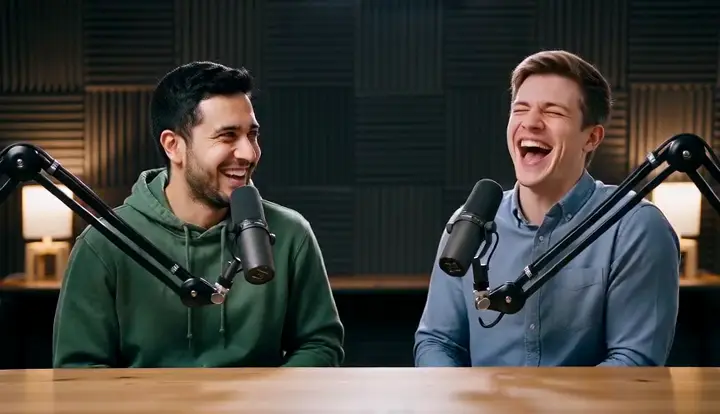
Podcast Clip Video
Boom mics, cosy studio, big laugh
- Output
- 8s · 480p
Podcast Clip Video Generator: An AI Two-Host Podcast Moment From Your Photo
Updated
Short answer: the VdoBloom podcast clip video generator makes an 8-second podcast moment from photos, with no recording. Upload your photo and an AI co-host joins you, or upload two photos for both hosts. You sit at a desk with broadcast mics on boom arms, say your line, and your co-host bursts out laughing. The voice and lip sync are made in the same clip. It opens on Seedance 2 Mini at 480p in 16:9, which costs 13 credits.
Already have a real episode? Then you want clips cut from it, not a new scene. Use the VdoBloom AI Clip Maker: upload the episode (1 to 90 minutes), and it finds the strongest moments and cuts vertical 9:16 clips with captions, at 2 credits a minute of video.
Is it free to try? New accounts get 10 free credits and the daily check-in adds 2 to 5 more, so after two daily check-ins (2, then 3 credits) the first 13-credit clip is covered. Free-tier clips can be downloaded with a VdoBloom watermark; any paid plan or credit pack gives the clean file. A clip is usually ready in a few minutes.
How it works
- 1
Upload one or two photos
One photo makes you the host with an AI co-host across the desk. Two photos put both people in the studio. Use chest-up photos with faces large and well lit.
- 2
Write the line in quotes
The Studio Moment template starts with "That is the part nobody talks about." Replace the quoted words with your own. Under about fifteen words fits 8 seconds.
- 3
Pick model, length and shape
Seedance 2 Mini at 480p for 8 seconds is the 13-credit default. Switch to 9:16 for TikTok, Reels and Shorts, or keep 16:9 for YouTube. The price shows before you generate.
- 4
Generate and post
The clip lands in My Creations. Add captions in the AI Caption Generator if you want burned-in text.
Why use this tool
A podcast set without a studio
Wooden desk, broadcast mics on boom arms, foam panels and warm lamps, all made by the AI from your photo.
One or two hosts
Bring a co-host photo, or let the AI add a generic co-host who reacts to your line.
Voice and lip sync in one step
The quoted line is spoken and lip-synced by the Seedance model, followed by the co-host laugh, with clean studio sound.
Faces kept
Both photos are used as references, so the studio is new while each face, hair and outfit stays the same.
The two-shot that podcast clips use
A medium-close shot with both faces large in frame, soft key light and gentle depth of field. No logos and no on-screen text.
Refund on failure
If a render fails, the credits go back to your balance automatically.
Quick facts
The tool at a glance.
- What it makes: an 8-second two-person podcast clip from photos.
- Input: one photo (an AI co-host joins) or two photos (both hosts). No audio or video needed.
- Template: Studio Moment. The prompt and the line are editable.
- Audio: your quoted line is spoken and lip-synced, then the co-host laughs.
- Default: Seedance 2 Mini, 8 seconds, 480p, 16:9, 13 credits.
- Shape: 16:9 by default; 9:16, 1:1, 3:4, 4:3 and 21:9 in the settings.
- Free credits: 10 at signup plus 2 to 5 a day from the daily check-in.
- Watermark: on free-tier clips; removed with any paid plan or credit pack.
Clip a real episode, or make a new podcast moment?
A "podcast clip video generator" means two different jobs. Pick the tool that matches what you have:
- A recorded episode, 1 to 90 minutes
- What you get:Vertical 9:16 highlight clips with word-timed captions, a title, a hook and a virality score
- Where on VdoBloom:AI Clip Maker, 2 credits a minute of video
- A short clip from the episode
- What you get:Burned-in, word-timed captions
- Where on VdoBloom:AI Caption Generator
- Only a photo and one line (our pick for this search when there is no recording)
- What you get:An 8-second AI podcast moment with lip sync and a co-host laugh
- Where on VdoBloom:This page, from 13 credits
- A script you want read on camera
- What you get:A longer talking-head video
- Where on VdoBloom:AI Talking Avatar
| You have | What you get | Where on VdoBloom |
|---|---|---|
| A recorded episode, 1 to 90 minutes | Vertical 9:16 highlight clips with word-timed captions, a title, a hook and a virality score | AI Clip Maker, 2 credits a minute of video |
| A short clip from the episode | Burned-in, word-timed captions | AI Caption Generator |
| Only a photo and one line (our pick for this search when there is no recording) | An 8-second AI podcast moment with lip sync and a co-host laugh | This page, from 13 credits |
| A script you want read on camera | A longer talking-head video | AI Talking Avatar |
Read more: AI Clip Maker · How to turn a podcast into short clips with AI · AI Caption Generator
What an AI podcast clip costs
Credits for one 8-second clip. All four models read your photos as references and make the voice in the same clip.
- Seedance 2 Mini (default)
- 480p:13
- 720p:27
- Good for:Drafts and everyday posts
- Seedance 2 Fast
- 480p:38
- 720p:80
- Good for:Sharper faces, still quick
- Seedance 2
- 480p:61
- 720p:131
- Good for:Hero clips and ads
- Seedance 2.5
- 480p:90
- 720p:202
- Good for:The newest Seedance model
| Model | 480p | 720p | Good for |
|---|---|---|---|
| Seedance 2 Mini (default) | 13 | 27 | Drafts and everyday posts |
| Seedance 2 Fast | 38 | 80 | Sharper faces, still quick |
| Seedance 2 | 61 | 131 | Hero clips and ads |
| Seedance 2.5 | 90 | 202 | The newest Seedance model |
Read more: Seedance 2 Mini model page · Seedance 2 model page · See credit packs
Lines that work in a podcast clip
A hook is one surprising sentence. Put the words in double quotes:
- "That is the part nobody talks about." (the built-in Studio Moment line)
- "I quit my job to do this, and here is what happened."
- "Most people get this one thing wrong."
- "Wait, you actually tried it?"
- "This changed how I think about money."
Ways to use it
Short podcast-style clips work as:
- A trailer or teaser hook for a show you are about to launch
- A short with a tip, a quote or a hot take for TikTok, Reels and Shorts
- A funny clip of two friends "on a podcast" for a group chat or a birthday
- An ad hook in the podcast format, before you cut to the product
Tips and limits
Each clip is one short exchange: one line and one reaction, not a full conversation. For a back-and-forth, make several clips and join them in an editor. The studio and the AI co-host are made up by the AI.
Use your own photos, or photos of adults who agreed to it. Do not present a clip as a real person's real interview. Prompts are screened before a job runs and generations follow VdoBloom's content policies.
- Use chest-up photos with faces large and evenly lit.
- Keep the line under about fifteen words for 8 seconds.
- Say how the line is spoken: confident, whispered, laughing.
- Regenerate once before changing model; results vary between runs.
Frequently asked questions
What is a podcast clip video generator?
Usually it means a tool that cuts a long podcast episode into short captioned clips. VdoBloom has that as the AI Clip Maker, at 2 credits a minute of video. This page does a different job: it makes a new 8-second podcast-style clip from one or two photos, with your line lip-synced.
How do I turn my podcast episode into short clips?
Upload the episode (1 to 90 minutes, up to 1 GB) to the AI Clip Maker. It transcribes the audio, picks the strongest moments, cuts each one to 9:16 and burns in word-timed captions. A 60-minute episode costs 120 credits for up to five clips.
Can AI make a podcast video from a photo?
Yes. Upload your photo and an AI co-host joins, or upload two photos for both hosts. You get an 8-second studio two-shot where one host says your quoted line and the other laughs, with voice and lip sync made in the clip.
Is the podcast clip video generator free?
You can try it free. New accounts get 10 credits and the daily check-in adds 2 to 5 a day, so two check-ins (2, then 3 credits) cover the 13-credit default clip. Free-tier clips carry a watermark; any paid plan or credit pack removes it.
Do I need a co-host photo?
No. With one photo, the AI adds a generic co-host across the desk. Add a second photo when you want a real friend or partner in the clip, with their agreement.
Can I make it vertical for TikTok and Reels?
Yes. The tab opens in 16:9 for YouTube, and 9:16 is in the settings. Pick the shape before you generate so both faces are framed for it.
How long is the clip?
8 seconds by default, which fits one line and one reaction. Seedance 2 Mini can make 4 to 15 seconds; longer clips cost more.
Does it add captions?
No. The clip has no on-screen text. Run it through the AI Caption Generator for burned-in, word-timed captions.
Can I use someone else's photo?
Only of an adult who agreed to it. Do not use a clip to put words in a real person's mouth or to pass it off as a real interview.