Time Travel Selfie Vlog
Vlogging from another century
A chest-up photo. Each era comes with its own spoken line.
Full-screen on phones: Instagram Reels, YouTube Shorts, WhatsApp Status.
Advanced options
Motion or style reference. MP4 or MOV, 480p to 720p, up to 15s total.
MP3 or WAV, up to 15 MB and 30s total.
Example
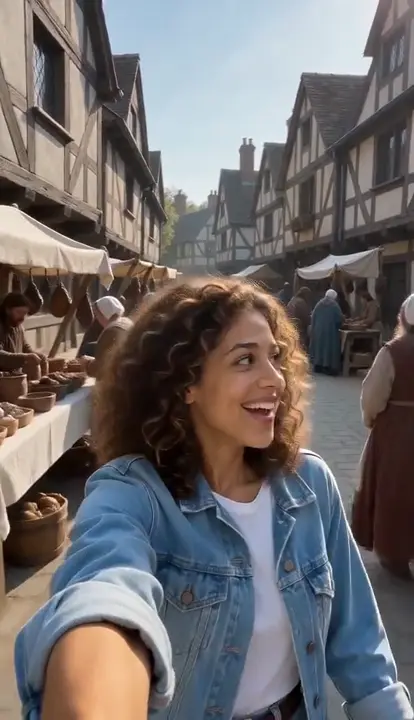
Time Travel Selfie Vlog
Knights, carts, muddy streets
- Output
- 8s · 480p
AI Time Travel Vlog Generator: Vlog From History With Your Own Face
Updated
Short answer: the VdoBloom time travel vlog generator turns one chest-up photo of you into an 8-second vertical selfie vlog filmed in another century. You hold the phone at arm's length in modern clothes while a medieval market, a pyramid building site or a 1920s jazz party carries on behind you, and you say your line out loud. The voice, the lip sync and the background sound are made in the same clip. It opens on Seedance 2 Mini at 480p for 13 credits, and a clip is usually ready in a few minutes.
Is it free to try? New accounts get 10 free credits, and the daily check-in adds 2 to 5 more. Set the length to 5 seconds and the clip costs 8 credits, so your first time travel vlog is free. Free-tier clips download with a VdoBloom watermark; any paid plan or credit pack gives the clean file.
Many time travel vlog tools use a stock AI presenter. Here the vlogger is you, or anyone who agreed to have their photo used: the photo is a reference, so your face, hair and outfit carry over into the past. The crowds are always generic people in period clothes, never real historical figures.
How it works
- 1
Upload one chest-up photo
A sharp, well-lit selfie of your face and shoulders. Your modern clothes stay on, which is the joke of the format.
- 2
Pick an era
Medieval Market (knights, carts, muddy streets), Ancient Egypt (a pyramid building site) or 1920s Party (jazz, feathers, black and gold).
- 3
Write your line in quotes
Each era comes with a line, such as "Guys, I actually made it to 1350." Replace it with your own. Under about 15 words fits an 8-second clip.
- 4
Pick length and quality
Seedance 2 Mini runs 4 to 15 seconds at 480p or 720p. Seedance 2 Fast, Seedance 2 and Seedance 2.5 are in the same picker. The price shows on the Create button.
- 5
Generate and post
The 9:16 clip lands in My Creations, ready for TikTok, Reels and Shorts. Make one clip per era and join them for a longer vlog.
Why use this tool
You are the time traveller
Your photo carries your face, hair and outfit into the scene. No green screen, costume or filming needed.
Speech and lip sync in one step
Seedance makes the voice and mouth movement from your quoted line, plus crowd, wind or jazz sound for the era.
Real selfie-vlog framing
Front camera, chest-up, handheld bounce and natural light, the look of a phone vlog rather than a movie scene.
Generic crowds only
The prompts ask for generic villagers, workers and guests and never real historical people, so clips stay safe to post.
No captions burned in
Nothing is written on the video, so you can add your own era title and subtitles.
Refund on failure
If a render fails, the credits go back to your balance automatically.
Quick facts: the AI time travel vlog
The numbers to know before you spend credits. Updated 21 November 2026.
- What it makes
- A vertical selfie vlog of you in another era, with your line spoken and lip-synced
- Input
- One chest-up photo plus your line in quotes
- Eras (templates)
- Medieval Market, Ancient Egypt, 1920s Party; the prompt is editable
- Length
- 8 s by default, 4 to 15 s on Seedance 2 Mini
- Default model and price
- Seedance 2 Mini, 480p, 9:16: 13 credits for 8 s, 8 credits for 5 s
- Free credits
- 10 on signup plus 2 to 5 a day from the daily check-in
- Watermark
- On free-tier clips; any paid plan or credit pack downloads clean
- Failed renders
- Credits refunded automatically
| Question | Answer |
|---|---|
| What it makes | A vertical selfie vlog of you in another era, with your line spoken and lip-synced |
| Input | One chest-up photo plus your line in quotes |
| Eras (templates) | Medieval Market, Ancient Egypt, 1920s Party; the prompt is editable |
| Length | 8 s by default, 4 to 15 s on Seedance 2 Mini |
| Default model and price | Seedance 2 Mini, 480p, 9:16: 13 credits for 8 s, 8 credits for 5 s |
| Free credits | 10 on signup plus 2 to 5 a day from the daily check-in |
| Watermark | On free-tier clips; any paid plan or credit pack downloads clean |
| Failed renders | Credits refunded automatically |
What a time travel vlog costs
Credits for one 8-second clip. All four models read your photo as a reference and make the sound in the same clip.
- Seedance 2 Mini (default)
- 480p:13
- 720p:27
- Good for:Trying eras and lines
- Seedance 2 Fast
- 480p:38
- 720p:80
- Good for:Sharper faces and crowds
- Seedance 2
- 480p:61
- 720p:131
- Good for:More detailed scenes
- Seedance 2.5
- 480p:90
- 720p:202
- Good for:Hero clips
| Model | 480p | 720p | Good for |
|---|---|---|---|
| Seedance 2 Mini (default) | 13 | 27 | Trying eras and lines |
| Seedance 2 Fast | 38 | 80 | Sharper faces and crowds |
| Seedance 2 | 61 | 131 | More detailed scenes |
| Seedance 2.5 | 90 | 202 | Hero clips |
Read more: Seedance 2 Mini model page · See all credit packs
How to make a longer time travel vlog
One generation makes one scene. The viral time travel vlogs on TikTok and Shorts are usually four to six short scenes: arriving, looking around, trying the food, getting in trouble, saying goodbye. Make each scene as its own clip with its own line, keep the same photo so you look the same in every scene, then join the clips in any video editor. Writing the era and the year into the line ("Day two in 1350 and nobody has heard of soap") helps viewers follow along.
- Use the same photo for every scene so your face and outfit match
- Keep each line short: one joke or one observation per clip
- Edit the prompt to try another place and year, such as ancient Rome or a Victorian street
- Add a title card with the year at the start of each scene
Which eras work best?
The three templates are written so the scene and the line fit together. What each one gives you:
- Medieval Market
- Scene:Villagers in tunics, stalls, a horse cart, timber houses
- Sound:Crowd and market
- Default line:"Guys, I actually made it to 1350."
- Ancient Egypt
- Scene:Workers hauling stone blocks to a half-built pyramid
- Sound:Wind and work sounds
- Default line:"It is way hotter than the documentaries said."
- 1920s Party
- Scene:Flapper dresses, suits and a jazz band in a ballroom
- Sound:Jazz and chatter
- Default line:"Nobody here knows what a phone is."
| Era | Scene | Sound | Default line |
|---|---|---|---|
| Medieval Market | Villagers in tunics, stalls, a horse cart, timber houses | Crowd and market | "Guys, I actually made it to 1350." |
| Ancient Egypt | Workers hauling stone blocks to a half-built pyramid | Wind and work sounds | "It is way hotter than the documentaries said." |
| 1920s Party | Flapper dresses, suits and a jazz band in a ballroom | Jazz and chatter | "Nobody here knows what a phone is." |
Limits
What to expect:
- It is entertainment, not a history lesson; buildings and clothes are the model's idea of the era
- One scene per clip; longer vlogs are several clips joined
- No real historical figures or famous people appear
- Only upload photos of adults who agreed to be used
Frequently asked questions
What is a time travel vlog?
A short selfie-style video where someone in modern clothes vlogs from the past, for example a medieval market or a pyramid building site, talking to the camera as if they really travelled there. VdoBloom makes one from a single photo of you.
Can I use my own face?
Yes. You upload a chest-up photo and it is used as a reference, so your face, hair and outfit carry over into the scene. Only use photos of yourself or of adults who agreed to it.
Is the time travel vlog generator free?
You can try it free. New accounts get 10 credits and a 5-second clip on the default Seedance 2 Mini costs 8. The default 8-second clip costs 13, which the daily check-in (2 to 5 credits a day) quickly covers. Free clips carry a VdoBloom watermark.
How much does a time travel vlog cost?
From 7 credits for 4 seconds on Seedance 2 Mini at 480p and 13 for the default 8 seconds. Stronger models cost more, for example 202 for 8 seconds on Seedance 2.5 at 720p. The Lite pack is 300 credits for $19.50 one-time or $15 a month.
How long is each vlog clip?
8 seconds by default. On Seedance 2 Mini you can pick anything from 4 to 15 seconds. For a longer vlog, make several scenes and join them.
Which eras can I pick?
The templates are Medieval Market, Ancient Egypt and a 1920s Party. You can edit the prompt to describe another place and year, and keep the line in double quotes so it is spoken.
Does my character talk?
Yes. The line you write in double quotes is spoken and lip-synced, with sound for the era, all in the same clip. There is no separate voice-over step.
Is it historically accurate?
Treat it as a fun clip, not a documentary. The prompts describe the era in broad strokes and the model fills in the details, so check anything you present as fact.
Will real historical people appear?
No. Every template asks for generic townspeople, workers or guests only and never real historical figures.
Can I post it on TikTok, Reels and Shorts?
Yes, after downloading. The clip is 9:16 by default. Use the platform's AI-content label where one is offered.