Clay Stop-Motion Video
You as a handmade clay puppet
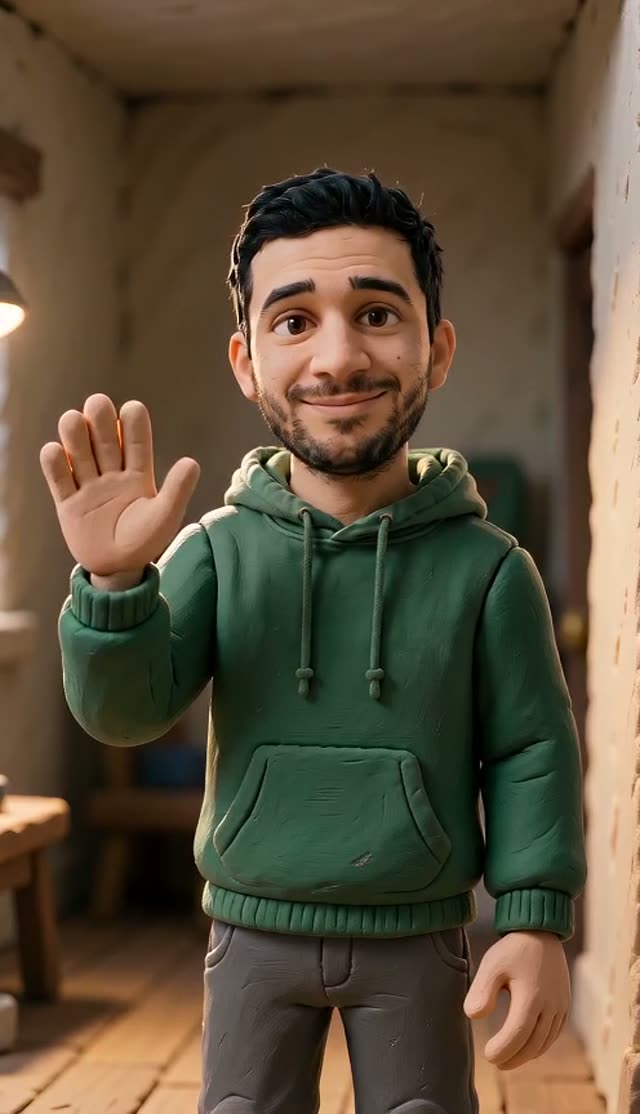
Clay Puppet Hello
Choppy stop-motion wave and walk
A photo of yourself or your pet.
Full-screen on phones: Instagram Reels, YouTube Shorts, WhatsApp Status.
Advanced options
Motion or style reference. MP4 or MOV, 480p to 720p, up to 15s total.
MP3 or WAV, up to 15 MB and 30s total.
Example
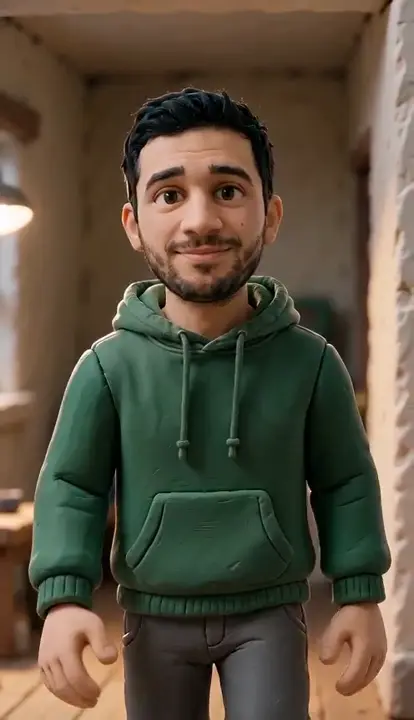
Clay Stop-Motion Video
Choppy stop-motion wave and walk
- Output
- 5s · 480p
AI Clay Stop Motion Generator: Turn a Photo into a Claymation Video
Updated
Short answer: VdoBloom’s AI clay stop motion tool turns one photo of you or your pet into a short claymation clip. You come back as a handmade plasticine puppet, with fingerprints and tool marks in the clay, and you wave and walk toward the camera in choppy 12 frames-per-second motion on a miniature set. The tab opens on Seedance 2 Mini: a 5-second 480p vertical clip costs 8 credits. New accounts get 10 free credits, so your first clip is free.
The look comes from the prompt, which is already written for you. It asks for plasticine texture, a slight flicker between frames and warm, shallow-focus light like a tabletop set, and it keeps your hair colour, outfit colours and key features from the photo. You can rewrite what the puppet does, for example "the puppet dances" or "the puppet waters a clay plant", and the clay and stop-motion rules stay in place.
It is AI that copies the stop-motion look. No clay is sculpted and no frames are shot one by one. If you want to animate real clay figures, you still need a capture app and a camera.
Examples
Clay Puppet Hello
Make thisHow it works
- 1
Upload one photo
A clear, well-lit photo of yourself or your pet, face sharp and not covered. Half-body or full-body shots give the puppet a body to move.
- 2
Keep or change the action
The Clay Puppet Hello template has the puppet wave, then walk a few steps toward the camera. Edit the prompt to change the action; keep it to one simple move.
- 3
Pick model, length and quality
Seedance 2 Mini at 480p for 5 seconds is the default at 8 credits. Switch to 720p, a longer clip or a stronger Seedance 2 model in the same picker. The price shows before you generate.
- 4
Generate and download
The clip renders in a few minutes and lands in My Creations, vertical 9:16 and ready for Reels, Shorts and TikTok.
Why use this tool
Handmade textures
Fingerprints and small tool marks in the clay and a slight frame-to-frame flicker: the details that make stop-motion read as handmade.
Your features kept
The photo is used as a reference, so hair colour, outfit colours and key features carry over into the puppet while the material changes to clay.
Choppy on purpose
AI video models move smoothly by default. The prompt asks for twelve-frames-per-second movement, which gives the hand-animated stutter.
Works for pets too
Upload a photo of your dog or cat and it becomes a little clay figure on the same miniature set.
Refunded on failure
If a render fails, its credits are returned to your balance automatically.
Private by default
Clips stay in your own library. Nothing is posted anywhere for you.
Quick facts
The tool at a glance.
- What it does: turns one photo of a person or pet into a clay stop-motion video of them as a plasticine puppet.
- Input: one photo. There is no video-to-clay upload on this tab.
- Template: Clay Puppet Hello (wave, then walk toward the camera). The prompt is editable.
- Default: Seedance 2 Mini, 480p, 5 seconds, 9:16 vertical, 8 credits. Seedance 2 Mini makes clips from 4 to 15 seconds.
- Models on this tab: Seedance 2 Mini, Seedance 2 Fast, Seedance 2 and Seedance 2.5.
- Free start: 10 credits at signup plus a daily check-in. Free-tier downloads carry a watermark; any paid plan or credit pack removes it.
- Failed renders refund their credits automatically.
How much does an AI clay stop motion video cost?
You pay per clip in credits, by model, quality and length. There is no subscription needed: the Lite pack is 300 credits for $19.50 one-time (the credits never expire) or $15 a month. Prices below are for one 5-second clip.
- Seedance 2 Mini (default)
- 480p:8
- 720p:17
- Good for:First tries and quick loops
- Seedance 2 Fast
- 480p:24
- 720p:50
- Good for:Cleaner motion
- Seedance 2
- 480p:38
- 720p:82
- Good for:More detail in the clay
- Seedance 2.5
- 480p:56
- 720p:126
- Good for:Final version
| Model | 480p | 720p | Good for |
|---|---|---|---|
| Seedance 2 Mini (default) | 8 | 17 | First tries and quick loops |
| Seedance 2 Fast | 24 | 50 | Cleaner motion |
| Seedance 2 | 38 | 82 | More detail in the clay |
| Seedance 2.5 | 56 | 126 | Final version |
Read more: Seedance 2 Mini model page · Seedance 2 Fast model page · Plans and credit packs
Prompt tips for a better claymation look
The template already names the clay, the frame rate and the light. When you change the action, keep these rules and the result stays handmade.
- One action per clip: a wave, a jump, a little dance. Several actions in 5 seconds blur together.
- Keep the words "plasticine", "fingerprints" and "stop-motion" in the prompt. They tell the model the material.
- Keep "twelve frames per second" if you edit. Without it the motion turns smooth and looks like 3D animation.
- Name one set detail, such as a felt hill, a cardboard house or a paper sun, instead of a long list.
- Use a photo with even light. Strong shadows on the face carry into the clay.
- Longer clips (8 to 10 seconds) give a walk or a dance time to finish. Seedance 2 Mini at 480p for 10 seconds is 16 credits.
Limits
This tab starts from one photo and makes one short clip. It does not turn an existing video into claymation, and it does not keep the same puppet across a series of scenes on its own: for a longer story, generate each scene from the same photo and join them in an editor. Hands, faces seen from the side and very small subjects can lose shape on some takes. If you want a music track, add one when you edit.
Only upload photos of yourself, your pets, or people who agreed to it. Every request is checked against VdoBloom’s content policy.
Popular ways to use it
Clay clips suit short, friendly content.
- A clay version of you for a profile video or channel intro
- Pet portraits as little clay figures
- Birthday and holiday greetings with a handmade feel
- A playful "meet the team" clip for a small business
- Trend Reels and Shorts in the claymation style
Frequently asked questions
Is there a free AI clay stop motion generator?
You can try this one free. New VdoBloom accounts get 10 credits, and the default clip (Seedance 2 Mini, 480p, 5 seconds) costs 8, so your first claymation video costs nothing. Free-tier downloads carry a watermark; a paid plan or any credit pack gives the clean file.
How do I turn a photo into a claymation video with AI?
Open the Clay Stop-Motion tab, upload one clear photo, keep the Clay Puppet Hello template or write your own action, and generate. The AI rebuilds the person or pet as a plasticine puppet on a miniature set and animates it in choppy stop-motion. The clip is ready in a few minutes.
Is AI clay stop motion real stop motion?
No. Real stop motion is shot frame by frame with physical clay figures. The AI copies the look: clay texture, fingerprints, a slight flicker and a 12 frames-per-second stutter. It is quick for social clips, but it is not a replacement for sculpting and shooting a real figure.
Will the clay puppet look like me?
It keeps your hair colour, outfit colours and key features, so it reads as a clay version of you, not a photo. A sharp, front-facing photo with even light gives the closest match. If a take drifts, run it again or try Seedance 2 Fast.
Can I make a claymation video of my pet?
Yes. Upload a clear photo of your dog, cat or other pet. The fur colour and markings carry over into the clay, and you can change the action in the prompt, for example "the clay dog wags its tail and sits".
Can I turn an existing video into claymation?
Not on this tab. It works from one photo. To restyle a short clip you already have (up to 15 seconds, depending on the model), upload it to the AI Video Editor and describe a clay stop-motion look in the prompt; how close it gets depends on the model. For a claymation scene with no photo at all, write a clay prompt in Text to Video.
How long can the clip be?
The tab opens at 5 seconds. Seedance 2 Mini makes clips from 4 to 15 seconds: 8 credits for 5 seconds and 16 for 10 seconds at 480p. Short clips keep the puppet most stable.
Which model is best for claymation?
Start on Seedance 2 Mini at 8 credits to check the look. If you like the idea but want cleaner motion or more detail in the clay, re-run the same photo on Seedance 2 Fast (24 credits at 480p) or Seedance 2 (38 credits at 480p). Seedance 2.5 is the top option on this tab.
How long does it take to make?
Usually a few minutes for a 5-second clip. You can leave the page; the finished clip appears in My Creations.