Dust Disintegration
You crumble to dust from the fingertips and blow away

Fade Away
Fingertips to dust
A full or half-body photo works best.
Full-screen on phones: Instagram Reels, YouTube Shorts, WhatsApp Status.
Advanced options
Motion or style reference. MP4 or MOV, 480p to 720p, up to 15s total.
MP3 or WAV, up to 15 MB and 30s total.
Example
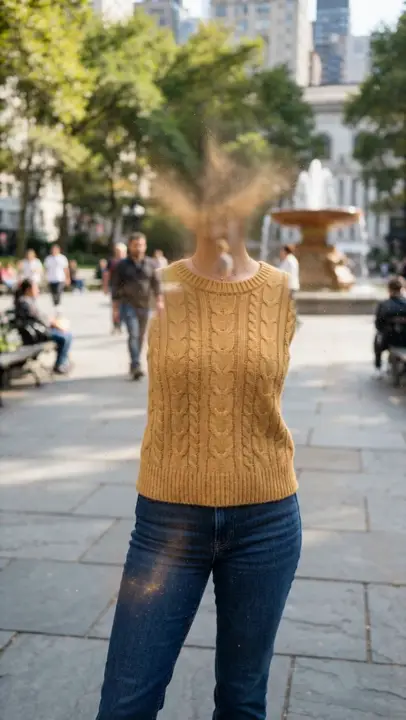
Dust Disintegration
Fingertips to dust
- Output
- 5s · 720p
AI Disintegration Effect: Crumble Into Dust From the Fingertips
Updated
Short answer: the VdoBloom AI disintegration effect turns one photo of a person into a short video where they break apart into fine dust, starting at the fingertips of one hand, spreading up the arm and across the body, until the wind carries them away and only the background is left. The tab opens on Seedance 2 Fast at 5 seconds and 720p (50 credits). Seedance 2 Mini at 480p costs 8 credits, so the 10 free credits every new account gets cover your first clip. A clip takes a few minutes.
The look is often called the Thanos snap effect, after the scene in the Marvel films where people turn to dust. Here the camera stays locked and the expression stays calm until the end, so the dust carries the whole shot. Your photo is the first frame, so the clip starts on you exactly as photographed.
Clips are vertical 9:16 for Reels, Shorts and TikTok by default. Free-tier clips carry a VdoBloom watermark; any paid plan or credit pack removes it. If a render fails, the credits go back to your balance automatically.
Examples
Fade Away
Make thisHow it works
- 1
Upload one clear photo
A sharp, well-lit full or half-body photo of one person, with the hands in view and a simple background.
- 2
Keep the Fade Away template
It is already written: the fingertips break into dust first, the crumbling spreads across the body, and the dust blows away to the side.
- 3
Change the dust if you like
Edit the prompt for glowing embers, ash, sand or petals, or for the wind to blow the other way. Keep one action per clip.
- 4
Pick a model and length
Seedance 2 Fast at 5 seconds and 720p is 50 credits. Seedance 2 Mini at 480p is 8 credits. Lengths run from 4 to 15 seconds.
- 5
Generate and share
The clip lands in My Creations in a few minutes. Download it or post it.
Why use this tool
No After Effects needed
No masking, particle plugins or tracking. One photo is enough.
Locked camera, calm face
The camera does not move and the expression stays calm, so all the motion comes from the dust.
Starts on your real photo
Your photo is the first frame, and the prompt keeps the face, hair and outfit from it until they turn to dust.
Editable prompt
Unlike a fixed one-tap preset, you can change what the person turns into and which way it blows.
Four Seedance models
Seedance 2 Mini, Seedance 2 Fast (default), Seedance 2 and Seedance 2.5 are in the picker on this tab.
Price before you press
The exact credit cost shows next to the Create button, and that is what is charged.
Quick facts
The disintegration tool at a glance.
- What it makes: a short clip where the person in your photo crumbles into dust and blows away.
- Input: one photo of one person. Full or half body, hands in view.
- Template: Fade Away (fingertips first, then the whole body). The prompt is editable.
- Default: Seedance 2 Fast, 5 seconds, 720p, 9:16: 50 credits.
- Lowest price on this tab: Seedance 2 Mini at 480p: 7 credits for 4 seconds, 8 for 5 seconds.
- Lengths: 4 to 15 seconds on Seedance 2 Mini, Fast and Seedance 2; up to 30 seconds on Seedance 2.5.
- Free credits: 10 at signup, plus 2 to 5 a day from the daily check-in.
- Watermark: on free-tier clips; removed with any paid plan or credit pack.
What is the AI disintegration effect?
The disintegration effect is a video effect where a person or object breaks apart into particles (dust, ash or sand) that drift away until nothing is left. It is also called the dust effect, the turn to dust effect or the Thanos snap effect. Video editors build it by hand in tools like After Effects with particle plugins, masks and tracked footage.
An AI disintegration effect makes the same shot from one still photo. The video model uses the photo as the first frame and animates the crumbling and the dust on its own, so there is nothing to mask or track. A clear subject against a simple background gives the model the cleanest edges to break apart.
Which model should I use?
Credits for one 5-second clip on this tab. Your photo is the first frame for every model.
- Seedance 2 Mini
- Resolution:480p / 720p
- Credits (5 s):8 / 17
- Good for:Your first free clip and quick drafts
- Seedance 2 Fast (default)
- Resolution:480p / 720p
- Credits (5 s):24 / 50
- Good for:Fine dust and smooth motion at a mid price
- Seedance 2
- Resolution:480p / 720p
- Credits (5 s):38 / 82
- Good for:More detail in the particles
- Seedance 2.5
- Resolution:480p / 720p
- Credits (5 s):56 / 126
- Good for:The newest Seedance model, and clips longer than 15 seconds
| Model | Resolution | Credits (5 s) | Good for |
|---|---|---|---|
| Seedance 2 Mini | 480p / 720p | 8 / 17 | Your first free clip and quick drafts |
| Seedance 2 Fast (default) | 480p / 720p | 24 / 50 | Fine dust and smooth motion at a mid price |
| Seedance 2 | 480p / 720p | 38 / 82 | More detail in the particles |
| Seedance 2.5 | 480p / 720p | 56 / 126 | The newest Seedance model, and clips longer than 15 seconds |
Read more: Seedance 2 Mini · Seedance 2 · Seedance 2.5
AI disintegration vs After Effects vs a one-tap preset
Three ways to get the shot:
- VdoBloom AI disintegration (our pick)
- What you need:One photo and a browser
- Control:Edit the prompt: dust, ash, sand or petals, and the wind direction
- After Effects or a particle plugin
- What you need:Video footage, masks, tracking and editing time
- Control:Full control over every particle
- One-tap app preset
- What you need:One photo
- Control:Fixed: the same dissolve every time
| Method | What you need | Control |
|---|---|---|
| VdoBloom AI disintegration (our pick) | One photo and a browser | Edit the prompt: dust, ash, sand or petals, and the wind direction |
| After Effects or a particle plugin | Video footage, masks, tracking and editing time | Full control over every particle |
| One-tap app preset | One photo | Fixed: the same dissolve every time |
Is the AI disintegration effect free?
You can make your first clip free. New accounts get 10 free credits, and a 5-second Seedance 2 Mini clip at 480p costs 8. The daily check-in adds 2 to 5 credits a day. Free-tier clips are watermarked; any paid plan or credit pack removes it. The Lite pack is 300 credits for $19.50 one-time (the credits never expire) or $15 a month, enough for 37 Seedance 2 Mini clips at 480p or 6 Seedance 2 Fast clips at 720p.
Read more: Credit packs and plans
Prompt ideas
Swap the dust line in the template for one of these:
- Breaks apart into glowing orange embers that float upward into the night.
- Crumbles into grey ash that falls to the ground in a soft pile.
- Turns into fine desert sand that blows away across the dunes.
- Dissolves into pink petals that drift away on a spring breeze.
- Breaks into tiny pixels that scatter like a glitch.
Tips for a clean disintegration
- Use one person, sharp and well lit, with the hands visible: the effect starts at the fingertips.
- A plain or simple background makes the dust read clearly and keeps the scene from warping.
- Keep the camera locked. Camera moves fight the effect.
- For a longer, slower fade, raise the length to 8 or 10 seconds.
- For the reverse (dust forming into a person), make the clip and play it backwards in any video editor.
Frequently asked questions
What is the AI disintegration effect?
A video effect where a person breaks apart into dust or particles that blow away until only the background is left. VdoBloom makes it from one photo: the crumbling starts at the fingertips and spreads across the body.
Is this the Thanos snap effect?
It is the same kind of shot people call the Thanos snap or turn to dust effect: a calm person crumbling into dust that drifts away on the wind, made from your own photo.
Can I make the disintegration effect for free?
Yes, your first clip. New accounts get 10 free credits and a 5-second Seedance 2 Mini clip at 480p costs 8. Free-tier clips carry a watermark; any paid plan or credit pack removes it.
How do I make a disintegration video with AI?
Upload a clear photo of one person, keep the Fade Away template and generate. The photo is the first frame; the model turns the person to dust from the fingertips up while the camera stays still.
How much does one clip cost?
Seedance 2 Fast, the default, is 50 credits for 5 seconds at 720p and 24 at 480p. Seedance 2 Mini is 8 credits at 480p and 17 at 720p. The exact price shows next to the Create button.
Can I control what I turn into?
Yes. The prompt is editable: ask for ash, embers, sand, petals or pixels, and say which way the wind blows. Keep one action per clip for the cleanest result.
What kind of photo works best?
A sharp, well-lit full or half-body photo of one person, with the hands in view and a simple background. Group photos and busy backgrounds blur the effect.
Can I reverse it so the dust forms into a person?
Make the disintegration clip, then play it backwards in any video editor. The template is written for the crumble, not the reassembly.
Does it work on pets or objects?
The template is written for a person. Edit the prompt to name your pet or object; the photo is still the first frame. Results vary more than with a clear photo of a person.
How long does it take?
Usually a few minutes. The clip appears in My Creations when it is done, and you can leave the page while it renders.