Inflate Effect
Blow anything up like a balloon
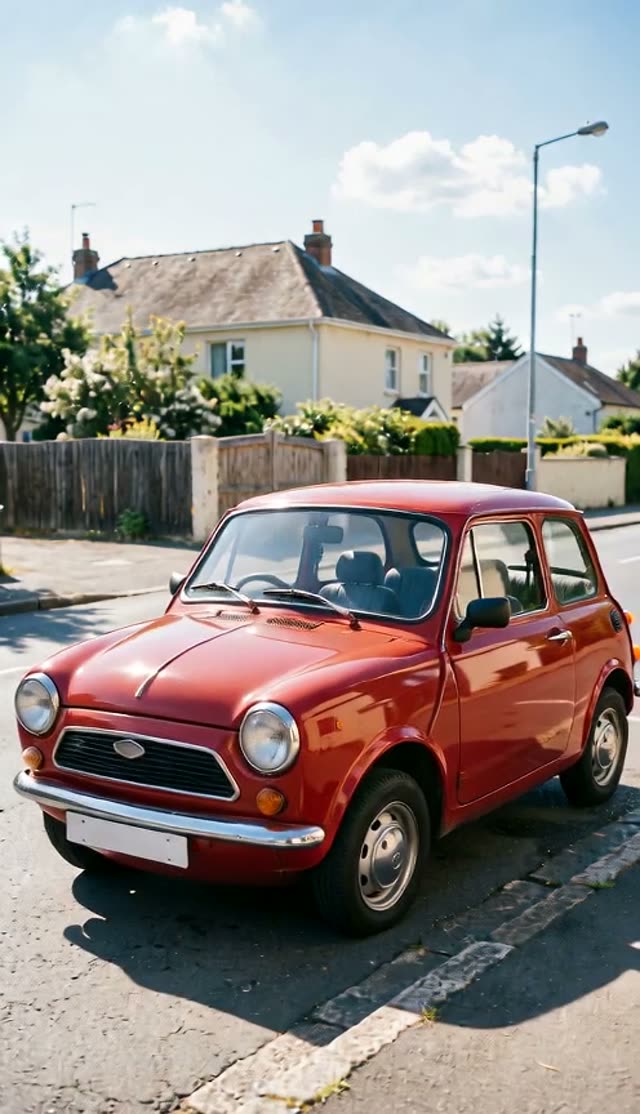
Inflate It
Swells up, floats away
A photo of an object, car or toy.
Full-screen on phones: Instagram Reels, YouTube Shorts, WhatsApp Status.
Advanced options
Motion or style reference. MP4 or MOV, 480p to 720p, up to 15s total.
MP3 or WAV, up to 15 MB and 30s total.
Example
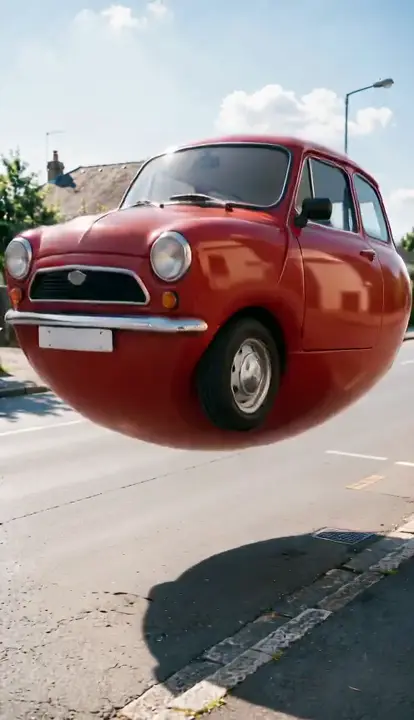
Inflate Effect
Swells up, floats away
- Output
- 5s · 480p
AI Inflate Effect: Blow Up Anything in a Photo Like a Balloon
Updated
Short answer: the VdoBloom AI inflate effect turns one photo into a short video where the main object puffs up like a balloon. It swells round and glossy, its surface stretches smooth while keeping its colours and pattern, then it lifts off and floats out of the top of the frame. The tab opens on Seedance 2 Mini at 5 seconds, 480p and vertical 9:16, which costs 8 credits. New accounts get 10 free credits, so your first inflate clip is free.
Your photo is the first frame, so viewers see the real object before it starts to swell. The camera and the light stay locked and the background does not change, so only the inflation moves. You do not need to write a prompt: the Inflate It template is loaded for you, and you can edit it if you want a different ending. A clip is usually ready in a few minutes.
It works best on cars, toys, food, sneakers, gadgets and products. Free-tier clips carry a VdoBloom watermark and can be downloaded; any paid plan or credit pack removes it. If a render fails, the credits go back to your balance automatically.
Examples
Inflate It
Make thisHow it works
- 1
Upload a photo of one object
One clear subject on a simple background: a car, a toy, a burger, a sneaker, a can or a product. Leave space above it, because it floats up out of the top of the frame.
- 2
Keep the Inflate It template
It is loaded for you. The prompt describes the object swelling up round and glossy, then lifting off and floating away.
- 3
Edit the prompt if you like
Ask it to stay on the ground, pop at the end, or swell slowly. Change one thing at a time.
- 4
Check model, length and size
Seedance 2 Mini, 5 seconds, 480p, 9:16 is the 8-credit default. 720p is 17 credits. More than 50 other image-to-video models are in the same picker.
- 5
Generate and post
The clip renders on the server, so you can close the tab. It lands in My Creations, sized for Reels, Shorts and TikTok.
Why use this tool
Real object first
Your photo is frame one, so the object, colours and background are yours before the inflation starts.
Colours and pattern kept
The prompt tells the model to keep the object's colours, patterns and details as it stretches, so a puffed-up car still looks like that car.
Locked camera and light
Only the object moves. The background stays exactly as shot, which is what makes the swell look like physics.
No prompt needed
One template does the whole effect. Edit it only if you want a different ending.
Compare models in one place
Seedance 2 Mini is the default; more than 50 image-to-video models work on this tab with the same credit balance.
Vertical by default
9:16 and five seconds out of the box, the size and length the trend uses on short-video apps.
Quick facts
The AI inflate effect at a glance.
- What it makes: a short clip where the object in your photo inflates like a balloon and floats away.
- Other names: inflate it, balloon effect, puff up effect, AI inflation effect.
- Input: one photo. The photo is the first frame.
- Template: Inflate It. The prompt is editable.
- Default: Seedance 2 Mini, 5 seconds, 480p, 9:16: 8 credits. 720p: 17 credits.
- Lengths: 4 to 15 seconds on Seedance 2 Mini; the price rises with length.
- Free credits: 10 at signup, plus 2 to 5 a day from the daily check-in.
- Watermark: on free-tier clips; removed with any paid plan or credit pack.
What an inflate clip costs
Credits for one clip. The exact price shows on the Create video button before you generate, and credits are taken only when the job starts.
- Seedance 2 Mini, 480p, 5 s (default)
- Credits:8
- Notes:Fits in the 10 free credits
- Seedance 2 Mini, 480p, 4 s
- Credits:7
- Notes:Shortest clip
- Seedance 2 Mini, 720p, 5 s
- Credits:17
- Notes:Sharper detail
- Seedance 2 Mini, 480p, 8 s
- Credits:13
- Notes:Slower swell and a longer float
- ByteDance V1 Pro Fast, 720p, 5 s
- Credits:7
- Notes:Another low-cost option
- Runway Gen-3, 720p, 5 s
- Credits:10
- Notes:Classic Runway look
- Seedance 2 Fast, 480p, 5 s
- Credits:24
- Notes:Stronger Seedance model
- Lite pack, 300 credits
- Credits:$19.50 one-time
- Notes:37 default inflate clips; or $15 a month
| Model and setting | Credits | Notes |
|---|---|---|
| Seedance 2 Mini, 480p, 5 s (default) | 8 | Fits in the 10 free credits |
| Seedance 2 Mini, 480p, 4 s | 7 | Shortest clip |
| Seedance 2 Mini, 720p, 5 s | 17 | Sharper detail |
| Seedance 2 Mini, 480p, 8 s | 13 | Slower swell and a longer float |
| ByteDance V1 Pro Fast, 720p, 5 s | 7 | Another low-cost option |
| Runway Gen-3, 720p, 5 s | 10 | Classic Runway look |
| Seedance 2 Fast, 480p, 5 s | 24 | Stronger Seedance model |
| Lite pack, 300 credits | $19.50 one-time | 37 default inflate clips; or $15 a month |
Read more: Seedance 2 Mini model page · Plans and credit packs
Is the AI inflate effect free?
Your first clip is. New accounts get 10 free credits with no card, and the default clip costs 8. The daily check-in adds 2 to 5 credits a day, so you can make more over time. Free-tier clips carry a watermark and can still be downloaded. Any paid plan or credit pack removes the watermark.
Inflate, deflate, squish or melt?
VdoBloom has a separate one-photo effect for each viral physics trend. Each does one action with the camera locked.
- Inflate (this page, our pick for the balloon trend)
- What happens to the object:Swells up round and glossy, then floats away
- Best subjects:Cars, toys, food, products
- Deflate
- What happens to the object:Wrinkles and sags into a flat skin, like a balloon losing air
- Best subjects:Plush toys, inflatables, balls
- Squish
- What happens to the object:Two hands squeeze it like soft foam, then it springs back
- Best subjects:Toys, food, products
- Melt
- What happens to the object:Melts like warm wax into a glossy puddle
- Best subjects:Ice cream, candles, statues
- Crush
- What happens to the object:A press plate flattens it
- Best subjects:Cans, gadgets, toy cars
- Explode
- What happens to the object:Bursts into colourful confetti
- Best subjects:Products and reveals
| Effect | What happens to the object | Best subjects |
|---|---|---|
| Inflate (this page, our pick for the balloon trend) | Swells up round and glossy, then floats away | Cars, toys, food, products |
| Deflate | Wrinkles and sags into a flat skin, like a balloon losing air | Plush toys, inflatables, balls |
| Squish | Two hands squeeze it like soft foam, then it springs back | Toys, food, products |
| Melt | Melts like warm wax into a glossy puddle | Ice cream, candles, statues |
| Crush | A press plate flattens it | Cans, gadgets, toy cars |
| Explode | Bursts into colourful confetti | Products and reveals |
Read more: AI Deflate Effect · AI Squish Effect · AI Melt Effect · AI Crush Effect · AI Explode Effect
Tips for a funny inflate clip
The photo decides most of the result.
- One object only. With several items in frame, the model has to guess which one to inflate.
- Leave space above and around it. The object grows and then floats up out of the frame.
- Use a plain table, floor or road behind it, so the still background makes the swell stand out.
- Even light and a sharp photo keep logos, stripes and prints readable as they stretch.
- Hard, boxy things (cars, phones, burgers) look funniest when they turn round and puffy.
- Want a pop at the end? Edit the prompt, or add the sound in your editor.
Read more: AI Sound Effect Generator
What people make with the inflate effect
Short, loopable clips that stop the scroll.
- The balloon trend on TikTok, Reels and Shorts: a puffed-up car, cat toy or sneaker floating away.
- Product teasers: your product swells and floats off before the reveal.
- Food clips: a burger or a cake that inflates like a party balloon.
- Meme reactions: blow up the thing you are proud of, or float away the thing you are done with.
Read more: AI squish, inflate and melt effects (guide) · Image to Video AI
Frequently asked questions
What is the AI inflate effect?
It is an AI video effect that makes the object in a photo puff up like a balloon. On VdoBloom you upload one photo, the object swells up round and glossy and floats out of the frame, and you get a 5-second video in a few minutes.
Is the AI inflate effect free?
Your first clip is. New accounts get 10 free credits and the default clip (Seedance 2 Mini, 5 seconds, 480p) costs 8. Free-tier clips carry a watermark; any paid plan or credit pack removes it.
How do I make an inflate video from a photo?
Upload a photo of one object to the AI Inflate Effect, keep the Inflate It template and press Create video. No prompt is needed. The clip appears in My Creations in a few minutes.
What photos work best?
One clear object with space above and around it, in even light on a simple background. Cars, toys, food, sneakers, gadgets and products work well.
Can I inflate a person or a pet?
The template is written for objects. With a photo of a person or a pet, the main subject is what inflates, so the result is less predictable. Use only photos of yourself or of adults who agreed, and keep it playful.
Is this the same as Pika's "Inflate it" effect?
It is the same viral idea, the balloon inflate. On VdoBloom it is a ready template that runs on Seedance 2 Mini by default, and you can switch to another image-to-video model in the picker.
How long is an inflate clip?
Five seconds by default, enough for the object to swell and float away. Seedance 2 Mini runs from 4 to 15 seconds; an 8-second clip is 13 credits at 480p.
Which aspect ratio should I use?
9:16 is the default, made for TikTok, Reels and Shorts. 1:1, 16:9, 3:4, 4:3 and 21:9 are also available on Seedance 2 Mini.
Is there a deflate effect too?
Yes. The AI Deflate Effect does the opposite: the object wrinkles, sags and goes flat like a balloon losing air. The Squish, Melt and Crush effects also work from one photo.
Can I add sound?
Yes. Download the clip and add a stretch, squeak or pop in your editor or on TikTok, or make one with the VdoBloom AI Sound Effect Generator.
What if the inflation looks wrong?
Usually the photo has more than one object or no room for the object to grow. Crop to one object with space around it and try again, or move to 720p or Seedance 2 Fast. Failed jobs are refunded automatically.