Green Giant Transformation
Muscles swell, skin turns green, the shirt tears
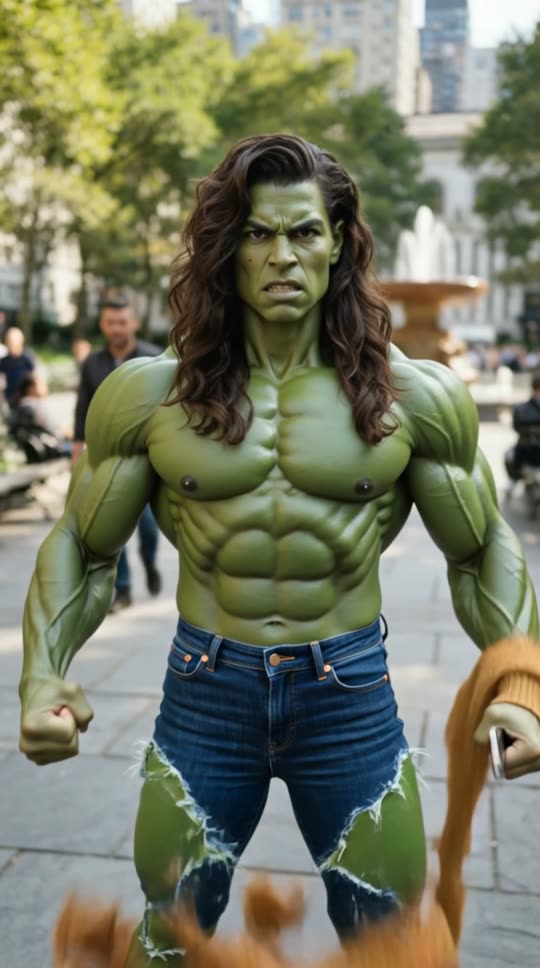
Green Giant
Bulk up and turn green
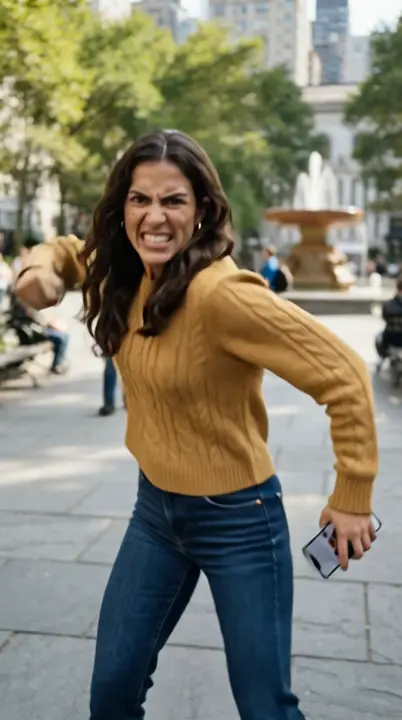
A full or half-body photo works best.

Full-screen on phones: Instagram Reels, YouTube Shorts, WhatsApp Status.
Example
Green Giant Transformation
Bulk up and turn green
- Output
- 5s · Standard
AI Green Giant Transformation: Turn Your Photo into a Green Muscle Giant Video
Updated
Short answer: VdoBloom’s Green Giant Transformation turns one photo of you into a 5-second video where you clench your fists, grow broader and taller, your skin turns deep green and your shirt splits at the seams, while your face keeps the same eyes, nose, mouth and hair. The camera stays still and the background stays as it was in your photo. The tab opens on Kling 3.0 at Standard quality, which costs 30 credits a clip. Switch to Seedance 2 Mini at 480p and a clip costs 8 credits, which the 10 free signup credits cover.
It is the same green-muscle-giant effect that trends on TikTok, Reels and Shorts, often called a Hulk-style transformation. You need no green screen, no editing app and no prompt: the effect is already written, and you can edit it if you want a variation. Clips usually finish in a few minutes and land in your Creations library.
Examples
Green Giant
Make thisHow it works
- 1
Confirm consent and upload one photo
Tick the box that the photo shows an adult who agreed to it, then add a JPG, PNG, WebP or HEIC up to 10 MB. A full or half-body photo with your face sharp works best.
- 2
Keep the Green Giant template or edit it
The prompt is ready: locked camera, fists clench, the body grows, skin turns green, the shirt tears, same face and background. Change the expression or the setting if you like.
- 3
Pick model and quality
Kling 3.0 Standard is the default at 30 credits for 5 seconds. Seedance 2 Mini at 480p is 8 credits for a first try. The price shows on the Create button before you generate.
- 4
Generate and share
The clip is ready in a few minutes for Reels, Shorts and TikTok. If a render fails, the credits go back automatically.
Why use this tool
One photo, full-body change
Your photo is the first frame, so the room, light and pose are yours. The model adds the growth, the green skin and the torn shirt on top.
Your face stays recognizable
The prompt asks for the same eyes, nose, mouth and hairstyle, and the camera does not move, so there is less for the face to drift with.
Five models in one picker
Kling 3.0 plus Seedance 2 Mini, Seedance 2 Fast, Seedance 2 and Seedance 2.5, each priced before you generate.
Shaped like your photo
On Kling 3.0 the clip follows your photo’s shape, so a vertical phone photo gives a vertical clip for Reels and Shorts.
Quick facts
The effect at a glance.
- What happens: fists clench, the body grows broader and taller, all visible skin turns deep green, the shirt splits at the seams and sleeves.
- Input: one photo of one adult, full or half body.
- Default: Kling 3.0, Standard quality, 5 seconds, 30 credits. The clip takes the shape of your photo.
- Lowest-cost option on the tab: Seedance 2 Mini, 480p, 5 seconds, 8 credits.
- Sound: the clip is silent; add music or a roar in any editor.
- Free start: 10 credits at signup plus a daily check-in. Free-tier downloads carry a watermark; any paid plan or credit pack removes it.
- Failed renders refund their credits automatically.
How much a green giant video costs
You pay per clip in credits. No subscription is needed: the Lite pack is 300 credits for $19.50 one-time (the credits never expire) or $15 a month. Prices below are for one 5-second clip.
- A 10-second Kling 3.0 Standard clip is 60 credits.
- With the Lite pack, 300 credits make 10 default Kling 3.0 clips or 37 Seedance 2 Mini clips at 480p.
- Kling 3.0 (tab default)
- Quality:Standard / Pro
- Credits (5 s):30 / 40
- Good for:The full-body change with the face held steady
- Seedance 2 Mini
- Quality:480p / 720p
- Credits (5 s):8 / 17
- Good for:A first try on the free credits
- Seedance 2 Fast
- Quality:480p / 720p
- Credits (5 s):24 / 50
- Good for:Quick re-runs at 720p
- Seedance 2
- Quality:480p / 720p
- Credits (5 s):38 / 82
- Good for:More detail
- Seedance 2.5
- Quality:480p / 720p
- Credits (5 s):56 / 126
- Good for:A final version
| Model | Quality | Credits (5 s) | Good for |
|---|---|---|---|
| Kling 3.0 (tab default) | Standard / Pro | 30 / 40 | The full-body change with the face held steady |
| Seedance 2 Mini | 480p / 720p | 8 / 17 | A first try on the free credits |
| Seedance 2 Fast | 480p / 720p | 24 / 50 | Quick re-runs at 720p |
| Seedance 2 | 480p / 720p | 38 / 82 | More detail |
| Seedance 2.5 | 480p / 720p | 56 / 126 | A final version |
Read more: Kling 3.0 on VdoBloom · Seedance 2 Mini model page · Plans and credit packs
Green giant, muscle or venom: which transformation?
VdoBloom has several body-change effects. They start from one photo but end in different places.
- Green Giant (this page)
- What changes:Whole body grows into a giant, shirt tears
- Skin color:Turns deep green
- Muscle Video
- What changes:Clothing gives way to a defined, muscular body; size and setting stay
- Skin color:Stays your own
- Venom Transformation
- What changes:A black symbiote spreads over the body
- Skin color:Covered in black
| Effect | What changes | Skin color |
|---|---|---|
| Green Giant (this page) | Whole body grows into a giant, shirt tears | Turns deep green |
| Muscle Video | Clothing gives way to a defined, muscular body; size and setting stay | Stays your own |
| Venom Transformation | A black symbiote spreads over the body | Covered in black |
Read more: AI Muscle Video Generator · AI Venom Transformation
Tips for a better transformation
The photo matters more than the model.
- Use a full or half-body photo; a tight face close-up leaves no body to grow.
- Leave some space around you so the bigger body still fits in the frame.
- Face the camera with even light and nothing covering your face.
- A plain T-shirt or shirt tears more convincingly than a heavy jacket.
- If the face drifts, run it again or move from Seedance 2 Mini up to Kling 3.0.
Limits and fair use
The effect works from one photo of one person and makes one short, silent clip. It does not take a video as input. Only upload photos of yourself or of adults who agreed to it, and do not use it to mislead anyone about a real person. Every request is checked against VdoBloom’s content policy.
Frequently asked questions
How do I make an AI green giant transformation video?
Open the Green Giant tab, tick the consent box, upload one full or half-body photo and generate. The template is already written. The default Kling 3.0 clip is 30 credits for 5 seconds; Seedance 2 Mini at 480p is 8 credits.
Is the green giant effect free?
You can try it free. New accounts get 10 credits, and a 5-second Seedance 2 Mini clip at 480p costs 8. The default Kling 3.0 clip costs 30. Free-tier downloads carry a watermark; any paid plan or credit pack removes it.
Is this the same as the AI Hulk transformation trend?
It is the same green-muscle-giant look that many people search for as a Hulk-style transformation. VdoBloom has no link to Marvel, and the effect does not copy any character’s face or costume: it keeps your own face and clothes and turns them green and huge.
Will my face still look like me?
The prompt keeps the same eyes, nose, mouth and hairstyle, with a fierce expression. A sharp, front-facing photo with even light gives the best match. Small or side-on faces drift more; re-run once if a clip looks off.
Can I use a video instead of a photo?
Not on this tab: it starts from one photo. To change a clip you filmed, use the AI Video Editor and describe the change in words; full-body changes on real footage vary more than this one-photo effect.
Which model should I pick?
Kling 3.0 is the default for this effect and costs 30 credits for 5 seconds at Standard. Use Seedance 2 Mini at 480p (8 credits) to test a photo first, then render the keeper on Kling 3.0.
How long is the clip and how long does it take?
The tab opens at 5 seconds, and Kling 3.0 runs from 3 to 15 seconds: a 10-second Kling 3.0 clip is also possible for 60 credits. Most clips are ready in a few minutes and appear in your Creations library.
Does the clip have sound?
No, it is silent. Add music, a roar or the sound of fabric tearing in any video editor, or make one with the AI Sound Effect Generator.