AI Crying Video Generator: Turn a Photo into a Tearful Clip
The VdoBloom AI Crying Video Generator turns one portrait into a short, realistic crying clip. The eyes turn glossy, the inner brows lift, moisture gathers on the lower lids and a tear rolls down one cheek before the other, while the face, hair, clothes and background stay exactly as in your photo. Upload a photo, pick Emotional, Gentle or Dramatic, and the clip arrives in a few minutes.
Is it free? New accounts get 10 free credits. The tab opens on Seedance 2 Fast at 720p, 5 seconds, 9:16, which costs 50 credits, because that model holds the face and stages the tears best. To stay inside the free credits, switch to ByteDance V1 Pro Fast (7 credits), Seedance 1.5 Pro (8), Seedance 2 Mini at 480p (8) or Runway Gen-3 (10). Free-tier results carry a watermark; any purchase removes it. The Lite pack is 300 credits for $19.50 one-time or $15 a month.
What makes these clips read as real is the prompt. Each preset is written as a staged performance with an identity lock: a static, eye-level close-up, the person holding back first, one eye tearing before the other, natural blinking, and explicit instructions not to change the face or hairstyle and not to over-act. That avoids the flat, theatrical "crying face" that a one-word prompt produces. It suits short-film inserts, the AI crying trend on TikTok and Reels, comedy "ugly cry" reactions and heartfelt farewell posts.
Examples
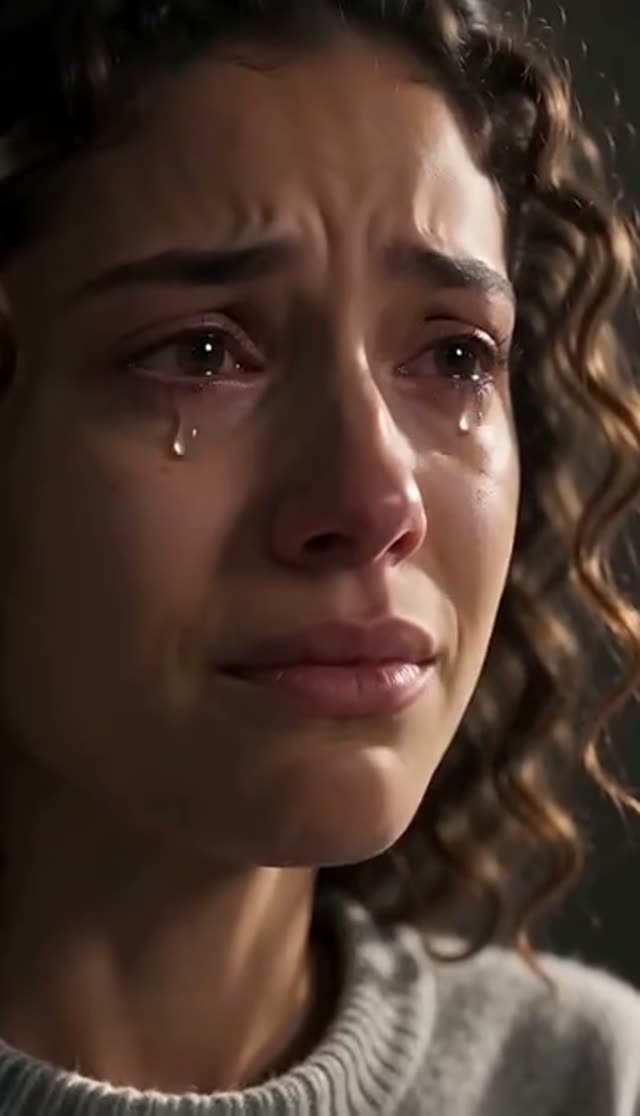
Emotional
Make this with my photo
Gentle
Make this with my photo
Dramatic
Make this with my photo
How it works
- 1
Upload a clear, front-facing photo
Eyes open, visible and roughly facing the camera. The eyes carry the whole effect, so avoid sunglasses, squinting, heavy glare and profile shots. A neutral expression works better than a big open-mouthed smile.
- 2
Choose how far the emotion goes
Gentle (holding back, one small tear escapes), Emotional (begins to cry, one eye then the other, trembling lip) or Dramatic (breaks down into a restrained sob, shoulders shake, head lowers).
- 3
Keep or adjust the model
Seedance 2 Fast at 720p and 5 seconds (50 credits) is preset for the most faithful face. Drop to 480p (24 credits) or switch to a cheaper model to save credits. The cost updates before you generate.
- 4
Set length and aspect ratio
The tab opens at 9:16 and 5 seconds. A 5 to 8 second clip gives the tears time to build; Seedance 2 Fast goes from 4 to 15 seconds.
- 5
Generate and download
The clip renders in the background and appears in My Creations. Free-tier downloads are watermarked; after any purchase you download the clean MP4.
Why use this tool
Staged crying, not a filter
The presets describe a sequence: lips press together, a swallow, glossy eyes, a tear spilling from one eye first. Asymmetric, involuntary tears are what make AI crying look believable.
Identity lock in every preset
Each prompt tells the model to keep the exact same face, hair, clothes, framing and background, with a static camera. The person stays recognisable from first frame to last.
Seedance 2 Fast by default
The tab pre-selects ByteDance Seedance 2 Fast at 720p, 5 s, 9:16 because it holds the face and stages tears better than the generic default it replaced.
Three intensity levels
Gentle, Emotional and Dramatic step from an almost imperceptible single tear to a restrained sob, so one tool covers sincere storytelling and comedy reactions.
Full model choice
Crying is a direct effect tab, so the whole image-to-video picker is available: Seedance, Runway, Kling, PixVerse, Vidu, WAN, Hailuo, Veo, Grok Imagine and more, from 7 credits.
Automatic refunds
If a generation fails, the credits return to your balance automatically.
Which model is best for an AI crying video?
Prices are for 5 seconds at 720p unless noted, from the same credit table the picker uses. The presets work on every model, but face fidelity varies.
| Model | Credits | When to pick it |
|---|---|---|
| Seedance 2 Fast (default) | 50 (480p: 24; 8 s at 720p: 80) | Best face hold and tear staging; the preset choice |
| Seedance 2 Mini | 17 (480p: 8) | Seedance-family look for less; 480p fits in the free credits |
| ByteDance V1 Pro Fast | 7 | Cheapest test of a reading |
| Seedance 1.5 Pro | 8 (480p, 4 s: 3) | Low-cost close-ups |
| Runway Gen-3 | 10 | Dramatic lighting, classic look |
| PixVerse v4.5 | 22 | Alternative motion character |
| Kling V3 Turbo | 36 | Hero shot in an edit |
| Runway Gen-4.5 | 48 | Top of the Runway range |
Read more: Seedance 2 Fast model page · Seedance 2 Mini model page · Seedance 2 Fast pricing
Emotional, Gentle or Dramatic?
All three keep the same face, hair, clothes, framing and background, use a static eye-level close-up, and forbid symmetrical tears and face changes.
| Preset | What happens on screen | Best for |
|---|---|---|
| Emotional (default) | Lips press, a swallow, eyes turn glossy; one tear spills from one eye, then the other; lower lip trembles. No sobbing. | Short films, sincere posts, the AI crying trend |
| Gentle | Gaze drops, trying not to cry; one small tear escapes. Soft natural light, almost imperceptible. | Quiet, restrained moments |
| Dramatic | Breaks down: eyes squeeze shut, tears from both eyes at different moments, restrained sob, shoulders shake, head lowers. Dramatic side light. | Grief scenes and comedy "ugly cry" reactions |
What does an AI crying video cost?
Credits are taken only when the job is accepted; failed renders are refunded.
- One-time pack credits never expire; subscription credits reset each billing cycle.
- Free-tier downloads carry a VdoBloom watermark. Any purchase unlocks clean downloads.
| What you make | Credits | Notes |
|---|---|---|
| Default: Seedance 2 Fast, 720p, 5 s | 50 | Best quality preset |
| Seedance 2 Fast, 480p, 5 s | 24 | Same model, lower resolution |
| Seedance 2 Mini, 480p, 5 s | 8 | Fits in the 10 free credits |
| ByteDance V1 Pro Fast, 720p, 5 s | 7 | Cheapest 720p option |
| Lite pack, 300 credits | $19.50 one-time | 6 default crying clips, or 37 on Seedance 2 Mini at 480p; or $15 a month |
What people make with AI crying videos
Crying clips are short inserts, which is why they are cheap to produce and easy to reuse.
- The AI crying trend on TikTok and Reels: a selfie that slowly breaks into tears, posted with a caption or a sad song.
- Short films and skits: a 5-second emotional close-up when there is no actor or second shoot day.
- Comedy reactions: the Dramatic preset as an over-the-top "ugly cry" response to a small disappointment.
- Farewell and heartfelt posts: the Gentle preset for a restrained, single-tear moment.
- Storyboards and pitches: show a director or client the emotional beat before you film it.
Tips for tears that look real
Small choices change the result more than the model does.
- Use soft, even light. Hard flash or blown-out skin leaves the model nowhere to put reflections, so tears look painted on.
- Start from a neutral face. A wide-open laugh as the starting photo fights the effect.
- Keep the eyes large in frame: a head-and-shoulders crop beats a full-body shot.
- Give it time. 5 to 8 seconds lets the tears build; under 4 seconds the effect often ends before the first tear falls.
- Direct it in plain words: "sitting in a parked car at night", "window light from the left", "trying to hide it with a smile".
- Change one variable per retry: preset, crop, or a single prompt line.
Limits to know before you start
What the crying generator will not do.
- It animates one photo. It does not build a multi-shot scene or add a second person.
- It does not write dialogue or add a sobbing soundtrack; add audio in your editor if needed.
- Long unbroken close-ups (10 seconds and more) are where realism drops; short inserts hold up best.
- It cannot add detail missing from a low-resolution photo.
Read more: How to make an AI crying video (step-by-step guide) · Best AI video model for realism
Frequently asked questions
Is the AI crying video generator free?
You can make a free clip with the 10 signup credits, but not on the default setting. Seedance 2 Fast at 720p and 5 seconds costs 50 credits. Switch to Seedance 2 Mini at 480p (8 credits), ByteDance V1 Pro Fast (7), Seedance 1.5 Pro (8) or Runway Gen-3 (10) to stay inside the free balance. Free results are watermarked.
How do I make someone cry in a photo with AI?
Upload a clear, front-facing portrait to the crying tab, choose Emotional, Gentle or Dramatic, keep Seedance 2 Fast or pick a cheaper model, and generate. The preset prompt stages the tears and locks the face, so you do not need to write anything.
Which AI model makes the most realistic crying video?
On VdoBloom the tab pre-selects Seedance 2 Fast because it holds the face and stages the tears best. Seedance 2 Mini is the budget option in the same family. ByteDance V1 Pro Fast and Seedance 1.5 Pro are the cheapest ways to test a photo first.
Will the person still look like themselves?
That is what the identity lock in every preset is for: the prompt tells the model to keep the exact same face, hair, clothes, framing and background, with a static camera. A sharp, well-lit source photo helps most.
How long should a crying clip be?
Five to eight seconds. The tears need time to build: lips press, eyes glaze, then one tear falls before the other. Seedance 2 Fast supports 4 to 15 seconds; 8 seconds at 720p costs 80 credits.
Can I make it funny instead of sad?
Yes. The Dramatic preset is the usual pick for comedy "ugly cry" reactions, and you can edit the prompt to exaggerate or to set an absurd scene. Keep the face lock lines if you want the person recognisable.
Will the video have a watermark?
On the free tier, yes; you can download the watermarked copy. Any purchase, a one-time pack or a subscription, removes the watermark and unlocks the clean MP4.
What photo works best?
A sharp, evenly lit, front-facing portrait with open eyes and a neutral expression. Avoid sunglasses, heavy filters, glare on glasses and profile angles.
What if the tears look fake?
Plastic-looking tears usually mean a low-resolution or flash-lit photo. Try a softer-lit photo, move to Seedance 2 Fast if you used a budget model, or extend the clip to 6 to 8 seconds. Failed jobs are refunded automatically.
Whose photos may I use?
Your own, or adults who have specifically agreed to be shown crying. Never upload photos of children. Label the result as AI-generated where you post it. Generations are moderated and may be rejected.