Birthday Invite

A photo becomes a 9:16 birthday invite for WhatsApp and Reels

Birthday style

Upload a photo or drop it hereA portrait or any photo of them

What you make here stays private to your account. We never publish or share it. See the Terms.

Your text is added as a title at the end, in any language. Refunded if it fails.

Aspect ratio

Full-screen on phones: Instagram Reels, YouTube Shorts, WhatsApp Status.

Example

Birthday Invite

A party video that ends on the invitation details

Birthday Invitation Video Maker: A Party Invite Starring the Birthday Person

Updated

Short answer: the Birthday Invite tool turns one photo into a vertical party-invite video with the name, age, date and venue typeset on screen, 7 credits for a 4-second 480p clip on Seedance 2 Mini (the tab opens at 720p, 14 credits). New accounts get 10 free credits, enough for one invite, and free-tier videos carry a VdoBloom watermark.

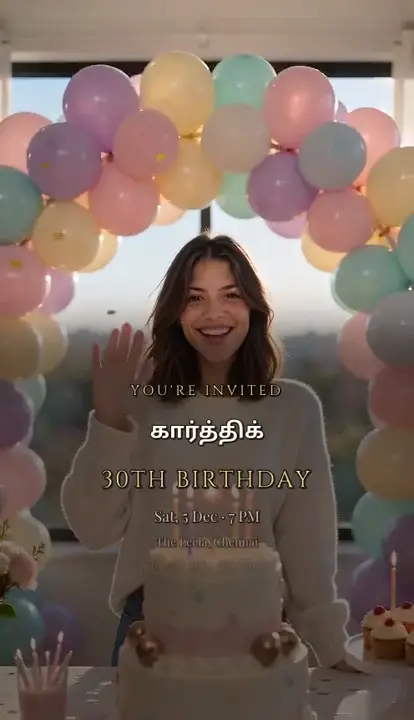
VdoBloom's birthday invitation video maker turns one photo of the birthday person into a short animated party invite. You upload the photo, choose one of six styles (Kids Birthday, Princess / Prince Theme, Teen Vibrant, Elegant Adult, Milestone 50/60/70+ or Bollywood Style), type the name, age, party date, venue and an optional message, and the AI places them in a decorated party scene. "You're Invited", the name, "10th Birthday" (or whichever age you enter) and the party details are then set on screen and held on the last frame. The default is a vertical 9:16 clip for WhatsApp, Status and Instagram.

Is it free? New accounts get 10 free credits and the default invite (Seedance 2 Mini, 4 seconds, 720p) costs 14 credits; at 480p it costs 7, so the first one is free. Free-tier videos carry a VdoBloom watermark; watermark-free downloads come with a paid plan. The Lite pack is 300 credits for $19.50 one-time (credits never expire) or $15 a month; in India the Starter pack is 75 credits for ₹299.

It works for parents planning a child's party, friends organizing a surprise, and families inviting relatives to a parent's 60th or 75th, anywhere a video in the family WhatsApp group will get more attention than a text message.

Examples

Birthday Invitation Video Maker: A Party Invite Starring the Birthday Person — Birthday invite demo: a party clip that ends on the invitation details example

Birthday invite demo: a party clip that ends on the invitation details

Make this

Watch the tutorial

How to Make a Birthday Invitation Video with AI (One Photo) | VdoBloom Tutorial

Turn one photo into a 9:16 birthday invitation video for WhatsApp, Reels and Shorts with VdoBloom's Birthday Invite. Pick a style (Kids Birthday, Princess / Prince Theme, Teen Vibrant, Elegant Adult, Milestone 50/60/70+…

All VdoBloom tutorials

How it works

  1. 1

    Upload the birthday person's photo

    A clear, happy photo with the face well lit. For a child, upload a personal family photo and confirm you are their parent or legal guardian.

  2. 2

    Choose a style that fits the age

    Kids Birthday, Princess / Prince Theme, Teen Vibrant, Elegant Adult, Milestone (50/60/70+) or Bollywood Style. Each sets the party scene and the color of the text.

  3. 3

    Type the party details

    Name (required), age or milestone such as "1st", "18th" or "60th", party date and time, venue, and an optional one-line message such as "Join us for cake and laughter".

  4. 4

    Pick length and quality, then generate

    The tab opens on Seedance 2 Mini, 4 seconds, 720p, 9:16 (14 credits); 480p costs 7. You can go up to 15 seconds (30 on Seedance 2.5) or a higher resolution. The price shows before you generate, and a video usually takes about 2–3 minutes.

  5. 5

    Send it to the guest list

    Download the MP4 and share it in WhatsApp groups, on Status or Instagram Stories. It is saved privately in My Creations.

Why use this tool

  • Six party styles for every age

    Balloon-arch kids' party, fairy-tale castle, neon teen party, champagne cocktail evening, gold-and-ivory milestone celebration and a marigold Bollywood set.

  • Age written for you

    Type "10" and the video reads "10th Birthday"; type "60th" and it is used as written. Leave it blank for "Birthday Celebration".

  • Details spelled exactly

    The model draws no lettering, so nothing gets garbled. The name, date, venue and message are typeset onto the finished clip afterwards.

  • Indian scripts supported

    Names and details in Devanagari, Bengali, Gujarati, Tamil, Telugu, Kannada or Malayalam script are set in a matching Noto font.

  • Private family photos

    Birthday invites are always private: never in the public gallery, sitemap or remix feeds. Photos of other people's children are not allowed.

  • Refunded if it fails

    A failed generation refunds its credits automatically; if only the text step fails you still get the clip with nothing extra charged.

Birthday invite video: quick facts

The short version: one photo, a name and the party details in, a vertical invite video out.

Inputs
One photo of the birthday person, the name (required), age, party date and time, venue and an optional message
Output
An MP4 with no music (models that generate audio add ambient sound), 9:16 vertical by default, with the invite text typeset on screen and held on the last frame
Length
4 to 15 seconds on Seedance 2 models, up to 30 seconds on Seedance 2.5
Price
7 credits for 4 s at 480p on Seedance 2 Mini, 14 for the default 4 s at 720p, 17 for 5 s at 720p
Free start
10 free credits on sign-up cover one 480p invite (watermarked)
Payment
Pay per video in credits; no subscription needed, and one-time pack credits never expire

Which birthday invitation style should I pick?

Each style is a written party scene for the model plus a matching text color. The person in your photo stays the star of every one.

Kids Birthday
What the scene looks like:Pastel and primary balloon arches, tall cake with sparklers, falling confetti, sunny indoor party
Best for:1st to 10th birthdays
Princess / Prince Theme
What the scene looks like:Fairy-tale castle silhouette, stardust, pink-gold or blue-silver tones, crown decorations
Best for:Themed kids' parties
Teen Vibrant
What the scene looks like:Neon pink, purple and blue accents, disco balls, foil balloon wall, ring-light glow
Best for:13th to 19th birthdays, Sweet 16, 18th
Elegant Adult
What the scene looks like:Cocktail setting, champagne flutes, crystal decor, warm golden light on a dark backdrop
Best for:21st, 30th, 40th and dinner parties
Milestone (50/60/70+)
What the scene looks like:Gold and ivory palette, white roses, candlelight, formal celebration setting
Best for:50th, 60th, 75th and other big milestones
Bollywood Style
What the scene looks like:Marigold garlands, sparklers, rich red and gold, festive film-set lighting
Best for:Big family celebrations

How much does a birthday invitation video cost?

You pay per video in credits, based on model, length and resolution. The name, age and party details are added at no extra cost, and the exact price shows before you generate.

Seedance 2 Mini (default)
Resolutions:480p, 720p
Max length:15 s
5-second invite:8 credits (480p) / 17 (720p)
10-second invite:16 credits (480p) / 33 (720p)
Seedance 2 Fast
Resolutions:480p, 720p
Max length:15 s
5-second invite:24 / 50
10-second invite:48 / 100
Seedance 2
Resolutions:480p, 720p, 1080p, 4K
Max length:15 s
5-second invite:38 (480p) / 82 (720p)
10-second invite:76 / 163
Seedance 2.5
Resolutions:480p, 720p, 1080p
Max length:30 s
5-second invite:56 (480p) / 126 (720p)
10-second invite:112 / 252

Read more: Pricing and credit packs · Seedance 2 Mini

What do the free credits and packs buy?

One-time pack credits never expire, so the same pack covers this year's party invite and next year's.

Seedance 2 Mini, 4 s, 480p (lowest cost)
Credits each:7
10 free sign-up credits:1 invite (watermarked)
Lite: 300 credits ($19.50):42 invites
India Starter: 75 credits (₹299):10 invites
Seedance 2 Mini, 5 s, 720p
Credits each:17
10 free sign-up credits:—
Lite: 300 credits ($19.50):17 invites
India Starter: 75 credits (₹299):4 invites
Seedance 2 Mini, 10 s, 720p
Credits each:33
10 free sign-up credits:—
Lite: 300 credits ($19.50):9 invites
India Starter: 75 credits (₹299):2 invites

What text appears on the birthday invite?

The text fades in line by line a little after the middle of the clip, over a soft dark band, and the last frame holds for 1.5 seconds so guests can read it. Fields you leave blank are dropped.

  • "You're Invited" in small capitals
  • The birthday person's name in a script font (up to 40 characters)
  • The age as a headline, for example "1st Birthday" or "60th Birthday" (or "Birthday Celebration")
  • Party date and time, for example "Saturday, 14th December 2026, 7 PM" (up to 60 characters)
  • Venue (up to 90 characters) and your message (up to 120 characters)

Birthday invitation video ideas

One photo and a few minutes per video make it easy to tailor the invite to the age and the guest list.

  • A 1st birthday invite in Kids Birthday or Princess / Prince using a favorite baby photo.
  • A surprise 50th or 60th for a parent in Milestone style, sent only to the guest group.
  • An 18th or 21st in Teen Vibrant or Elegant Adult for friends on Instagram Stories.
  • Two versions of the same invite: names in Hindi or Tamil for grandparents and English for school friends.
  • A matching thank-you clip after the party using the Birthday template in the Festival Greeting tool.

Tips and limits

A few habits that save credits, and what the tool does not do yet.

  • Use a sharp, front-facing photo of one person. Group photos and very dark photos give weaker results.
  • Keep the venue short ("The Oberoi, Bangalore") so it fits on one line on a phone screen.
  • Make a 7-credit 480p version first to check the style, then re-make it at 720p or longer.
  • The video has no music, only the sound the video model makes with the picture (on models that generate audio). Add a birthday song when posting, or generate one with the AI Music Generator and join them in the Timeline Editor.
  • The headings ("You're Invited", "Birthday") are in English; your own text can be in other scripts. Punjabi (Gurmukhi) and Odia scripts can't be drawn yet.
  • Upload only your own photos or your own family's. Photos of other people's children are not allowed.

Frequently asked questions

Can I make a birthday invitation video for free?

Yes, one. The 10 free signup credits cover a 7-credit 480p invite, with a VdoBloom watermark on the free tier.

Will the AI spell my child's name correctly?

Yes. The name, age, date and venue are typeset onto the finished clip rather than drawn by the video model, so they come out spelled as you typed them.

Can I send the invite on WhatsApp?

Yes. Download the MP4 and forward it to the group; the default is vertical 9:16, which fills a phone screen.

What is the best AI tool to make a birthday video invitation?

Pick a tool that keeps the birthday person's face from your photo and spells the party details correctly. VdoBloom's Birthday Invite tool places the person from one photo in a decorated party scene, then typesets the name, age, date and venue onto the clip so nothing is garbled. An invite costs 7 credits at 480p, and 10 free credits come with a new account.

How do I make a birthday invitation video for my kid?

Upload a clear photo of your child and confirm you are their parent or guardian. Choose Kids Birthday or Princess / Prince, type the name, the age (for example "5" shows "5th Birthday"), the date and time, and the venue. Generate a 7-credit 480p version first, then download the MP4 and send it in the class or family WhatsApp group. Children's invites stay private to your account.

What is the best AI first birthday invitation video maker?

For a first birthday, use a favorite baby photo with the Kids Birthday or Princess / Prince style and type "1" in the age field, so the video reads "1st Birthday". You confirm you are the parent or guardian before generating, and the invite is never shown in the public gallery.

Can I make an AI birthday wishes video with a photo and name?

Yes. For an invite, the Birthday Invite tool adds the name and party details to a clip made from the photo. For a wishes video after the party, use the Birthday template in the Festival Greeting tool, which writes your wish and the person's name on screen. Both start at 7 credits.

What is the best birthday video maker app with AI?

VdoBloom works in the phone browser and in the Android app, so you can make the invite on your phone: upload a photo from the gallery, fill in the details, and download the MP4 to forward on WhatsApp. You pay per video in credits with no subscription.

Can I make an AI name animation video for a birthday?

Yes. The invite already animates the name onto the clip line by line. If you want the name itself as the star of the video, use the Name Animation Video Generator, then share both clips together.

Is there an AI birthday cake effect video?

Yes. The Kids Birthday style already includes a tall cake with sparklers in the party scene. For a short effect clip built around a cake, try the AI Cake Effect tool and send it alongside the invite.

How can I make a birthday surprise video for my girlfriend with AI?

Use the Elegant Adult style with her photo and a short message in the message field, or turn several of your photos together into a song-backed clip with Photo to Music Video. Our AI birthday video maker guide walks through surprise ideas step by step. Only use photos she has shared with you, and keep the video private until you send it.

How do I make a birthday invitation video?

Upload one photo of the birthday person to VdoBloom's Birthday Invite tool, choose a style such as Kids Birthday or Milestone, type the name, age, date and venue, and generate. In about 2–3 minutes you get a vertical video invite with the details on screen, ready to send on WhatsApp.

Can I make a birthday invitation video for free?

Yes, one. New accounts get 10 free credits and an invite costs 7 credits at 480p (14 at the default 720p). Free-tier videos carry a watermark; watermark-free downloads come with a paid plan, such as the Lite pack at 300 credits for $19.50 or the Starter pack at 75 credits for ₹299 in India.

Can I make a 1st birthday invitation video with my baby's photo?

Yes. Upload a personal family photo and confirm you are the child's parent or legal guardian. Kids Birthday and Princess / Prince suit a first birthday, and typing "1" in the age field shows "1st Birthday". Children's invites stay private to your account.

Is there a style for a 50th or 60th birthday?

Yes. The Milestone (50/60/70+) style uses a gold and ivory palette, white roses and candlelight for a formal look. Type the age, for example "60th", and it appears as the headline under the name.

How long should a birthday invitation video be?

For WhatsApp, 5–10 seconds is usually enough: guests need the name, the age, when and where. You can choose from 4 to 15 seconds on the Seedance 2 models, or up to 30 seconds on Seedance 2.5.

Can I make a birthday invitation video on my phone?

Yes. VdoBloom runs in the phone browser and in the Android app: upload a photo from your gallery, fill in the details and download the MP4 straight to your phone to forward on WhatsApp.

Does the birthday invite include music?

No. The clip has no music, only the sound the video model makes with the picture (on models that generate audio). Add a song when you post it to Instagram or Status, or create a track with VdoBloom's AI Music Generator and put the two together in the Timeline Editor.

Can the name be written in Hindi or Tamil?

Yes. Names, dates and venues in Devanagari, Bengali, Gujarati, Tamil, Telugu, Kannada or Malayalam script are set in a matching Noto font with correct joining. The small headings stay in English.

What if the party date changes?

Make a new invite with the new details. A finished video can't be re-captioned, but a 480p version costs 7 credits and takes a few minutes.