POV Product Ad
First-person product demo, only hands in view
Effect: Desk POV Demo · Pick up, show label, use once
A clear product photo. Plain background works best.
Priced per second: a longer clip costs more, and a higher resolution bills each second at a higher rate. 6s: 480p … · 720p … credits
Full-screen on phones: Instagram Reels, YouTube Shorts, WhatsApp Status.
Advanced options
Motion or style reference. MP4 or MOV, 480p to 720p, up to 15s total.
MP3 or WAV, up to 15 MB and 30s total.
Example
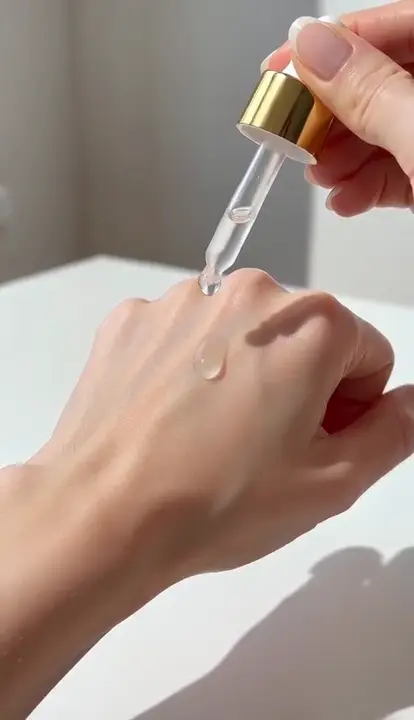
POV Product Ad
Pick up, show label, use once
- Output
- 6s · 480p
AI POV Product Ad Generator: A Hands-Only Product Demo From One Photo
Updated
Short answer: VdoBloom's AI POV product ad generator turns one product photo into a 6-second, first-person video ad. Two hands pick your product up from a clean desk, turn the label to the camera, use it once and set it down. Only the hands are in view, filmed as if from your own eyes. The default, Seedance 2 Mini at 480p and 9:16, costs 10 credits, so the 10 free credits on a new account cover your first ad. It is usually ready in a few minutes.
A POV ad (point-of-view ad) puts the viewer behind the camera, so the product is seen the way a buyer would hold it. It is the hands-only, product-in-hand look of TikTok and Reels demo ads. Many AI ad tools mean something else by "POV": an AI creator holding your product and talking to camera. This page makes the literal first-person version with no face and no presenter. For a talking creator, use the AI UGC Ad Generator.
Your photo is used as a reference, and the built-in prompt tells the model to keep the product's shape, colours, label and logo as photographed. The hand action is fixed by the Desk POV Demo; there is no prompt box on this tab, so your choices are length, quality, shape and model. Seedance 2 models add sound in the same pass. Free-tier downloads carry a VdoBloom watermark; any paid plan or credit pack removes it.
How it works
- 1
Upload a product photo
One clear shot of the product, ideally on a plain background, with the label facing the camera. Confirm you own the photo or have the rights to use it; the tab asks before it runs.
- 2
Check the action
The Desk POV Demo has two hands pick the product up, show the front label, use it once and set it down. The action is built in; this tab has no prompt box.
- 3
Choose length, quality and shape
The defaults are 6 seconds, 480p and 9:16 on Seedance 2 Mini for 10 credits. Switch to 720p or a larger Seedance model for the final cut, and to 1:1 or 16:9 for feed and web slots. The cost shows on the button before you generate.
- 4
Generate the ad
The clip is filmed from the viewer's own eyes, hands only, and lands in My Creations in a few minutes. If a render fails, the credits go back to your balance.
- 5
Add your hook and post
Put your caption, price or call to action on in your editor, then post to TikTok, Reels, Shorts or a Meta ad. Free-tier downloads are watermarked.
Why use this tool
Hands only, no face
The prompt asks for hands only, with no face in view. There is no presenter to cast, and no face to approve or license.
Your real product
The photo is a reference, and the prompt asks the model to keep the exact shape, colours, label and logo of your product.
From one photo
No filming, no props and no hand model. A packshot you already have is enough to start.
Vertical by default
9:16 and 6 seconds out of the box, the shape and length of a short-form ad. Up to 15 seconds on Seedance 2 Mini.
Sound in the same pass
Seedance 2 models return the clip with sound, such as the soft room tone and the product being set down.
No stray text
No captions, extra products or overlays are added, so your own hook and brand copy sit on a clean clip.
Quick facts
The short version, before you upload:
- Input: one product photo. A reference video or audio clip is optional.
- Output: a first-person, hands-only product demo with sound.
- Default: Seedance 2 Mini, 6 s, 480p, 9:16, 10 credits.
- Length: 4 to 15 seconds on Seedance 2 Mini.
- Shapes: 9:16, 1:1, 16:9, 3:4, 4:3 and 21:9.
- Free: 10 credits at signup cover one default ad; no card needed.
- Watermark: free-tier downloads are watermarked; any paid plan or credit pack gives the clean MP4.
Which kind of POV product ad do you need?
"POV ad" is used for a few different formats. Pick the tool by what should be on screen. All of these are VdoBloom tools that start from a product photo.
- First-person hands pick up, show and use the product (our pick for POV)
- AI POV Product Ad Generator (this page)
- An AI creator holds the product and talks to camera
- AI UGC Ad Generator
- A box bursts open and the product rises out of it
- Box Burst Ad Generator
- The product turns on a turntable
- 360° Product Video Generator
- A product demo with scenes and copy
- Product Demo Video Maker
| What you want on screen | VdoBloom tool |
|---|---|
| First-person hands pick up, show and use the product (our pick for POV) | AI POV Product Ad Generator (this page) |
| An AI creator holds the product and talks to camera | AI UGC Ad Generator |
| A box bursts open and the product rises out of it | Box Burst Ad Generator |
| The product turns on a turntable | 360° Product Video Generator |
| A product demo with scenes and copy | Product Demo Video Maker |
Read more: AI UGC Ad Generator · Box Burst Ad Generator · 360° Product Video Generator · Product Demo Video Maker
Which model and how much does a POV ad cost?
The tab offers the Seedance 2 family only. Prices are for the default 6-second clip, from the same credit table the picker uses. A longer clip costs more, and adding a reference video changes the rate; the Create button always shows the exact amount charged.
- Draft on Seedance 2 Mini at 480p, then re-render the keeper at 720p or on Seedance 2.
- The Lite pack is 300 credits for $19.50 one-time (credits never expire) or $15 a month: 30 default ads, or 15 at 720p.
- Credits are taken only when the job is accepted; failed renders refund automatically.
- Seedance 2 Mini (default)
- 480p:10
- 720p:20
- 1080p:Not offered
- Seedance 2 Fast
- 480p:29
- 720p:60
- 1080p:Not offered
- Seedance 2
- 480p:45
- 720p:98
- 1080p:245
- Seedance 2.5
- 480p:68
- 720p:152
- 1080p:380
| Model | 480p | 720p | 1080p |
|---|---|---|---|
| Seedance 2 Mini (default) | 10 | 20 | Not offered |
| Seedance 2 Fast | 29 | 60 | Not offered |
| Seedance 2 | 45 | 98 | 245 |
| Seedance 2.5 | 68 | 152 | 380 |
Read more: Seedance 2 Mini model page · Seedance 2 model page · See all credit packs
Tips for a POV ad that looks real
The product is the hero, so the photo decides most of the result.
- Use a sharp, evenly lit photo with the label facing the camera. A plain background gives the cleanest edges.
- One product per photo. Bundles and multipacks confuse which item the hands should pick up.
- Crop out other items before you upload, so the hands pick up the right product.
- Draft at 480p, then re-render the version you like at 720p for sharper label text.
- Add your hook text in the edit. Text drawn by a video model is unreliable.
What it can and cannot do
It makes one short, first-person shot of hands handling your product. It does not write a script, add captions, assemble several scenes or put a presenter on screen.
- Hands only by design: the prompt keeps faces out of frame.
- One product photo per clip, and one built-in action (Desk POV Demo). There is no prompt box to change the action or the setting.
- Small text on labels can soften at 480p; use 720p or Seedance 2 for close label shots.
- Use photos you own or have the rights to. If you add a reference video with people in it, they must be adults who agreed to appear.
Read more: How to make a product video ad with AI · UGC ad video from a product photo
Frequently asked questions
What is a POV product ad?
A short video filmed from the viewer's point of view, so you see the product in your own hands: picking it up, turning it, using it. It reads like a real buyer's clip rather than a studio commercial, which is why it is common on TikTok and Reels.
Can AI make a POV product ad from one photo?
Yes. Upload one product photo and VdoBloom generates a 6-second, first-person clip of hands picking the product up, showing the label and using it once. The product keeps the shape, colours and label of your photo.
Is the AI POV product ad generator free?
Your first ad is. New accounts get 10 free credits and the default ad (Seedance 2 Mini, 6 seconds, 480p) costs 10, with no card needed. Free-tier downloads carry a watermark; any paid plan or credit pack removes it.
How much does a POV product ad cost?
A 6-second ad costs 10 credits on Seedance 2 Mini at 480p, 20 at 720p, 29 on Seedance 2 Fast and 45 on Seedance 2 at 480p. The Lite pack is 300 credits for $19.50 one-time, enough for 30 default ads.
Does a face or an AI presenter appear?
No. The prompt asks for hands only, with no face in view. If you want an AI creator who holds the product and speaks to camera, use the AI UGC Ad Generator instead.
Can I make an unboxing POV video?
Not as a separate style. The built-in Desk POV Demo picks the product up from a desk, shows the label and uses it once, and this tab has no prompt box to change that. For a box that bursts open with the product rising out, use the Box Burst Ad Generator.
Will my product look the same as in the photo?
That is what the built-in prompt asks for: the exact shape, colours, label and logo of your photo. AI video can still soften fine detail, so clear photos with the label facing the camera hold up best. Small print can soften at 480p, so use 720p for label close-ups.
How long should a POV ad be?
Most short-form POV ads run 6 to 15 seconds. The tab starts at 6 seconds, and Seedance 2 Mini goes up to 15. Keep one action per clip and join several clips in your editor if you need a longer ad.
Does the video have sound?
Yes. Seedance 2 models generate sound with the video, such as room tone and the product being handled. You can also add an optional reference audio clip under Advanced options, or put your own music on in the edit.
How long does it take to generate?
Usually a few minutes for a 6-second clip. The job runs on the server and the ad lands in My Creations, so you can queue several versions and compare them.
Can I use the ads in paid campaigns?
Yes, for TikTok, Meta, YouTube Shorts and your store, as long as you own the product photo or have the rights to it. Buy a pack or plan first so the download has no watermark.
Can I add text, a price or a call to action?
Not inside the generation. The clip is made with no captions or overlays on purpose, so add your hook, price and call to action in your editor, where the text stays sharp.