Car Wrap Visualizer: See Your Own Car in Any Color and Finish
VdoBloom’s car wrap visualizer repaints the car in your own photo so you can see a color before you pay for a wrap or a respray. Upload one photo of the car, pick a color — 13 named shades such as Nardo grey, Miami blue or British racing green, or any exact hex code — choose a finish, and the AI returns the same car in the new color with the wheels, glass, lights and background left as they were.
Is it free? New accounts get 10 free credits with no card, and each render costs 5 credits on GPT Image 2.5 at 2K, so you can try two colors before paying. After that a one-time 300-credit pack is $19.50 and those pack credits never expire. It is made for car owners choosing a wrap, wrap and detailing shops showing clients options, and anyone who wants a quick “what would it look like” before committing.
Examples
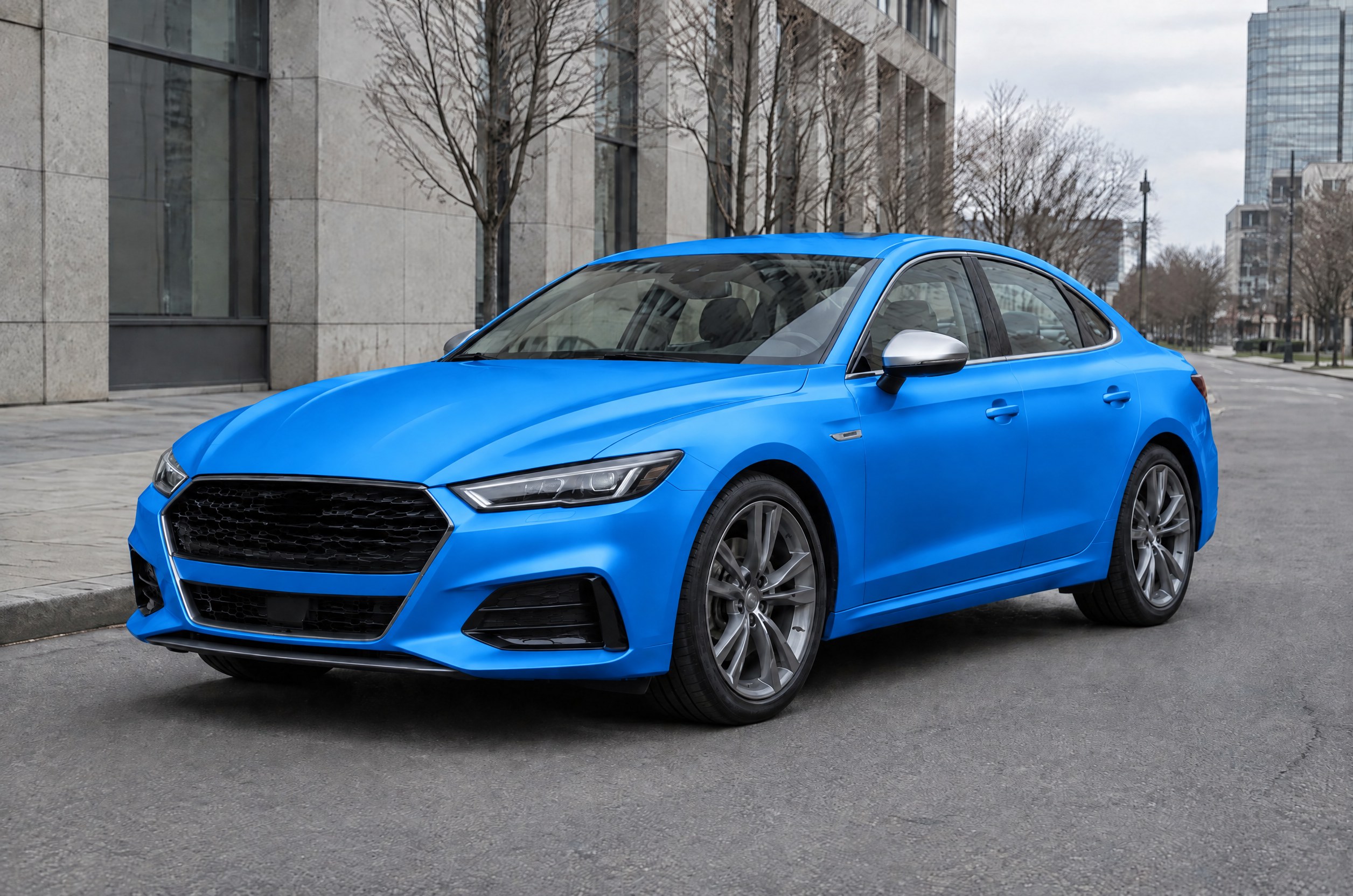
Satin Miami blue wrap preview
Make this with my photo
How it works
- 1
Upload a photo of your car
Use one clear photo of the whole car, side or three-quarter view, in even daylight. Avoid heavy reflections, deep shade and cropped bumpers.
- 2
Pick a color
Choose one of 13 named colors, or pick Custom hex and type an exact code such as #1E90FF to match a vinyl swatch or paint chip.
- 3
Choose a finish
Gloss, satin, matte, mirror chrome, color-shift (the hue changes with viewing angle) or carbon-fiber texture.
- 4
Render and compare
Each render costs 5 credits and keeps the wheels, glass, lights and background. Run a few colors on the same photo and compare them side by side; upscale the one you like.
Why use this tool
Your car, not a stock model
The color goes onto the car in your photo, so you judge it on your actual body shape and trim.
Exact hex colors
Custom hex lets you preview a specific vinyl or paint code rather than a vague “dark blue”.
Six real-world finishes
Gloss, satin, matte, chrome, color-shift and carbon fiber cover the common wrap films.
Everything else stays put
Wheels, tyres, windows, lights and the background are kept, so the before and after are directly comparable.
Colors and finishes you can preview
Every color can be combined with every finish. The named colors are a starting point; Custom hex covers anything else.
| Option | Choices |
|---|---|
| Named colors (13) | Nardo grey, black, pearl white, racing red, British racing green, Miami blue, midnight blue, lime green, sunset orange, yellow, purple, rose gold, silver |
| Custom color | Any 6-digit hex code, e.g. #1E90FF |
| Finishes (6) | Gloss, satin, matte, chrome, color-shift, carbon fiber |
| Output | 2K image of your car in the new color; optional upscale |
What a car wrap preview costs
The price is per render and is shown before you generate. A failed render is refunded.
| What you do | Credits | Notes |
|---|---|---|
| One color preview (GPT Image 2.5, 2K) | 5 | Either GPT Image 2.5 model |
| Compare 4 colors on the same photo | 20 | 4 renders |
| 10 free signup credits | 2 previews | No card needed |
| One-time 300-credit pack ($19.50) | 60 previews | Pack credits never expire |
Getting a realistic result
The model repaints what it can see, so the photo matters more than the prompt.
- Shoot the whole car in soft, even light; strong sun creates reflections that read as paint.
- Side or three-quarter views work best; extreme close-ups and interior shots do not.
- For chrome and color-shift, expect the reflections to be invented, so judge the overall tone rather than exact highlights.
- Use Custom hex with the code printed on the vinyl swatch for the closest match, then confirm with a physical sample.
What it does not do
It is a visual preview, not a color-accurate proof: screens, lighting and the AI all shift color slightly, so check a real swatch before you buy film or paint. It changes the body color only — it does not add decals, liveries, stripes or text, and it does not change wheels or body parts. One car per photo works best.
Frequently asked questions
How can I see what my car looks like in a different color?
Upload a photo of your car to VdoBloom’s car wrap visualizer, pick a color or hex code and a finish, and the AI returns your car in that color with the wheels, glass and background unchanged. Each render costs 5 credits.
Is the car wrap visualizer free?
New accounts get 10 free credits, which covers two previews at 5 credits each. After that a one-time 300-credit pack is $19.50 (60 previews), and pack credits never expire.
Can I use an exact paint or vinyl code?
Yes. Choose Custom hex and type the 6-digit code, such as #1E90FF. Treat the result as a preview and confirm with a physical swatch.
Which finishes can I try?
Gloss, satin, matte, mirror chrome, color-shift and carbon fiber. Any finish can be combined with any color.
Does it change the wheels or windows?
No. The wheels, tyres, glass, lights and background are kept as they are, so you can compare the before and after directly.
What photo works best?
One clear photo of the whole car from the side or a three-quarter angle, in soft daylight, with nothing blocking the body.
Can wrap shops use it with customers?
Yes. Run several colors on the customer’s own car photo and show them side by side before quoting. Each render is 5 credits.
Can it add stripes, decals or a livery?
No. It changes the body color and finish only. For other edits to a photo, use the AI Image Editor.