AI Fashion Walk Video Generator: Turn One Outfit Photo into a Runway Walk
An AI fashion walk video turns a single photo of a person in an outfit into a short clip of them walking, as if on a runway or a street shoot. On VdoBloom you upload one full-body photo, pick a walk style (Classic Runway, Street Style, Evening Gown or Casual Chic), and the AI adds the stride while keeping the face, hair, proportions and the garment as photographed. Is it free? Every new account gets 10 credits, and the default model, Runway Gen-3, costs exactly 10 credits for a 5-second 720p walk, so your first clip costs nothing. After that, walks cost 10 to 48 credits each depending on the model you pick. It is built for clothing brands, boutiques and marketplace sellers, stylists, and creators making outfit content.
The four walk styles are separate instructions, not filters on one render. Each preset is a long prompt that names identity, hairstyle, outfit and lighting as things the model must not change, which is what makes the result usable for selling clothes: the dress that walks is the dress you photographed. Classic Runway gives a formal catwalk under hard overhead light with a glossy floor; Street Style moves the subject along a city pavement with a tracking camera; Evening Gown slows the walk so fabric trails and catches the light; Casual Chic keeps a relaxed everyday stride against a clean backdrop.
Fashion walk runs on VdoBloom's keyframe pipeline: the AI first builds a clean walking keyframe from your photo with WAN 2.7, then animates it with the video model you choose. That keyframe step is not billed separately. The price you see before you generate is the whole price, credits are only deducted once the video provider accepts the job, and they are refunded automatically if the render fails.
Examples
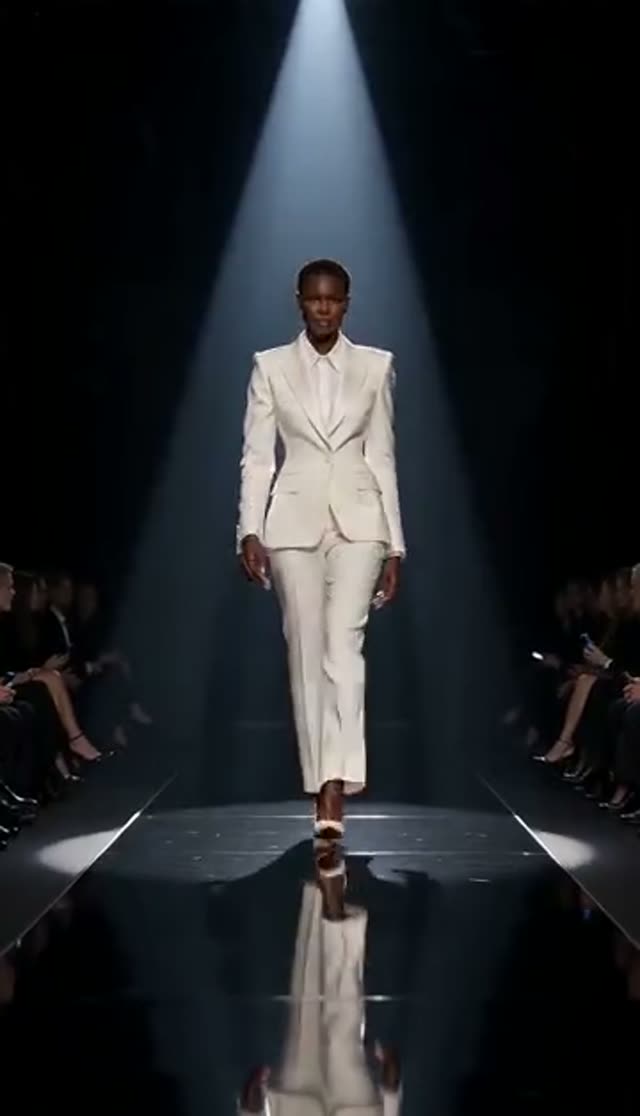
Classic Runway
Make this with my photo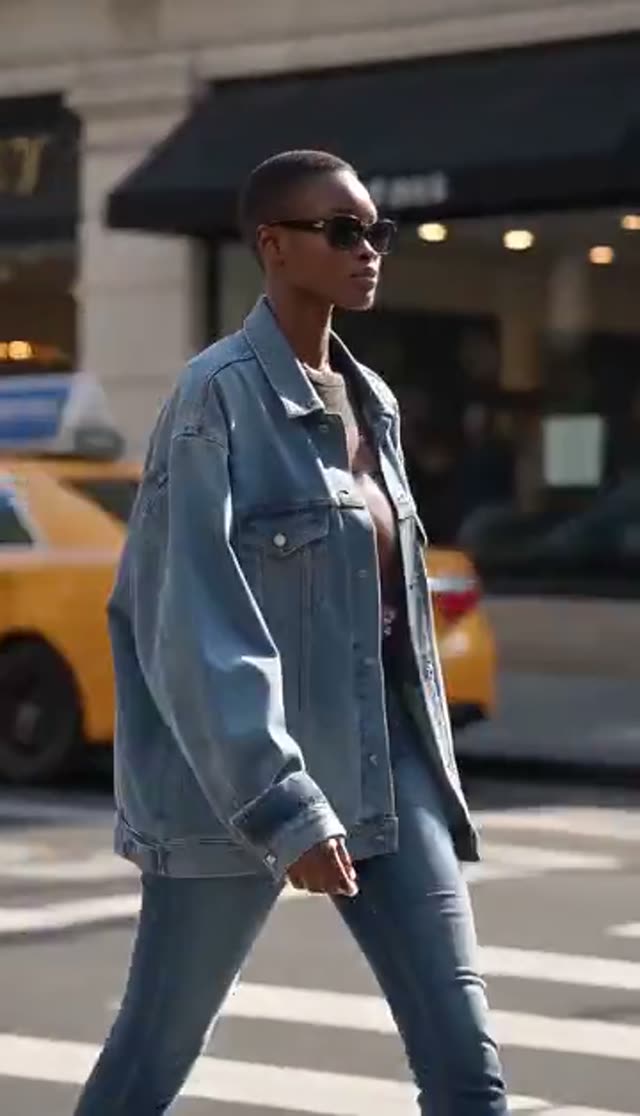
Street Style
Make this with my photo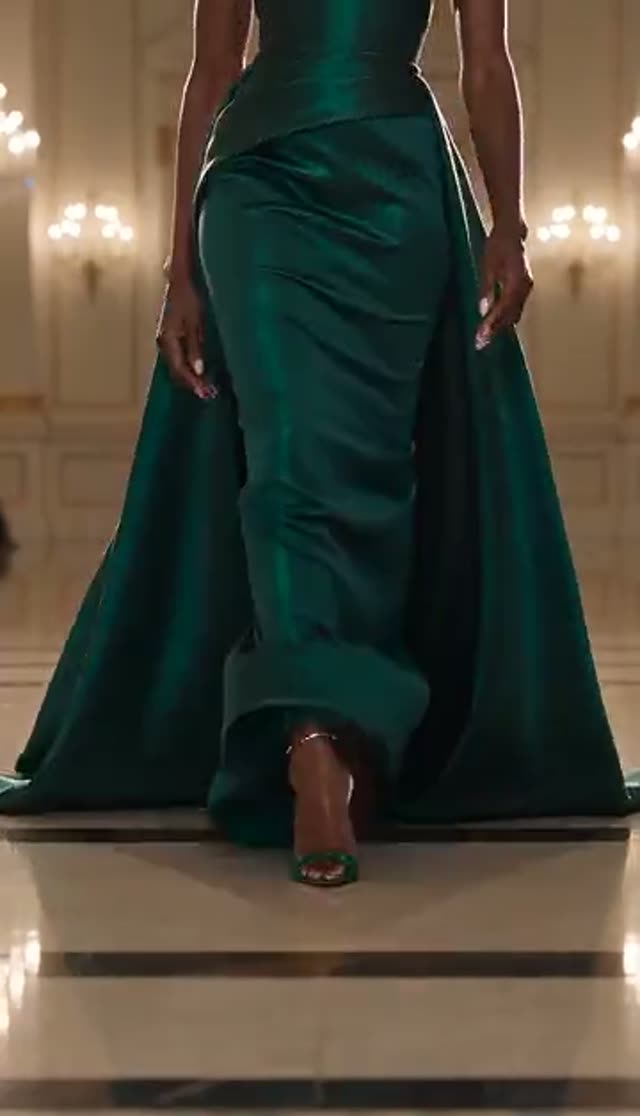
Evening Gown
Make this with my photo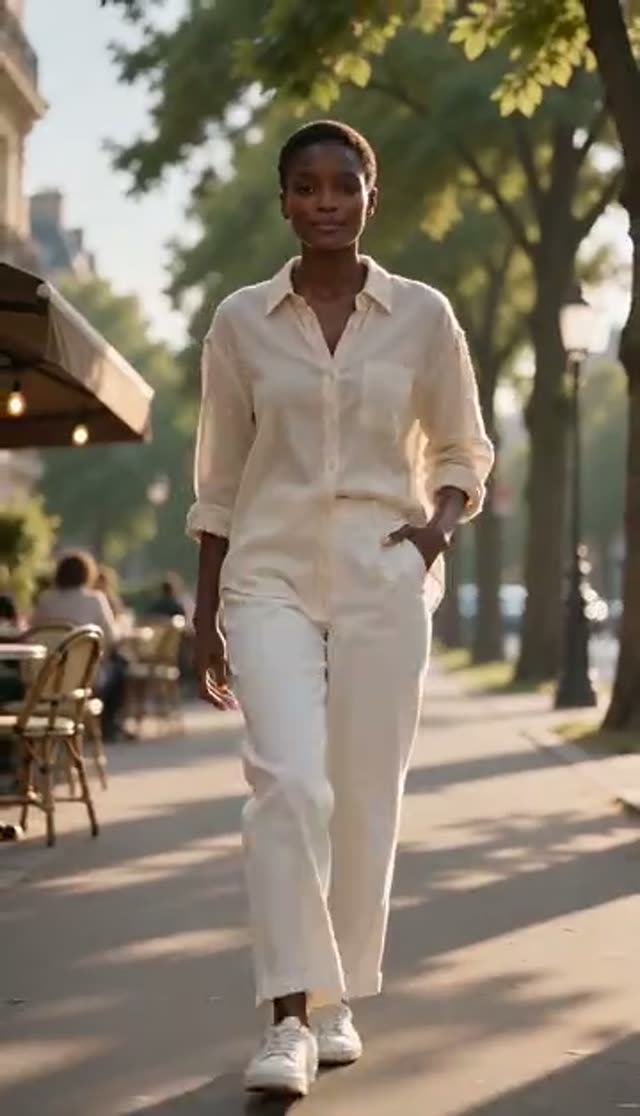
Casual Chic
Make this with my photo
How it works
- 1
Upload a full-body outfit photo
Use a sharp, evenly lit photo with the whole look in frame, head to shoes. Lookbook shots, product photos on a model and good phone photos against a plain wall all work. The hem and shoes matter most, because they move the most in a walk.
- 2
Choose a walk style
Classic Runway for a formal catwalk, Street Style for an urban editorial feel, Evening Gown for long or heavy fabrics, Casual Chic for everyday outfits. Match the walk to the garment, not just the brand mood.
- 3
Add to the prompt if the scene matters
The preset text is editable. Append details such as the backdrop, the light, or a slower pace that lets the fabric settle. Add to the end rather than deleting, so the lines that protect the outfit and face stay in.
- 4
Pick a model, length and aspect ratio
Runway Gen-3 is selected by default at 10 credits for 5 seconds at 720p. Choose 9:16 for Reels, TikTok and Shorts, 1:1 or 3:4 for a product gallery, 16:9 for a website banner. The credit cost updates before you confirm.
- 5
Generate and review
Most short clips finish within a few minutes and keep rendering on the server if you leave the page. Check colour, print and hem movement first: those are what a shopper notices.
- 6
Download and use it
On a paid plan the watermark is removed and the MP4 downloads, ready for product pages, lookbooks, Reels or ads. Free-tier clips play in your library with a watermark and cannot be downloaded.
Why use this tool
Clothes kept as photographed
Every preset tells the model to preserve the outfit, face, hairstyle, body proportions and lighting from your upload and add only the walking motion.
Four walk styles
Classic Runway, Street Style, Evening Gown and Casual Chic, each with its own lighting, camera and pace, and each with a preview clip in the picker.
One photo, no shoot
No model booking, venue or videographer. A product photo you already have becomes motion footage that shows drape, fit and how the hem swings.
16 model variants
Runway, Kling, PixVerse and Vidu variants in one picker, from 10 credits (Runway Gen-3) to 48 credits (Runway Gen-4.5) for a 5-second 720p clip.
Formats for feed and store
Pick duration, resolution and aspect ratio before you generate, so the same outfit can become a vertical Reel and a square product clip without cropping.
Fair billing
Credits are charged only after the provider accepts the job and are refunded automatically if the render fails. The keyframe step has no extra charge.
Is the AI fashion walk generator free?
Your first walk is free. New accounts get 10 credits with no card, and the default Runway Gen-3 render (5 seconds, 720p) costs 10. Free-tier clips play in your VdoBloom library at full resolution with a watermark, and download is switched off. Any paid plan removes the watermark and unlocks the MP4.
For regular use, the Lite pack is 300 credits for $19.50 one-time (credits never expire) or $15 a month on a subscription (credits reset each cycle). Here is what 300 credits buys on this tab:
| Walk clip | Credits per clip | Clips from 300 credits |
|---|---|---|
| Runway Gen-3, 5 s, 720p (default) | 10 | 30 |
| Runway Gen-3, 10 s, 720p | 20 | 15 |
| Runway Gen-3, 5 s, 1080p | 20 | 15 |
| Vidu Q2 Turbo, 5 s, 720p | 18 | 16 |
| Runway Gen-4 Turbo, 5 s, 720p | 20 | 15 |
| Kling V2.5 Turbo, 5 s, 720p | 40 | 7 |
| Runway Gen-4.5, 5 s, 720p | 48 | 6 |
Read more: See all credit packs
Which model should I use for a fashion walk?
Because this tab runs the keyframe pipeline, its picker holds the 16 native effect variants: Runway (Gen-3, Gen-4 Turbo, Gen-4.5), Kling V2.5 Turbo, PixVerse (v3.5 to v6) and Vidu (2.0 to Q3). Start cheap to check framing and walk style, then re-run the version you like on a stronger model for final assets.
| Model | 5 s, 720p | 5 s, 1080p | Good for |
|---|---|---|---|
| Runway Gen-3 (default) | 10 | 20 | First drafts, testing walk styles |
| PixVerse v3.5 | 18 | 24 | Low-cost alternative look |
| Vidu Q2 Turbo | 18 | 22 | Cheap 1080p walks |
| Runway Gen-4 Turbo | 20 | 20 | Sharper motion at the same 1080p price |
| Vidu Q3 Turbo | 20 | 30 | Fast mid-range renders |
| PixVerse v5 | 25 | 32 | Mid-range detail |
| PixVerse v5.5 | 35 | 45 | Longer clips (up to 10 s) |
| Kling V2.5 Turbo | 40 | 40 | Natural body motion |
| PixVerse v6 | 45 | 90 | Latest PixVerse, up to 15 s |
| Runway Gen-4.5 | 48 | 48 | Hero clips and ads |
Read more: Runway Gen-3 model page · Runway Gen-4.5 model page · PixVerse v5 model page · Vidu Q2 Turbo model page
What people use fashion walk videos for
A walking clip answers the questions a still photo cannot: how a fabric drapes, how a hem swings, whether a jacket holds its shape. Common uses:
- Product page and marketplace listing videos for dresses, suits, coats and sets
- Lookbook and new-collection previews without booking a studio day
- Outfit-of-the-day and styling content for Reels, TikTok and Shorts
- Ad creative tests: the same garment in runway, street and casual versions
- Stylist and personal-shopper portfolios showing looks in motion
- Event and occasion wear (prom, wedding guest, evening) where movement sells the piece
Tips for a better runway walk
Most problems with AI walks come from the source photo, not the model. Before you spend credits on a premium render:
- Use a head-to-toe photo with shoes visible; a crop at the knee forces the AI to invent the part that moves most
- Keep arms slightly away from the body so the silhouette is readable
- Pick even, soft lighting; harsh shadows can flicker once the subject moves
- Match the walk to the fabric: Evening Gown for long or heavy fabric, Casual Chic for knitwear and denim
- Name the fabric and colour in the prompt (for example "emerald satin midi dress") to help the model keep it accurate
- Draft on Runway Gen-3, then re-run the winning photo and style on Gen-4.5 or Kling for the final asset
Limits: what this tool does not do
Knowing the limits saves credits:
- It animates the outfit in your photo; it does not put a new garment on the person. For that, use AI Fashion Try-On first, then animate the result here
- One person per photo works best; groups and crossing limbs are less stable
- Clips are short (5 or 10 seconds on most models); for a full show, generate several walks and cut them together
- Very small text or logos on clothing can soften in motion
- Upload only photos of adults who have agreed to be animated, or images you have licensed
Read more: AI Fashion Try-On · How to make an AI fashion walk video · AI fashion lookbook video guide
Frequently asked questions
How do I make an AI fashion walk video from a photo?
Upload a full-body photo on the Fashion Walk tab, choose Classic Runway, Street Style, Evening Gown or Casual Chic, pick a model and aspect ratio, and click generate. The AI adds a walking motion while keeping the outfit and face from your photo. Most 5-second clips are ready within a few minutes.
Is the fashion walk generator free?
The first clip is. New accounts receive 10 free credits and the default Runway Gen-3 walk (5 seconds, 720p) costs 10. Free-tier videos are watermarked and cannot be downloaded; a paid plan removes the watermark and unlocks the MP4.
How much does a fashion walk video cost?
From 10 credits for a 5-second 720p clip on Runway Gen-3, up to 48 credits on Runway Gen-4.5. The Lite pack of 300 credits is $19.50 one-time or $15 a month, which is 30 default walks. The keyframe step is included in the price shown before you generate.
Will the AI change my outfit or face?
The presets instruct the model to preserve the clothing, face, hairstyle, body proportions and lighting and to add only motion. Results are usually faithful, but fine prints and small logos can soften. If something drifts, regenerate or try another model family. Keep the protective wording in the prompt when you edit it.
Can I put a different outfit on the person?
Not on this tab, which walks the outfit already in the photo. Use AI Fashion Try-On to dress the person in a new garment image first, then upload that result here to make it walk.
What photo works best?
A sharp, evenly lit, full-body photo with the whole outfit visible, shoes included, against a simple background. Front-facing or slight-angle poses work best. Avoid heavy filters, cropped legs and bags or arms covering the garment.
Which aspect ratio should I choose?
Use 9:16 for TikTok, Reels and Shorts, 1:1 or 3:4 for product galleries and feed posts, and 16:9 for website banners. Set it before generating so the walk is composed for that frame instead of cropped later.
Can clothing brands use the videos commercially?
Yes, once you are on a paid plan that allows downloads. Make sure you own or have licensed the photo and that the person in it agreed to appear, and follow the ad and AI-disclosure rules of the platform you publish on.
How long does it take?
Usually a few minutes for a 5-second clip. Longer clips, 1080p and premium models take longer. Rendering runs on the server, so you can start several walks and collect them from your library later.
What if the walk looks unnatural?
Regenerate once first; a second pass often fixes it. If not, use a cleaner full-body photo, switch to a walk style that suits the fabric, or move to another model family such as Kling or Runway Gen-4.5. Failed renders are refunded automatically.