Best AI Image Editors in 2026: Which Model for Which Edit
The best AI image editors in 2026, ranked by edit type: object swaps, text fixes, erasing, extending, relighting and background removal, with credit costs.
Contents (8 sections)
No single AI image editor wins every edit, so the honest answer is a short list by job. All the picks below run in one VdoBloom photo editor. For everyday changes typed in plain words, Auto mode picks the model for you at 7 credits. For a cheap, strong default, Nano Banana 2.1 costs 3 credits. For fixing text inside an image, Ideogram 4.5 Precise Edit is the pick. To remove something cleanly, use FLUX Erase.
Quick facts
- All edits run in the VdoBloom AI photo editor: upload a photo, type the change.
- Auto (Smart Edit): 7 credits. Muse Image: from 1 credit. Nano Banana 2.1: 3 credits.
- GPT Image 2.6 Flare edit: 5 credits. Seedream 5.5 Edit: 4 credits. Flux Kontext Pro: 7 credits.
- Ideogram 4.5 Precise Edit: 5 credits. FLUX Erase: 10 credits. FLUX Outpainting: 12 credits.
- Background remover: 1 credit (Standard) or 2 (HD). Relight: 5 credits.
- GPT Image 2.6 Economy edit: 2 credits.
- Pay per edit, no subscription. Credits never expire; 10 credits on sign-up.
Upload a photo and type your edit
How we ranked them
- Does it do what you asked? The instruction is followed, nothing more.
- Does it leave the rest alone? Face, pose, light and background stay unless you asked to change them. This is where most editors fail.
- Text handling. Can it change words on a sign or label without breaking the rest?
- Resolution. Does the output stay sharp?
- Cost per edit.
Our picks by edit type
Best overall: Auto (Smart Edit)
If you do not want to learn model names, leave the editor on Auto. It reads your instruction and the photo and routes the edit to a suitable model. It costs 7 credits an edit. It is the best starting point for "change the background to a beach", "make the jacket red" or "add a coffee cup on the table". Try this edit.
Best value: Nano Banana 2.1
Nano Banana 2.1 is the strongest model at its price. At 3 credits it handles outfit changes, backgrounds, adding and removing objects, and style changes, and it keeps faces well. It also supports 1K, 2K and 4K output. For most people this is the model to pick by hand. See the Nano Banana 2.1 page. Try this edit.
Best for detailed instructions: GPT Image 2.6 Flare
When an edit has several parts ("swap the logo, change the shirt to navy, keep the lighting"), GPT Image 2.6 Flare follows long instructions closely. It costs 5 credits and outputs 1K to 4K. It is also good at text in the image, such as menus and packaging. Try this edit.
Best for low-cost drafts: GPT Image 2.6 Economy
GPT Image 2.6 Economy runs the same instruction-following family at 2 credits an edit. Use it to test an idea several times, then re-run the keeper on Flare. Try this edit.
Best for fixing text: Ideogram 4.5 Precise Edit
Changing a single word on a poster or price tag is a hard job for most editors, because they redraw the whole area. Ideogram 4.5 Precise Edit is built for targeted changes like that, at 5 credits. Quote the old and new text in your prompt: change "Open 9-5" to "Open 10-6". Try this edit.
Best for removing things: FLUX Erase
For removing a person, a sign or a power line, FLUX Erase (10 credits) fills the gap with background that matches. It is cleaner than asking a general model to "remove" something, which sometimes swaps the object for another one. Try this edit.
Best for extending a photo: FLUX Outpainting
Need a portrait photo to fit a wide banner? FLUX Outpainting (12 credits) extends the edges and invents matching scenery. It is the right tool for changing aspect ratio without cropping heads. Try this edit.
Specialist tools worth knowing
- Seedream 5.5 Edit (4 credits): fast, good for style changes and product scenes. Try it.
- Flux Kontext Pro (7 credits): a dependable all-rounder for instruction edits. Try it.
- Kling IMAGE O1 (14 credits): takes up to 10 reference images in one edit, handy for combining products and people. Try it.
- Muse Image (from 1 credit): the lowest-cost option for quick tries. Try it.
- Background remover: a transparent PNG for 1 or 2 credits.
- Relight: six lighting presets such as golden hour or neon, 5 credits.
- Virtual try-on: put a clothing photo on a person, 5 credits per look.
A quick word on cost. Edits on VdoBloom are billed once per run, and the price shows on the button before you start. Because the low-cost models are good, the cheapest route is often to try Nano Banana 2.1 first at 3 credits and only switch to a specialist when the job needs it. If a run fails, the credits come back.
Comparison table
| Edit you want | Best pick | Credits |
|---|---|---|
| Anything, quickly | Auto (Smart Edit) | 7 |
| Everyday edits at low cost | Nano Banana 2.1 | 3 |
| Long multi-part instructions | GPT Image 2.6 Flare | 5 |
| Many low-cost drafts | GPT Image 2.6 Economy | 2 |
| Change words in the image | Ideogram 4.5 Precise Edit | 5 |
| Remove an object or person | FLUX Erase | 10 |
| Widen or change aspect ratio | FLUX Outpainting | 12 |
| Transparent background | Background remover | 1 or 2 |
| New lighting | Relight | 5 |
A real example
This image was made on VdoBloom with Nano Banana 2.1, the model we suggest trying first. It is the model's own preview in our model picker. The original prompt was not recorded, so the prompt below describes the shot.
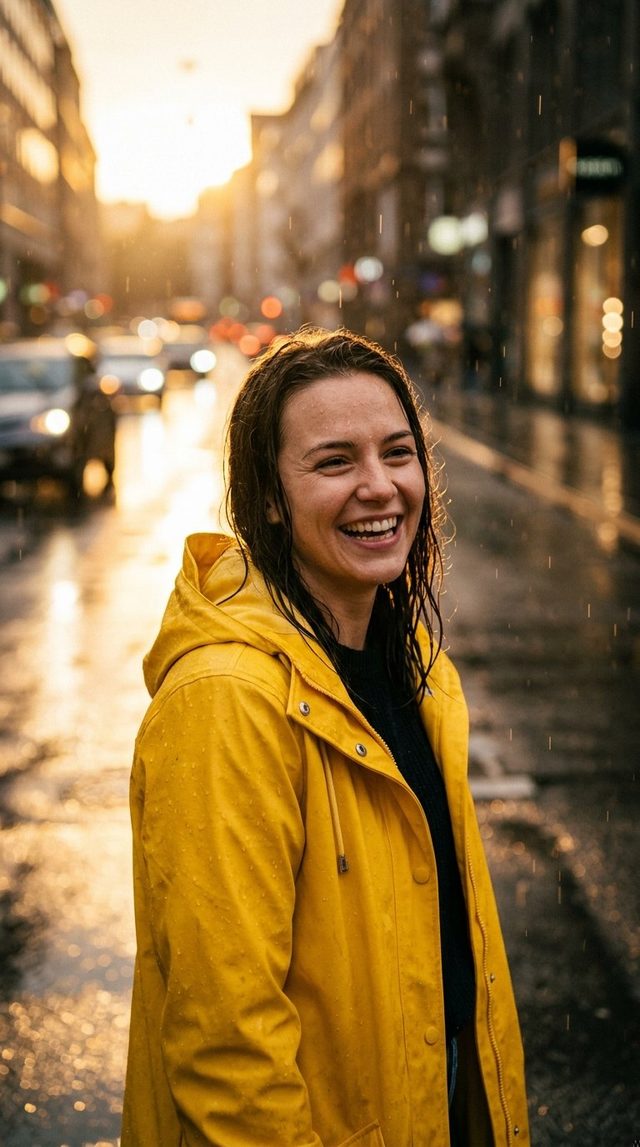
Prompt: "A woman in a yellow raincoat laughing on a wet city street at golden hour, light rain, shallow depth of field". Cost: 3 credits. Recreate this. Then open it in the photo editor and change the coat color to test an edit.
Common editing mistakes
Most failed edits come from the instruction, not the model. These fixes help on every editor.
- Too many changes at once. "New background, new outfit, add a dog, make it sunset" asks for four edits. The model gets two right and guesses the rest. Do them one by one and edit the result each time.
- Not saying what to keep. Models change things you did not mention. Add a short keep list: "keep her face, hair and pose unchanged".
- Vague words. "Make it better" gives the model nothing to aim at. Say "brighter, warmer light from the left" or "replace the grey wall with white brick".
- Using a general model to remove things. Asking a general model to "remove the man" can swap him for someone else. FLUX Erase is built for removal and fills the gap with matching background.
- Editing a tiny image. A 400-pixel photo gives the editor little to work with. Upscale it first on the Image Upscaler, then edit.
- Retyping text without quotes. When changing words, put both the old and the new text in quotes so the model knows exactly what to replace.
A good habit: write the instruction as if you were briefing a human retoucher. One clear change, what to leave alone, and the result you expect. Short, specific prompts beat long, clever ones on every model in this list, and they cost the same credits.
How to edit an image on VdoBloom
- Open the AI photo editor and upload your photo (or pick one from My Library).
- Leave the model on Auto, or pick one from the table above.
- Type one clear instruction. Say what should stay the same, too: "keep her face and pose".
- Check the credit cost and run it.
- Not quite right? Edit the result again rather than starting over.
Tip: one change per run works better than five at once. Chain small edits.
Edit a photo with Nano Banana 2.1
Remove a background in one click
FAQ
What is the best AI image editor in 2026?
For most people, Nano Banana 2.1 on VdoBloom: strong results at 3 credits. If you do not want to choose, use Auto at 7 credits.
Which AI editor keeps the face the same?
Nano Banana 2.1 and GPT Image 2.6 Flare keep faces well. Add "keep the face unchanged" to your prompt either way.
Can AI change text on a photo?
Yes. Ideogram 4.5 Precise Edit is made for it. Quote the old and new words.
How do I remove a person from a photo?
Use FLUX Erase in the AI photo editor. It fills the space with matching background for 10 credits.
Is there a subscription?
No. You pay per edit with credits that never expire. New accounts get 10 credits on sign-up.
Related reading: Best AI image models in 2026, Best AI image upscalers, How to use P-Image-Edit.
Try it yourself
Image Edit
Upload a photo or write a prompt, and see the credit price before you generate. Pay per use with credits that never expire.