Best AI Image Models for Fashion and Brand Content in 2026
Which AI image model to use for lookbooks, on-model shots, campaign visuals and on-brand graphics: Nano Banana Pro, Seedream, GPT Image 2.6, Recraft V4 and more.
Contents (10 sections)
For fashion photos, Nano Banana Pro gives the most convincing fabric, fit and skin, up to 4K for 24 credits, while Nano Banana 2.1 does most of the same job for 3 credits. For campaign visuals that carry a headline, GPT Image 2.6 Flare handles text best. For logos, icons and flat brand graphics, Recraft V4 is the right tool. To put a real garment on a model, use Virtual Try-On rather than a text prompt. All of them run on VdoBloom from one credit balance, so you can test one prompt on each.
Quick facts
- Nano Banana Pro: 1K, 2K, 4K. 24 credits at 4K.
- Nano Banana 2.1: 1K, 2K, 4K. 3 credits.
- Seedream 5.5: 1K or 2K, 2 credits. Seedream 5.0 Pro: 10 credits.
- GPT Image 2.6 Flare: 1K to 4K, from 4 credits.
- Recraft V4: 12 credits (Pro 22). Recraft V4 Vector: 14 credits.
- Virtual Try-On: 5 credits per look on Nano Banana Edit.
- No subscription. Credit packs never expire; 10 credits on sign-up.
A real example: Seedream 5.0 Pro
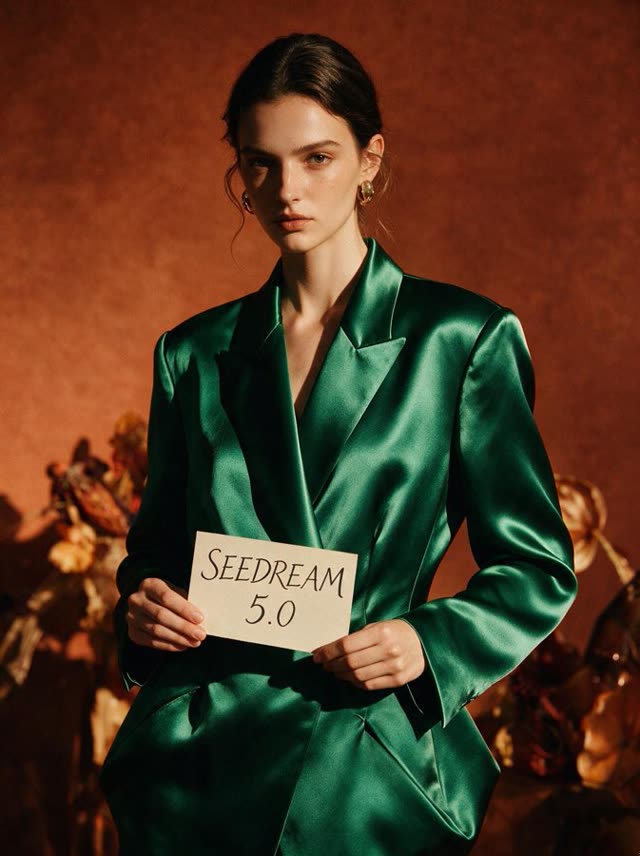
This image was made on VdoBloom with Seedream 5.0 Pro; it is the sample shown in our image generator. Prompt summary: editorial fashion portrait, emerald satin blazer, hand-lettered card, warm studio backdrop. Seedream 5.0 Pro starts at 10 credits. Recreate this
How we ranked them
Fashion and brand teams need different things from a general image model:
- Garment truth. Fabric, drape, seams and prints that look real and stay as designed.
- People. Natural skin, hands and poses, and the same model across a set.
- Brand control. Exact colours, typography and layouts.
- Resolution. Enough pixels for e-commerce zoom and print.
- Cost per image at volume. A lookbook is dozens of shots.
The ranking
1. Nano Banana Pro: best for hero fashion shots
Nano Banana Pro is our pick for the shots that lead a campaign. Knits look like knits, satin catches light properly, and hands and faces hold up at 4K. It also edits, so you can keep a model and change the outfit or set. At 24 credits for 4K, use it for the final selects rather than for exploring. Nano Banana Pro page. Try this prompt
2. Nano Banana 2.1: best for lookbooks at volume
For the many in-between shots of a lookbook, Nano Banana 2.1 is the value pick at 3 credits. It supports up to 4K and is strong at keeping the same model across a series when you pass the earlier image as a reference. Draft a full set here and promote the best frames to Pro if needed. Try this prompt
3. Seedream 5.5 and 5.0 Pro: best for editorial mood
Seedream models lean toward a polished editorial look: strong colour and lighting with a magazine feel. Seedream 5.5 costs 2 credits at 1K or 2K and suits mood boards and social posts. Seedream 5.0 Pro (10 credits) adds detail for finished images. Seedream is also a useful fallback for swimwear and lingerie shots that some other models refuse; see our note on blocked swimwear images. Seedream 5.5: Try this prompt
4. GPT Image 2.6 Flare: best for campaign visuals with text
A sale banner, a launch post or a lookbook cover needs words that are spelled right. GPT Image 2.6 Flare follows long, detailed briefs and prints text well, from 4 credits up to 4K. Put the exact copy in quotes. Try this prompt
5. Recraft V4: best for brand graphics
Recraft V4 is made for design work rather than photography: logos, icons, patterns and flat illustrations with controlled colour. It costs 12 credits (Pro 22). Recraft V4 Vector (14 credits) turns an image into a vector style, useful for prints and labels. Pair it with the AI logo generator for marks. Try this prompt
For real garments: Virtual Try-On
A text prompt cannot reproduce your exact product. When the item is real, upload it. Virtual Try-On puts a clothing photo onto a person in up to six settings, such as studio, street and mirror selfie, at 5 credits per look. For packshots, the AI product photography tool builds clean scenes around the item.
Comparison table
| Model | Best for | Max resolution | Credits |
|---|---|---|---|
| Nano Banana Pro | Hero fashion shots | 4K | 24 at 4K |
| Nano Banana 2.1 | Lookbooks at volume | 4K | 3 |
| Seedream 5.5 | Mood boards, social | 2K | 2 |
| Seedream 5.0 Pro | Editorial finals | High setting | 10 |
| GPT Image 2.6 Flare | Visuals with text | 4K | From 4 |
| Recraft V4 | Logos, icons, patterns | 1K (Pro 2K) | 12 (Pro 22) |
| Virtual Try-On | Your real garment on a model | - | 5 per look |
Responsible use
Fashion images often show people, so a few rules keep a brand safe. Do not generate images that look like a real, named person unless you have their permission. If you use a photo of a real model, make sure your agreement with them covers AI edits. Label AI images where an ad platform or marketplace asks for it. And check that the generated garment matches the product you actually sell: a customer who receives a different colour or cut will return it. For listings, the safest pattern is Virtual Try-On or product photography built from a photo of the real item, with generated scenes used only for mood and campaign imagery.
Keep a brand consistent
- Write a style line once ("soft daylight, beige backdrop, 85mm look") and paste it into every prompt.
- Reuse references. Save your model and set images to My Library and attach them to each edit.
- Fix colours by name and hex in the prompt, then check them on the result.
- Use one model per set. Mixing models in one lookbook changes the look.
Which model for which brand job
- E-commerce on-model shots: Virtual Try-On with your real garment, then Nano Banana 2.1 for extra poses.
- Seasonal campaign hero image: Nano Banana Pro at 4K. Spend the extra credits only on the frames you will use.
- Instagram grid and Stories: Seedream 5.5 at 2K for mood and colour, or Nano Banana 2.1 for people.
- Sale banners and launch posts: GPT Image 2.6 Flare, with the exact copy in quotes.
- Logos, tags, patterns and stickers: Recraft V4, or Recraft V4 Vector for print.
- Clean packshots: the AI product photography tool.
Budget tip: plan the set before you generate. Write the shot list (front, back, detail, lifestyle), draft every shot on a low-cost model, and pick finals together. A 20-shot lookbook drafted on Nano Banana 2.1 is 60 credits. Upgrading five finals to Nano Banana Pro at 4K adds 120.
How to make a fashion set on VdoBloom
- Open the AI image generator and pick Nano Banana 2.1.
- Write the style line plus the shot ("full-body, walking, linen suit").
- Generate a few options; save the model you like to My Library.
- Make the rest of the set in the AI photo editor with that image as a reference.
- Re-render the best frames on Nano Banana Pro at 4K.
- Animate a frame with the fashion walk video tool for Reels.
Edit a fashion photo with Nano Banana Pro
FAQ
What is the best AI image model for fashion photos?
Nano Banana Pro for hero shots and Nano Banana 2.1 for volume. Both handle fabric and people well.
Can AI put my actual clothing on a model?
Yes. Use Virtual Try-On with a photo of the garment, 5 credits per look. A text prompt alone will not match your exact item.
Which model is best for brand logos and graphics?
Recraft V4. It is built for design work with controlled colour.
How do I keep the same model across a lookbook?
Save the first image and use it as a reference for each new shot in the photo editor, and stay on one model for the whole set.
Can I use these images commercially?
Read the VdoBloom terms of service first. Do not use real people's likeness without their permission.
Related reading: Best AI image models in 2026, AI fashion lookbook video, Best AI product photo generators.
Try it yourself
AI Fashion Walk Video
Pick a model, add a photo or a prompt, and see the credit price before you generate. Pay per use with credits that never expire.