Qwen Image 3.0 Pro: AI Image Generator Online

AI Image Generator★ 4.8 / 5Flexible content filter

Bottom line

Qwen Image 3.0 Pro: sharper realism and typography, 6 credits at 1K, 7 at 2K. Pick Qwen Image 3.0 Pro in the Text to Image tool, write your prompt, and pay per image in credits — the price is visible before you generate.
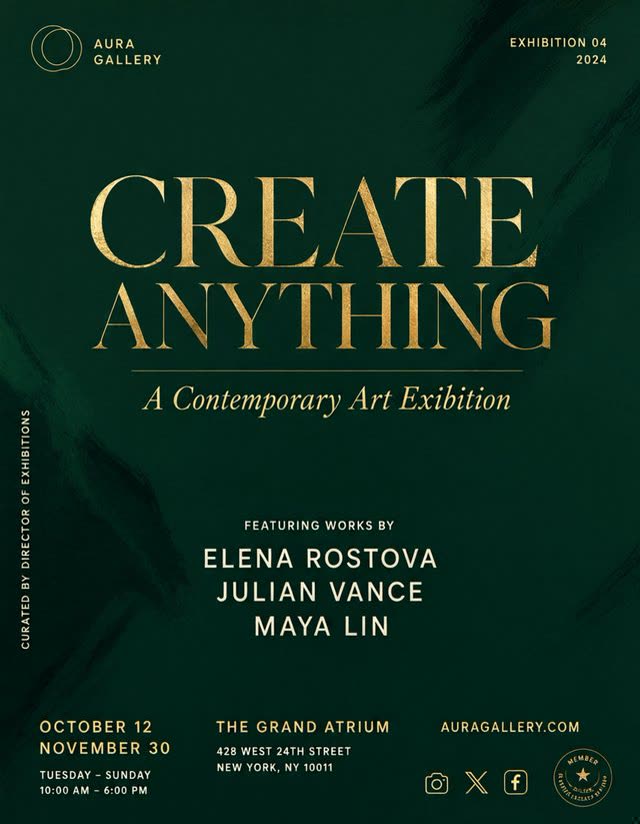
Example output generated with Qwen Image 3.0 Pro

Qwen Image 3.0 Pro is the enhanced tier above Qwen Image 3.0, aimed at sharper realism and stronger typography — Alibaba's Qwen image line has built much of its reputation on in-image text rendering, and this Pro tier is where VdoBloom applies that strength to generation. It shares the standard tier's eight aspect ratios (16:9, 1:1, 3:2, 2:3, 4:3, 3:4, 9:16, 21:9) and 1K/2K resolution choice, plus negative-prompt support.

Unlike the standard tier's flat pricing, Qwen Image 3.0 Pro's cost scales with resolution: 6 credits at 1K, 7 at 2K — reflecting the higher provider cost behind the Pro model. It runs primarily on Runware, with a KIE fallback.

Added August 7, 2026, the same date as the standard tier, Qwen Image 3.0 Pro rates 4.8 with VdoBloom users — the highest of any Qwen model on the platform — and carries the HOT content label for more permissive filtering than GPT Image or Nano Banana's STRICT tier. As with every model, the exact credit cost for your chosen resolution is shown before you generate.

What it costs on VdoBloom

Qwen Image 3.0 Pro is priced by resolution: 6 credits at 1K, 7 at 2K. Four 1K generations cost 24 credits; four 2K generations cost 28. The 10 free signup credits cover one generation at either resolution. Cost is shown before you generate, and failed jobs are refunded automatically.

Qwen Image 3.0 Pro vs the standard tier and GPT Image 2

The Pro premium over the standard Qwen Image 3.0 is small in credits (1 at 1K, 2 at 2K) but consistent, and it buys a rating bump from 4.6 to 4.8 along with sharper typography and realism. Against GPT Image 2's resolution ladder (3/5/8 credits), Qwen Image 3.0 Pro costs more at every tier it covers and skips 4K entirely — the trade is VdoBloom's more permissive HOT content label against GPT Image 2's STRICT.

What creators use Qwen Image 3.0 Pro for

  • Poster, packaging, and signage comps where in-image text needs to render as real, legible words.
  • Photoreal generation where the standard tier's fidelity isn't quite enough.
  • Comparing 1K drafts (6 credits) against a 2K final render (7 credits) before committing.
  • Excluding unwanted elements with negative prompts on text-heavy compositions.

How to use Qwen Image 3.0 Pro on VdoBloom

  1. 1Open the Text to Image tool and select Qwen Image 3.0 Pro.
  2. 2Write your prompt.
  3. 3Set resolution (1K/2K), aspect ratio, review the credit cost, and generate.

Frequently asked questions

How much does Qwen Image 3.0 Pro cost?

6 credits at 1K, 7 credits at 2K — unlike the standard Qwen Image 3.0, which is flat at 5 credits regardless of resolution. Five 2K generations cost 35 credits.

Can I try Qwen Image 3.0 Pro for free?

New accounts get 10 free credits, enough for one 1K generation (6 credits, 4 left) or one 2K generation (7 credits, 3 left).

Is Qwen Image 3.0 Pro censored?

It carries VdoBloom's HOT content label, the platform's more permissive filtering tier, versus the STRICT label on GPT Image and Nano Banana. VdoBloom doesn't promise explicit or NSFW output on any model.

Is Qwen Image 3.0 Pro open source?

Alibaba has released earlier Qwen-Image models as open weights, but VdoBloom runs Qwen Image 3.0 Pro as a hosted API via Runware — there's no local checkpoint through this integration.

Qwen Image 3.0 Pro vs the standard Qwen Image 3.0

Pro costs 1-2 credits more (6/7 versus the standard tier's flat 5) and rates higher with users (4.8 versus 4.6). The difference is realism and typography — Pro is the tier to use when in-image text or fine detail matters; for text-free imagery, the standard tier is the cheaper, equally capable option.

Qwen Image 3.0 Pro vs GPT Image 2

GPT Image 2 is cheaper at every resolution tier it shares (3/5 credits for 1K/2K versus Qwen Image 3.0 Pro's 6/7) and adds a 4K option (8 credits) that Qwen Image 3.0 Pro doesn't offer. GPT Image 2 carries VdoBloom's STRICT content label against Qwen's HOT.

How do I use Qwen Image 3.0 Pro for text-heavy designs?

Spell out the exact copy in quotation marks within the prompt, keep layout description separate from the text content, and choose the 3:2 or 4:3 ratio for poster-style work. Add a negative prompt to exclude elements you don't want, since Pro supports it on the generation side.

Which aspect ratios does Qwen Image 3.0 Pro support?

Eight: 16:9, 1:1, 3:2, 2:3, 4:3, 3:4, 9:16 and 21:9 — the same set as the standard Qwen Image 3.0.

Does Qwen Image 3.0 Pro also edit images?

No — this is the generation-only tier. Editing with the same Pro-quality model runs through the separate Qwen Image 3.0 Pro Edit model instead.

Related models