Seedream 5 Lite Text-to-Image: AI Image Generator Online
Bottom line
Seedream 5 Lite Text-to-Image is ByteDance's photoreal 2K/4K generator from February 2026, at a flat 6 credits per image and rated 4.6 by VdoBloom users. Pick Seedream 5 Lite Text-to-Image in the Text to Image tool, write your prompt, and pay per image in credits. The price is visible before you generate.
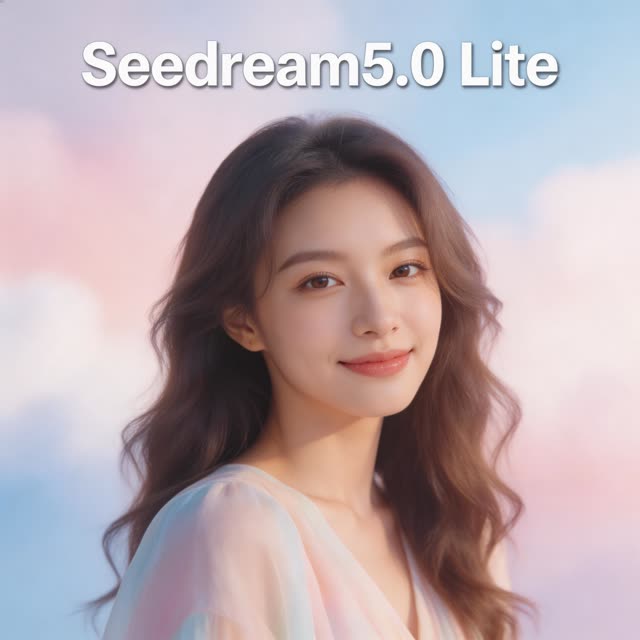
Seedream 5 Lite Text-to-Image (Seedream 5.0 Lite) is the photoreal generator in ByteDance's Seedream 5 line, released in February 2026. On VdoBloom it costs a flat 6 credits per image at either Basic (2K) or High (4K). VdoBloom's internal model-routing guide lists it as the top-rated pick for photorealism, especially landscapes, lifestyle and food, and users rate it 4.6 out of 5. Write a prompt of up to 3,000 characters, choose one of eight aspect ratios from 9:16 to 21:9, and get back a 2K or 4K image. The 10 free signup credits cover one render with 4 credits left, and 300 credits buys exactly 50 images.
"Lite" names the tier, not the output size. It reaches the same 4K as Seedream 4.5 for one credit less. Seedream 4.5 (7 credits) is the better choice when the image has to carry readable text. Seedream 5 Flash (2 credits, 1K/2K) is the drafting tier. Seedream 5.0 Pro (10 or 19 credits) is the flagship that also edits. This page sets out the specs, a cost table, a family comparison, prompting notes for realism, and the model's limits.
Seedream 5 Lite Text-to-Image specs at a glance
Every value comes from VdoBloom's model configuration, the Seedream 5 Lite service and the credit table. As with Seedream 4.5, resolution is set through Quality: Basic is 2K and High is 4K. Both cost 6 credits, so a 4K render costs no more than a 2K one.
| Spec | Seedream 5 Lite Text-to-Image on VdoBloom |
|---|---|
| Developer and release | ByteDance (Seedream 5 generation); released 13 February 2026 |
| Mode | Text to image only; edits go to Seedream 5 Lite I2I |
| Output size | Basic = 2K, High = 4K |
| Aspect ratios | 8: 1:1, 4:3, 3:4, 16:9, 9:16, 2:3, 3:2, 21:9 |
| Prompt length | Up to 3,000 characters |
| Price | 6 credits per image at 2K or 4K |
| Free trial | 10 signup credits = one render, 4 credits left |
| Content filter | Flexible (VdoBloom's more permissive tier); platform rules still apply |
| User rating on VdoBloom | 4.6 / 5 |
| Best at (routing guide) | Top-rated photorealism at 2K/4K; landscapes, lifestyle, food |
| Where it runs | Text to Image, Pose Variations |
What Seedream 5 Lite costs: worked examples
Six credits divides evenly into the 300-credit Lite allowance, which makes budgeting simple: 50 images, nothing left over. The dollar column uses the Lite plan rate of $15 for 300 credits ($0.05 per credit). A one-time pack of 300 credits is $19.50 and never expires. Plan credits reset each billing cycle. If a render fails, its credits are refunded automatically.
| Batch | Credits | At the Lite plan rate |
|---|---|---|
| 1 image, 2K or 4K | 6 | $0.30 |
| 4 variations of one scene | 24 | $1.20 |
| 10 images | 60 | $3.00 |
| 25 images | 150 | $7.50 |
| 50 images (a full 300 credits) | 300 | $15.00 |
Read more: Every image model's price per image
Seedream 5 Lite vs 4.5 vs 5 Flash vs 5.0 Pro
Seedream 5 Lite and Seedream 4.5 have the same output ceiling, the same eight ratios and the same 3,000-character prompt cap. The differences are price (6 against 7 credits), rating (4.6 against 4.5) and what each one is best at. VdoBloom's routing guide sends photorealism to 5 Lite and text and lettering to 4.5. Seedream 5 Flash costs a third as much at 2 credits but stops at 2K. Seedream 5.0 Pro costs 10 (Standard) or 19 (High), works in five aspect ratios, and both generates and edits.
A practical routine is to draft compositions on Flash, then re-run the prompt you like on 5 Lite at High for the 4K final. Move to 4.5 when words matter and to 5.0 Pro for multilingual text or precise follow-up edits.
| Model | Mode | Output | Inputs | Prompt cap | Credits per image |
|---|---|---|---|---|---|
| Seedream 4.5 Text-to-Image | Text to image | Basic 2K or High 4K, 8 aspect ratios | Prompt only | 3,000 chars | 7 (both sizes) |
| Seedream 4.5 Edit | Edit | Basic 2K or High 4K, 8 aspect ratios | 1 to 10 images | 3,000 chars | 7 (both sizes) |
| Seedream 5 Lite Text-to-Image | Text to image | Basic 2K or High 4K, 8 aspect ratios | Prompt only | 3,000 chars | 6 (both sizes) |
| Seedream 5 Lite I2I | Edit | Basic 2K or High 4K, 8 aspect ratios | 1 to 14 images | 3,000 chars | 6 (both sizes) |
| Seedream 5 Flash | Text to image | Basic 1K or High 2K, 8 aspect ratios | Prompt only | 5,000 chars | 2 (both sizes) |
| Seedream 5 Flash Edit | Edit | Basic 1K or High 2K, 8 aspect ratios | 1 to 10 images | 5,000 chars | 4 (both sizes) |
| Seedream 5.0 Pro | Generate and edit in one model | Standard or High quality, 5 aspect ratios | Prompt, or up to 10 images | 2,000 chars when editing | 10 Standard, 19 High |
Read more: Seedream 4.5 Text-to-Image · Seedream 4.5 Edit · Seedream 5 Lite Text-to-Image · Seedream 5 Lite I2I · Seedream 5 Flash · Seedream 5 Flash Edit · Seedream 5.0 Pro
Prompting Seedream 5 Lite for photorealism
Realism comes from specific physical detail, not from words like "ultra-realistic". Describe the light source and its direction (late-afternoon window light from the left), the lens and distance (85mm portrait, shallow depth of field), the materials (linen shirt, brushed steel, wet asphalt) and one small imperfection (flyaway hair, a crumb on the plate). Those details give the model something concrete to render.
Keep the subject count low, because one or two people photograph more convincingly than a crowd. Choose the ratio to match where the image will be used: 4:5 is not offered, so use 3:4 for an Instagram feed post, 9:16 for Stories and Reels, and 16:9 or 21:9 for headers. Use High (4K) whenever the image might be cropped, since it costs the same 6 credits. If skin looks waxy, the plastic-skin guide below lists the prompt changes that help.
- Name the light source, direction and time of day.
- Give a lens or framing cue: 35mm street, 85mm portrait, overhead flat lay.
- Describe materials and one natural imperfection.
- Keep to one or two main subjects for the most believable result.
- Render at High (4K); it costs the same as 2K.
Read more: How to fix plastic skin in AI images
Seedream 5 Lite settings by use
The model has no 1K tier and no price difference between 2K and 4K, so the real choice is the frame shape. The table matches common photoreal jobs to a ratio and a prompt focus. Every row costs 6 credits. Basic (2K) is enough for anything that stays on a phone screen. Choose High (4K) when the image might be printed, shown large or cropped.
| Use | Aspect ratio | Quality | Prompt focus | Credits |
|---|---|---|---|---|
| Instagram feed portrait | 3:4 | Basic (2K) | Window light, 85mm framing, natural skin texture | 6 |
| Reels, Stories or TikTok cover | 9:16 | Basic (2K) | Subject in the middle third, clear background | 6 |
| Overhead food flat lay | 1:1 or 4:3 | High (4K) | Surface material, steam or crumbs, soft top light | 6 |
| Landscape wallpaper or header | 16:9 or 21:9 | High (4K) | Time of day, weather, foreground detail | 6 |
| Lifestyle product-in-context scene | 3:2 or 4:3 | High (4K) | Setting and props; add the real product later with Seedream 5 Lite I2I | 6 |
| Print photo at 2:3 | 2:3 | High (4K) | Lens and depth-of-field cue, one subject | 6 |
Where to run Seedream 5 Lite on VdoBloom
On the Text to Image page, pick Seedream in the family list and then Seedream 5 Lite Text-to-Image. Quality (Basic 2K or High 4K) and the aspect ratio sit under the prompt. Pose Variations accepts it as a text-to-image engine for a set of consistent poses. When the render needs changing (a different background, an added product, a second person), send it to Image Edit and pick Seedream 5 Lite I2I, which takes up to 14 images for the same 6 credits.
Read more: Open Text to Image · Pose Variations · Seedream 5 Lite I2I · Seedream 5.0 Lite guide
Limits and honest caveats
It cannot take a reference image, so faces, products and logos have to be added afterwards with an edit model. There is no 1K draft tier, which means every render costs the full 6 credits. Seedream 5 Flash is the place for cheap drafts. Text in the image is not this model's strength: VdoBloom's routing guide sends lettering to Seedream 4.5. The eight ratios leave out 4:5 and 5:4. The prompt cap is 3,000 characters, shorter than Flash's 5,000.
The Flexible content label means filtering is more permissive than on strictly moderated models. It does not mean anything goes: VdoBloom's platform rules still apply, and refused or failed renders are refunded.
What creators use Seedream 5 Lite Text-to-Image for
- Photoreal lifestyle and portrait images for web and social at 2K, with believable skin, fabric and light.
- Food photography, from overhead flat lays to close-up plates, a category the routing guide names for this model.
- Landscape and travel scenes at 4K for wallpapers, headers and large displays.
- Product-in-context scenes (a mug on a café table, a bag on a city street) before you composite the real product with an edit model.
- Vertical 9:16 realism for short-form video covers and thumbnails.
How to use Seedream 5 Lite Text-to-Image on VdoBloom
- 1Open the Text to Image tool and select Seedream 5 Lite Text-to-Image.
- 2Write your prompt.
- 3Set aspect ratio, review the credit cost, and generate.
Frequently asked questions
How much does Seedream 5 Lite cost?
A flat 6 credits per image at Basic (2K) or High (4K). At the Lite plan rate that is $0.30 an image, and 300 credits buys exactly 50 images.
Is Seedream 5 Lite free to try?
Yes. The 10 free signup credits cover one 6-credit render, with 4 credits left over.
Does 'Lite' mean lower quality?
No. Lite is a tier name within ByteDance's Seedream 5 line. It still outputs 2K or 4K, users rate it 4.6, and VdoBloom's routing guide lists it as the top-rated photorealism pick.
What resolutions does Seedream 5 Lite output?
Basic gives 2K and High gives 4K, chosen with the Quality setting. Both cost 6 credits.
Seedream 5.0 Lite vs Seedream 4.5: which is better?
For photorealism, 5 Lite: it costs a credit less (6 against 7) and is rated slightly higher (4.6 against 4.5). For text and lettering in the image, 4.5, which is the routing guide's pick for posters and signs. Output size and aspect ratios are the same.
Seedream 5 Lite vs Seedream 5 Flash?
Flash costs 2 credits but outputs 1K (Basic) or 2K (High). Lite costs 6 credits and reaches 4K. Draft on Flash, then re-run the prompt you keep on Lite for the final.
Can Seedream 5 Lite edit an uploaded photo?
Not this text-to-image model. Seedream 5 Lite I2I is the editing version: it costs 6 credits and accepts up to 14 input images.
What aspect ratios does Seedream 5 Lite support?
Eight: 1:1, 4:3, 3:4, 16:9, 9:16, 2:3, 3:2 and 21:9. There is no 4:5, so use 3:4 for portrait feed posts.
Is Seedream 5.0 Lite censored?
It carries VdoBloom's Flexible label, the more permissive filtering tier, at the opposite end from GPT Image's strict filtering. VdoBloom's platform-wide rules still apply.
Do I need a ByteDance or API account to use Seedream 5 Lite?
No. On VdoBloom it runs on your credit balance. The exact cost appears before each render, and no API key is needed.
Seedream 5 Lite Text-to-Image guides, prices and comparisons
This page is the Seedream 5 Lite Text-to-Image hub. Each guide below goes deeper on one question and links back here.
Seedream 5.0 Lite guide, prompts and features
Settings, prompt patterns and examples.
Qwen and Seedream image generator
Seedream 5 Lite next to Qwen Image 3.0 and Seedream 5.0 Pro.
Multi-model AI image generator
Compare one prompt across Seedream, Qwen and Nano Banana.
How to fix plastic skin in AI images
Realism fixes for portrait prompts.
How much does an AI image cost?
Per-image credits across the full roster.
Best AI image models in 2026
Where Seedream 5 Lite fits among every model VdoBloom runs.
Seedream 5.0 Pro prompts
15 prompts for the flagship, with notes on when Lite is enough.